1.1.1.1: Fast, privacy-first consumer DNS service
https://blog.cloudflare.com/announcing-1111/
_l4jh · 8 years ago
120 comments
https://blog.cloudflare.com/announcing-1111/
_l4jh · 8 years ago
120 comments
ajross · 8 years ago
This is the Cloudflare resolver, right? What's the "privacy-first" part about? It's just another third party DNS host. They haven't changed the protocol to be uninspectable and AFAIK haven't made any guarantees about logging or whatnot that would enhance privacy vs. using whatever you are now. This just means you're trusting Cloudflare instead of Comcast or Google or whoever.
shimms · 8 years ago
Yes they have:
"Privacy First: Guaranteed. We will never sell your data or use it to target ads. Period. We will never log your IP address (the way other companies identify you). And we’re not just saying that. We’ve retained KPMG to audit our systems annually to ensure that we're doing what we say.
Frankly, we don’t want to know what you do on the Internet—it’s none of our business—and we’ve taken the technical steps to ensure we can’t."
dictum · 8 years ago
> Frankly, we don’t want to know what you do on the Internet—it’s none of our business
In the DNS resolver space, what is their business?
hrunt · 8 years ago
They want fast resolution of names that point to websites hosted by Cloudflare. Cloudflare makes their money selling their network to businesses that use it, and anything that makes that service better for the end-user increases customer stickiness.
distantsounds · 8 years ago
Making the internet fast and reliable, and arguably DNS resolution plays into that.
tbyehl · 8 years ago
Could be a precursor to launching an OpenDNS competitor.
wtmt · 8 years ago
Is OpenDNS even as relevant as it was earlier, before Google DNS appeared (and then OpenDNS was bought by Cisco)?
tialaramex · 8 years ago
Maybe not _as_ relevant, but still a considerable number of clients are configured to trust OpenDNS, and their far more ambiguous stance on what exactly this is for is appealing to some people. For example, OpenDNS says yes, absolutely it is their business what you're looking up, and maybe you are a Concerned Parent™ who wants to ensure their children don't access RedTube, so that feels like a good idea.
tbyehl · 8 years ago
I was thinking more along the lines of their SME offering. DNS filtering is an important layer in network security and CloudFlare’s position of being in the middle of a large portion of Internet traffic, alongside now trying to attract a chunk of general DNS queries, potentially gives them a great deal of insight into who the bad actors are.
jhanschoo · 8 years ago
Traffic from heavily censored regimes to its big customers, which often end up being censored due to user contributions, I suppose.
ajross · 8 years ago
Serious question: where is that quote from? The link above is just to the resolver address.
brantonb · 8 years ago
Quote is at: https://1.1.1.1
dingo_bat · 8 years ago
Not opening for me.
lugg · 8 years ago
Try https://1.0.0.1/
vimda · 8 years ago
Did you read the page? They're supporting DNS over TLS and DNS over HTTPS - both changes to the protocol to make in uninspectable. They've also said they're not logging IP info and they're getting independent auditors in to confirm what they're saying. Sounds trustworthy to me
dingaling · 8 years ago
Both encrypted extensions are of course inspectable at the end-point, which is the privacy model being discussed.
What is intriguing to me is why Cloudflare are offering this. Perhaps it is to provide data on traffic that is 'invisible' to them, as in it doesn't currently touch their networks. Possibly as a sales-lead generator.
Or is the plan to become dominant and then use DNS blackholing to shutdown malware that is a threat to their systems?
vimda · 8 years ago
Im probably being naive, but maybe altruism? At least if you buy into their making the internet better rhetoric
wtmt · 8 years ago
Cloudflare is already a significant enough player in handling Internet traffic. Maybe the company does want to do good for the sake of doing good, but I’m wary of companies taking over in this manner and making the Internet more like a monolith than a distributed system.
zackbloom · 8 years ago
The goal is to make the sites that use Cloudflare ridiculously fast by putting the authoritative and recursive DNS on the same machine (for clients who use 1.1.1.1).
kzrdude · 8 years ago
It seems like bait-and-switch though? They tell about DNS over https and dns without logging, and then direct to an installation instruction where you can learn to start to use, "DNS without logging", but nothing that's encrypted? What am I missing?
yjftsjthsd-h · 8 years ago
On the contrary, they've taken 2 big steps that are better than ISPs (not sure about Google):
* no logging
* DNS over HTTPS
therealmarv · 8 years ago
Google is one of the first ones using DNS over HTTPS.
BTW if you want to use DNS over HTTPS on Linux/Mac I strongly recommend dnscrypt proxy V2 (golang rewrite) https://github.com/jedisct1/dnscrypt-proxy and put e.g. cloudflare in their config toml file to make use of it.
cptskippy · 8 years ago
The whole point of encrypting DNS traffic is to hide it from the likes of Google.
akquise · 8 years ago
For me personally it is much more important to hide my DNS traffic from my ISP instead of Google, etc., even though I don't live in the US.
I pay them to access the internet, every further information they gather about my internet activity does not mean any benefit for me.
opencl · 8 years ago
Hiding DNS traffic from your ISP is pointless when you have to give them the IP that gets resolved anyway for them to route your traffic.
markonen · 8 years ago
Not really. Typically the query includes much more information (the site you want to visit) than the response (an IP potentially shared by thousands or millions of sites).
pfg · 8 years ago
You're still leaking that information due to SNI.
xioxox · 8 years ago
Even with https, the name of the site is sent in clear when the connection to the site is established (this is SNI).
markonen · 8 years ago
Back when they chose this design for SNI, I’m sure someone argued that it was fine because DNS had already leaked the hostname anyway :)
tialaramex · 8 years ago
It's really hard to fix this. https://datatracker.ietf.org/doc/draft-ietf-tls-sni-encrypti... is the state of the art -- note that's a Draft, and really, really not finished, help is doubtless welcome.
If it was easy, it would have been done during the TLS 1.3 process, but after a lot of discussion we're down to basically "Here is what people expect 'SNI encryption' would do for them, here's why all the obvious stuff can't achieve that, and here are some ugly, slow things that could work, now what?"
dfox · 8 years ago
It is hard because of the TLS's pre-PFS legacy and to some extent also because of (very meaningful) intention to reduce roundtrips. The way to do SNI-like stuff is obvious: negotiate unauthenticated encrypted channel (by means of some EDH variant, you need one roundtrip for that) and perform any endpoint authentication steps inside that channel. This is what SSH2 does and AFAIK Microsoft's implementation of encrypted ISO-on-TCP (eg. rdesktop) does something similar.
Edit: in SSH2 the server authentication happens in the first cryptographic message from server (for the obvious efficiency reasons), and thus for doing SNI-style certificate selection there would have to be some plaintext server-ID in first clients message, but the security of the protocol does not require that as long as the in-tunnel authentication is mutual (it is for things like kerberos).
tialaramex · 8 years ago
So, it feels like you're saying this is how SSH2 and rdesktop work, and then you caveat that by saying well, no, they actually don't offer this capability at all it turns out.
You are correct that you can do this if you spend one round trip first to set up the channel, and both the proposals for how we might encrypt SNI in that Draft do pay a round trip. Which is why I said they're slow and ugly. And as you noticed, SSH2 and rdesktop do not, in fact, spend an extra round trip to buy this capability they just go without.
gsich · 8 years ago
A load balancer can chose the correct backend by using the SNI. So there is a use for being unencrypted.
throw2016 · 8 years ago
This does not make sense. Either people are not concerned about hiding their traffic or if they are it follows they would be equally if not much more concerned about Google that can track them across devices and build far more indepth invasive profiles than the ISP.
Aside it's strange https everywhere has been pushed aggressively by many here under the bogeyman of ISP adware and spying while completely ignoring the much larger adware and privacy threats posed by the stalking of Google, Facebook and others. It is disingenuous and insincere.
ocdtrekkie · 8 years ago
Most fears of ISPs have been stoked primarily by tech companies, who invest a lot more money into marketing than the ISPs do.
tialaramex · 8 years ago
I can only really discuss the UK, since that's the only place where I've bought home ISP service.
Only a handful of small specialist firms actually just move bits in the UK. Every single UK ISP big enough to advertise on television is signed up to filter traffic and block things for being "illegal" or maybe if Hollywood doesn't like them, or if they have "naughty" words mentioned, or just because somebody slipped. If you're thinking "Not mine" and it runs TV adverts then, oops, nope, you're wrong about that and have had your Internet censored without realising it. I wonder how ISPs got their bad reputation...
pnutjam · 8 years ago
I've switched to cloudflare and none of the dns leak tests are showing my DNS, which I find interesting. They always showed google.
otoburb · 8 years ago
Cloudflare is making a public pronouncement that they're not going to sell your DNS data nor track your IP address, with the implication that they will also not use the usage data to upsell you services. That's about the only additional "privacy" edge they offer.
In the same breath, they insinuate that Google both sells and uses DNS usage from their 8.8.8.8 and 8.8.4.4 resolvers.
heisenbit · 8 years ago
They are NOT saying Google is lying and collecting the data. They are saying the business model of Google inherently provides such incentive.
Cloudflare is somewhat right: Means, Motive and Opportunity - but for a conviction you have to prove someone acted on the Opportunity. The Motive of Google is tampered with severe risk for loosing trust.
Cloudflare can make an argument they are fundamentally better positioned and that is all they do. As with all US based operations the NSA may cook up some convincing counterarguments and we may never know.
Twisol · 8 years ago
It's clear what you meant, but for whatever it's worth, I think the word you wanted was "tempered", not "tampered".
wtmt · 8 years ago
For what it’s worth, you missed to point out “loosing” vs. “losing” in that comment (where it talks about “loosing trust”). :)
Twisol · 8 years ago
That looked more like a garden-variety typo than a bona fide eggcorn, so I gave it a pass ;)
bogomipz · 8 years ago
>"They are NOT saying Google is lying and collecting the data."
The OP did not say that cloudflare is "saying" that. The OP very clearly said they are "insinuating" it. And yes under the heading "DNS's Privacy Problem" the post mentions:
"With all the concern over the data that companies like Facebook and Google are collecting on you,..."
I think that juxtaposition of this statement under a bolded heading of "DNS's Privacy Problem" is very much insinuating that.
ocdtrekkie · 8 years ago
Bear in mind, Google's changed its mind before and can again at any time. For instance, when they bought DoubleClick they promised not to connect it with the Google account data they had. Then they changed that policy later.
bogomipz · 8 years ago
That does not change the the fact that Cloudflare is insinuating something something about Google's DNS.
ocdtrekkie · 8 years ago
Is the suggestion that a company whose main business is targeting ads based on collecting data about you might be collecting data about you an unfair insinuation?
bogomipz · 8 years ago
Please follow the thread - the question of whether an insinuation if "fair" is not what's being discussed. What's being discussed is whether or not Cloudflare said or insinuated that there were privacy concerns with using 8.8.8.8.
kentonv · 8 years ago
> they insinuate that Google both sells and uses DNS
I don't think it's intended to say anything about Google specifically. Keep in mind that there are many other DNS services out there, and some of them are known for being pretty scummy, e.g. replacing NXDOMAIN results with "smart search" / ad pages.
bogomipz · 8 years ago
>"I don't think it's intended to say anything about Google specifically"
Google is mentioned 13 times in this post and their resolvers 3. That's 16 total mentions of Google in their post.
kentonv · 8 years ago
I was specifically referring to the statement that Cloudflare won't sell your DNS history.
tialaramex · 8 years ago
"We will never log your IP address (the way other companies identify you). And we’re not just saying that. We’ve retained KPMG to audit our systems annually to ensure that we're doing what we say."
Now, audits are generally not worth very much (even, perhaps even especially, from a Big Four group like KPMG), but for this type of thing (verifying that a company isn't doing something they promised they would not do) they're about the best we have.
runningmike · 8 years ago
Where is the technical audit report published? Open access url please.
bostik · 8 years ago
Having dealt with KPMG recently (which I do at least once a year...), I would not expect to see the report.
KPMG's risk department - the lawyers' lawyers - appears to be violently allergic to their customers disclosing any report to outside parties. Based on my experience you can get a copy, but first you and the primary customer need to submit some paperwork. And among the conditions you need to agree with is that you don't redistribute the report or its contents.
Disclosure: I deal with security audits and technical aspects of compliance.
jlgaddis · 8 years ago
> KPMG's risk department - the lawyers' lawyers - appears to be violently allergic to their customers disclosing any report to outside parties.
Isn't that the entire point of such an audit? To be able to present it to outside third-parties?
For examples, Mozilla (CA/B) requires audits for root CAs. The CA must provide a link to the audit on the auditor's public web site -- forwarding a copy or hosting it on their own isn't sufficient.
tialaramex · 8 years ago
You'd think, but it's surprisingly difficult to get the real full audit report. Mozilla's root policy _does_ require that they be shown the report, and has a bunch of extra requirements in there to ensure they're more detail, rather than some summary or overview document the auditors were persuaded to produce for this purpose. But the CA/B rules would allow just an audit letter which basically almost always says "Yes, we did an audit, and everything is fine" unless the auditors weren't comfortable writing "everything is fine". And almost always they feel that a footnote on a sub-paragraph buried in a detailed report is enough to leave "everything is fine" as the headline in the letter...
If you've ever been audited for some other reason, you'll know they find lots of things, and then you fix them, and that's "fine". But well, is it fine? Or, should we acknowledge that they found lots of things and what those things were, even if you subsequently fixed them? The CA/B says you have several months to hand over your letter after the audit period. Guess what those months are spent doing...
dx034 · 8 years ago
Auditors will confirm the result of the audit but usually not disclose the content of the audit report.
bogomipz · 8 years ago
>"Now, audits are generally not worth very much (even, perhaps even especially, from a Big Four group like KPMG)"
Indeed, see the recent KPMG scandal:
https://www.marketwatch.com/story/kpmg-indictment-suggests-m...
anonnyj · 8 years ago
Seems we need an auditor auditor.
ritinkar · 8 years ago
Quis custodiet ipsos custodes?
auxym · 8 years ago
They were also implicated in tax evasion schemes in Canada.
http://www.cbc.ca/news/business/canada-revenue-kpmg-secret-a...
aquis · 8 years ago
Worth noting they have already edited the article (less than 2hours later) and taken out the "We will never log your IP" bit...
"We committed to never writing the querying IP addresses to disk and wiping all logs within 24 hours."
"While we need some logging to prevent abuse and debug issues, we couldn't imagine any situation where we'd need that information longer than 24 hours. And we wanted to put our money where our mouth was, so we committed to retaining KPMG, the well-respected auditing firm, to audit our code and practices annually and publish a public report confirming we're doing what we said we would."
forapurpose · 8 years ago
> Worth noting they have already edited the article (less than 2hours later) and taken out the "We will never log your IP" bit...
> "We committed to never writing the querying IP addresses to disk ..."
A DNS resolver does need to record the querying IP for at least a few moments because, you know, they have to respond to your query.
However, I don't know why they changed that sentence; it could be for other reasons too.
staticassertion · 8 years ago
Seems like they're just trying to be clear.
It's not uncommon to retain logs like that for debugging purposes, abuse prevention purposes, etc, but then to go back later and wipe them or anonymize them.
iwalsh · 8 years ago
Not sure if they edited anything. Your quote is from the blog post[1] but the aforementioned quote by tialaramex is from the 1.1.1.1 site itself[2].
[1] https://blog.cloudflare.com/announcing-1111/ [2] https://1.1.1.1
Bromskloss · 8 years ago
Does KPMG employ technology people? I thought they did only financial audits.
tialaramex · 8 years ago
First of all, KPMG is the name of a group. All the Big Four are arranged as group companies, a single financial entity owns the name (e.g "KPMG", "EY") from some friendly place, (London in all but one case) and licenses out the right to operate a member company to professional services companies in various jurisdictions around the world. The group has the famous name, and sets some rules about training and compliance, but the employees will (almost all) work for the local member companies even though reporting for lay people will say the group name, as they do here.
Secondly, the idea in audit is not really about digging into the engineering. So although they will need people who have some idea what DNS is, they don't need experts - this isn't code review. The auditors tend to spend most of their time looking at paperwork and at policy - so e.g. we don't expect auditors to discover a Raspberry Pi configured for packet logging hidden in a patchbay, but we do expect them to find if "Delete logs every morning" is an ambition and it's not anybody's job to actually do that, nor is it anybody's job to check it got done.
thinkloop · 8 years ago
I think it's somewhere in between, the article itself states:
"to audit our code and practices annually and publish a public report confirming we're doing what we said we would."
I run an investment fund (hedge fund) and we are completing our required annual audit (not by KPMG). It is quite thorough, they manually check balances in our bank accounts directly with the bank, they verify balances directly off blockchain (it's a crypto fund) and have us prove ownership of keys by signing messages, etc. And they do do a due diligence (lots of doodoo there) that we are not doing scammy things like the equivalent of having a raspberry pi attached to the network. Now this is extremely tough of course, and they are limited in what they can accomplish there, but the thought does cross their mind. All firms are different, but from what we've seen most auditors do decent good jobs most of the time. Their reputation can only be hit so many times before their name is no longer valuable to be an auditor.
badsectoracula · 8 years ago
How do we know they are not lying (or forced to lie, they are a US company after all)?
cornholio · 8 years ago
I think the whole point for such free services is to log that data and extract statistical meaning out of it - in this case, they pledge to use an anonymized format. On the other hand CloudFlare's mission (ensure secure, solid end to end connectivity) is much better aligned with the user's needs than Google's mission (sell more ads).
mkj · 8 years ago
If everyone* just ran a full recursing resolver would that cause undue load on the root-servers? Seems like a sane way to decentralise.
* Actually only ~1% of internet users, the kind of people that install openwrt
vimda · 8 years ago
Root servers get basically no traffic anyway. It's basically all cached by recursors.
JdeBP · 8 years ago
That's not in fact true. There are quite a lot of cache misses in the normal course of affairs, to start with.
oneplane · 8 years ago
Well, OpenWRT, DD-WRT, pfSense and OPNSense eh.
tomputer · 8 years ago
Today I learned that it is possible to request a certificate for an IP address.
tialaramex · 8 years ago
Yup, the Subject Alternative Name (often misunderstood as an alias, but "Alternative" here is meant in the sense of this is the Internet's _Alternative_ way to name things versus the X.500 series directory hierarchy that the X.509 certificates are originally intended for) can be one of several distinct types, the two relevant for servers are dnsName and ipAddress. dnsName can be any er, name, in the DNS hierarchy, or, as a special case, a "wildcard" with asterisks, whereas ipAddress can be any type of IP address, currently either IPv4 or IPv6.
The Baseline Requirements agreed between Web Browser vendors and root Certificate Authorities dictate how the CA can figure out if an applicant is allowed a certificate for a particular name, for dnsNames this is the Ten Blessed Methods, for ipAddress the rules are a bit... eh, rusty, but the idea is you can't get one for that dynamic IP you have from your cable provider for 24 hours, but somebody who really controls the IP address can get one. They're uncommon, but not rare, maybe a dozen a day are issued?
Your web browser requires that the name in the URL exactly matches the name in the certificate. So if you visit https://some-dns-server.example/ the certificate needs to be for some-dns-server.example (or *.example) and a certificate for 1.1.1.1 doesn't work, even if some-dns-server.example has IP address 1.1.1.1 - so this cert is only useful because they want people actually typing https://1.1.1.1/ into browsers...
[edited, I have "Servers" on the brain, it's _Subject_ Alternative Name, you can use them to name email recipients, and lots of things that aren't servers]
tomputer · 8 years ago
Thanks for the clarification. I did know it was possible when setting up CA's for VPN servers, they can use certificates with DNS and/or IP as identifiers. Somehow I never thought about certificates for public IP addresses.
jlgaddis · 8 years ago
FWIW, until a few years ago, it was also possible to get certificates for private IP addresses (and "private" hostnames, such as .local).
shawnz · 8 years ago
Using an ip instead of a domain name like this allows the possibility of dns rebinding attacks, right?
zAy0LfpBZLC8mAC · 8 years ago
What would be rebound to what?
dorfsmay · 8 years ago
Edit: I had not realised what the parent comment here meant, that you can coonect to an IP address without getting an error by adding the IP to the SAN. My explanation bellow is about finding certs installed for a given IP/hotname, typically with openssl.
Yes, but...
This only works if they don't use SNI[1]. If they use SNI then you just get the default cert. They might have more certs for other hostnames served on that IP address.
therealmarv · 8 years ago
Where can I flush a address there (just asking for DevOps purposes)?
vimda · 8 years ago
By setting a low TTL? Does any recursor allow you to manually flush?
therealmarv · 8 years ago
I can flush Google's DNS entries https://developers.google.com/speed/public-dns/cache and OpenDNS https://cachecheck.opendns.com/ which is very handy when you play with your DNS entries of your servers.
infinisil · 8 years ago
9.9.9.9 [1] has been praised by a bunch of people in the thread from a couple days ago [2]. How do those two compare?
yjftsjthsd-h · 8 years ago
Logging: https://www.quad9.net/privacy/
matwood · 8 years ago
Anonymized logging to improve the service and security. Is this different from Cloudflare?
bitxbitxbitcoin · 8 years ago
Cloudflare is saying they won't log and will have audits by KPMG yearly to prove as such. Not logging and logging anonymized data are different approaches.
matwood · 8 years ago
FTA: While we need some logging to prevent abuse and debug issues, we couldn't imagine any situation where we'd need that information longer than 24 hours.
So the difference is how long the logs are kept, and possibly what the log data is used for.
okket · 8 years ago
"Here are some DNS measurements comparing @Google Public DNS, @Quad9DNS and @Cloudflare, v6 and v4. Sourced from AS3320 near Frankfurt. Quad9 is fastest in avg. The proposed v6 address from Cloudflare is not yet working, but the longer ones."
dorfsmay · 8 years ago
I love the fact that the consortium managed to get 9.9.9.9 (because Google's 8.8.8.8) and named themselves Quad9!
r3bl · 8 years ago
I don't use them (even though I would love to) because it takes approximately 3x as long to reach the server.
To compare the two, together with Google's DNS as a reference, from a fast connection:
    64 bytes from 1.1.1.1: icmp_seq=5 ttl=59 time=3.62 ms
    64 bytes from 8.8.8.8: icmp_seq=5 ttl=60 time=3.60 ms
    64 bytes from 9.9.9.9: icmp_seq=5 ttl=60 time=9.20 ms
    64 bytes from 1.1.1.1: icmp_seq=5 ttl=58 time=11.1 ms
    64 bytes from 8.8.8.8: icmp_seq=5 ttl=59 time=11.9 ms
    64 bytes from 9.9.9.9: icmp_seq=5 ttl=59 time=34.2 ms
Reason077 · 8 years ago
Do you think that ~23ms is going to make any real, perceptible difference to your internet performance? Considering that a) your browser will make any DNS requests it needs in parallel when loading a web page, and b) most DNS requests will be cached anyway.
kentonv · 8 years ago
Yes, absolutely.
I'm not sure what you meant in point (a) but, of course, DNS cannot be parallelized with HTTP since the browser doesn't know where to connect until DNS completes. Also, DNS requests for subresources can't start until the referring resource has been loaded. So you could easily see a few serialized DNS requests in the long pole for loading a web site.
Also note that the timing above were ping times. An actual DNS query will have to recurse if the result is not cached at the DNS server -- which in these days of 60-second TTLs for is not uncommon. Cloudflare, though, happens to be the authoritative DNS for quite a few web sites, in which case no recursion is necessary.
Reason077 · 8 years ago
"DNS cannot be parallelized with HTTP"
I meant that DNS requests are parallelized within the browser. Once it loads the initial resource (html), there might be 10 more dependencies it needs at various different URLs under different domain names. It's usually loading all these dependencies that make up the vast majority of the load time on a complex web page.
Those subsequent DNS requests can of course be made in parallel, so if your DNS latency is 20ms then you're adding ~20ms, not 10 x 20ms.
Even then, DNS is probably making up a small fraction of the overall load time. If a complex page is taking, say, 3000ms to load and render, then adding 20-40ms of DNS time is not going to make a perceptible difference.
DesertBattery · 8 years ago
Quad9 not friendly to CDN.
  $ dig +short @8.8.8.8 icnerd-1e5f.kxcdn.com
  p-rumo00.kxcdn.com.
  188.42.31.172
  $ dig +short @1.1.1.1 icnerd-1e5f.kxcdn.com
  p-rumo00.kxcdn.com.
  188.42.31.172
  $ dig +short @9.9.9.9 icnerd-1e5f.kxcdn.com
  con-na00.kvcdn.com.
  p-ussj00.kxcdn.com.
  209.58.130.199
  $ dig +short @9.9.9.10 icnerd-1e5f.kxcdn.com
  con-na00.kvcdn.com.
  p-ussj00.kxcdn.com.
0x0 · 8 years ago
Note that 9.9.9.9 is NOT a regular DNS service and does not give you an unrestricted view of the global internet domain name system.
They match your requests with IBM's X-Force threat intelligence database and give you filtered results.
https://www.theregister.co.uk/2017/11/20/quad9_secure_privat...
mandelbulb · 8 years ago
https://quad9.net/faq/#Is_there_a_service_that_Quad9_offers_...
Is there a service that Quad9 offers that does not have the blocklist or other security?
The primary IP address for Quad9 is 9.9.9.9, which includes the blocklist, DNSSEC validation, and other security features. However, there are alternate IP addresses that the service operates which do not have these security features. These might be useful for testing validation, or to determine if there are false positives in the Quad9 system.
Secure IP: 9.9.9.9 Provides: Security blocklist, DNSSEC, No EDNS Client-Subnet sent. If your DNS software requires a Secondary IP address, please use the secure secondary address of 149.112.112.112
Unsecure IP: 9.9.9.10 Provides: No security blocklist, DNSSEC, sends EDNS Client-Subnet. If your DNS software requires a Secondary IP address, please use the unsecure secondary address of 149.112.112.10
Note: Use only one of these sets of addresses – secure or unsecure. Mixing secure and unsecure IP addresses in your configuration may lead to your system being exposed without the security enhancements, or your privacy data may not be fully protected
--------------------------
IPV6: https://quad9.net/faq/#Is_there_IPv6_support_for_Quad9
Is there IPv6 support for Quad9?
Yes. Quad9 operates identical services on a set of IPv6 addresses, which are on the same infrastructure as the 9.9.9.9 systems.
Secure IPv6: 2620:fe::fe Blocklist, DNSSEC, No EDNS Client-Subnet
Unsecure IPv6: 2620:fe::10 No blocklist, DNSSEC, send EDNS Client-Subnet
TheWoodsy · 8 years ago
Thought this was an April Fool joke at first.
Queries are jumping anywhere from 10ms to 138ms compared to a flat 6ms on Google and OpenDNS in Australia. Maybe unexpected traffic?
noobermin · 8 years ago
I thought so too, especially the emphasis on April 1. But I'm not sure what the joke is.
nubela · 8 years ago
$ ping 1.1.1.1
PING 1.1.1.1 (1.1.1.1): 56 data bytes
64 bytes from 1.1.1.1: icmp_seq=0 ttl=47 time=214.866 ms
64 bytes from 1.1.1.1: icmp_seq=1 ttl=47 time=173.416 ms
64 bytes from 1.1.1.1: icmp_seq=2 ttl=45 time=256.007 ms
64 bytes from 1.1.1.1: icmp_seq=3 ttl=45 time=196.638 ms
64 bytes from 1.1.1.1: icmp_seq=4 ttl=45 time=294.694 ms
64 bytes from 1.1.1.1: icmp_seq=5 ttl=45 time=314.883 ms
64 bytes from 1.1.1.1: icmp_seq=6 ttl=47 time=335.099 ms
(From Singapore)
Google's 8.8.8.8 has about <4ms
wakokueh · 8 years ago
PING 1.1.1.1 (1.1.1.1): 56 data bytes
64 bytes from 1.1.1.1: icmp_seq=0 ttl=60 time=2.099 ms
64 bytes from 1.1.1.1: icmp_seq=1 ttl=60 time=2.073 ms
64 bytes from 1.1.1.1: icmp_seq=2 ttl=60 time=1.963 ms
64 bytes from 1.1.1.1: icmp_seq=3 ttl=60 time=2.089 ms
PING 8.8.8.8 (8.8.8.8): 56 data bytes
64 bytes from 8.8.8.8: icmp_seq=0 ttl=60 time=1.908 ms
64 bytes from 8.8.8.8: icmp_seq=1 ttl=60 time=1.888 ms
64 bytes from 8.8.8.8: icmp_seq=2 ttl=60 time=1.993 ms
64 bytes from 8.8.8.8: icmp_seq=3 ttl=60 time=1.891 ms
From SG too. Could it be... just you?
isatty · 8 years ago
Just him. Starhub Fiber:
     ping 1.1.1.1
    PING 1.1.1.1 (1.1.1.1): 56 data bytes
    64 bytes from 1.1.1.1: icmp_seq=0 ttl=59 time=3.111 ms
    64 bytes from 1.1.1.1: icmp_seq=1 ttl=59 time=3.172 ms
    64 bytes from 1.1.1.1: icmp_seq=2 ttl=59 time=3.301 ms
    64 bytes from 1.1.1.1: icmp_seq=3 ttl=59 time=3.018 ms
    64 bytes from 1.1.1.1: icmp_seq=4 ttl=59 time=3.218 ms
    ^C
    --- 1.1.1.1 ping statistics ---
    5 packets transmitted, 5 packets received, 0.0% packet loss
    round-trip min/avg/max/stddev = 3.018/3.164/3.301/0.096 ms
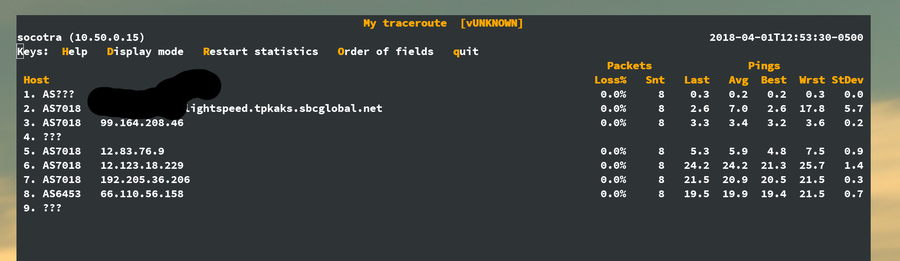
sho · 8 years ago
Interesting, mine is bad too. From singtel:
     Host                                                  Loss%   Snt   Last   Avg  Best  Wrst StDev
  1. 192.168.1.254                                         0.0%    75    1.3   1.6   1.1  14.8   1.6
  2. bbXXX-XXX-XXX-XX.singnet.com.sg                       0.0%    75    3.4   2.8   1.9  18.7   2.5
  3. 202.166.123.134                                       0.0%    75    3.2   3.5   2.7  15.9   2.0
  4. 202.166.123.133                                       0.0%    75    3.0   3.0   2.4   6.6   0.7
  5. ae8-0.tp-cr03.singnet.com.sg                          0.0%    75    3.1   3.3   2.8   6.9   0.7
  6. ae4-0.tp-er03.singnet.com.sg                          0.0%    75    2.9   3.1   2.6   6.7   0.5
  7. 203.208.191.197                                       0.0%    75    7.8   4.6   2.9  18.3   3.6
  8. 203.208.149.138                                       0.0%    75    3.0   7.5   2.7  67.2  13.4
  9. 203.208.153.126                                       0.0%    75  182.8 186.9 174.4 327.7  20.5
     203.208.172.226
     203.208.172.178
     203.208.158.50
     203.208.152.214
     203.208.173.106
     203.208.149.58
     203.208.149.30
  10. ix-xe-0-1-2-0.tcore2.pdi-palo-alto.as6453.net         0.0%    74  201.4 190.5 183.9 210.1   5.9
  11. if-ae-5-2.tcore2.sqn-san-jose.as6453.net              0.0%    74  181.4 184.7 179.4 197.9   4.6
  12. if-ae-1-2.tcore1.sqn-san-jose.as6453.net              0.0%    74  177.8 177.3 172.0 190.0   4.8
  13. 63.243.205.106                                        0.0%    74  179.2 184.2 179.1 196.2   4.5
  14. 1dot1dot1dot1.cloudflare-dns.com                      0.0%    74  191.9 184.7 172.4 202.3   6.6
Might send CloudFlare a quick email as they'll probably want singtel to correct this.
chanux · 8 years ago
What's the tool you used there?
From MyRepublic 8.8.8.8 is 2 hops shorter and about a millisecond faster.
Disclaimer: I probably don't know what I'm doing :D
sho · 8 years ago
mtr aka mytraceroute. Available on homebrew if you're on osx
ValentineC · 8 years ago
M1 Business:
  PING 1.1.1.1 (1.1.1.1) 56(84) bytes of data.
  64 bytes from 1.1.1.1: icmp_seq=1 ttl=58 time=3.57 ms
  64 bytes from 1.1.1.1: icmp_seq=2 ttl=58 time=3.30 ms
  64 bytes from 1.1.1.1: icmp_seq=3 ttl=58 time=3.31 ms
  64 bytes from 1.1.1.1: icmp_seq=4 ttl=58 time=3.21 ms
  64 bytes from 1.1.1.1: icmp_seq=5 ttl=58 time=3.21 ms

  PING 8.8.8.8 (8.8.8.8) 56(84) bytes of data.
  64 bytes from 8.8.8.8: icmp_seq=1 ttl=57 time=3.15 ms
  64 bytes from 8.8.8.8: icmp_seq=2 ttl=57 time=3.17 ms
  64 bytes from 8.8.8.8: icmp_seq=3 ttl=57 time=2.34 ms
  64 bytes from 8.8.8.8: icmp_seq=4 ttl=57 time=2.93 ms
  64 bytes from 8.8.8.8: icmp_seq=5 ttl=57 time=3.19 ms
  PING 1.1.1.1 (1.1.1.1) 56(84) bytes of data.
  64 bytes from 1.1.1.1: icmp_seq=1 ttl=60 time=1.88 ms
  64 bytes from 1.1.1.1: icmp_seq=2 ttl=60 time=1.93 ms
  64 bytes from 1.1.1.1: icmp_seq=3 ttl=60 time=1.96 ms
  64 bytes from 1.1.1.1: icmp_seq=4 ttl=60 time=1.85 ms
  64 bytes from 1.1.1.1: icmp_seq=5 ttl=60 time=1.85 ms

  PING 8.8.8.8 (8.8.8.8) 56(84) bytes of data.
  64 bytes from 8.8.8.8: icmp_seq=1 ttl=59 time=1.86 ms
  64 bytes from 8.8.8.8: icmp_seq=2 ttl=59 time=1.66 ms
  64 bytes from 8.8.8.8: icmp_seq=3 ttl=59 time=1.40 ms
  64 bytes from 8.8.8.8: icmp_seq=4 ttl=59 time=1.38 ms
  64 bytes from 8.8.8.8: icmp_seq=5 ttl=59 time=1.60 ms
bufferoverflow · 8 years ago
I get roughly the same 45-48ms from the EU for both.
relyio · 8 years ago
~3ms average for both from Western Europe
agumonkey · 8 years ago
EU, but my network setup is shitty as one can be:
    --- 8.8.8.8 ping statistics ---
    23 packets transmitted, 20 received, 13% packet loss, time 22093ms
    rtt min/avg/max/mdev = 37.756/51.634/75.856/12.714 ms

    --- 1.1.1.1 ping statistics ---
    7 packets transmitted, 7 received, 0% packet loss, time 6007ms
    rtt min/avg/max/mdev = 38.920/43.627/52.355/4.547 ms
jjoonathan · 8 years ago
Sorry man :(
Things are a bit quicker in the US:
64 bytes from 1.1.1.1: icmp_seq=1 ttl=60 time=0.421 ms
64 bytes from 8.8.8.8: icmp_seq=1 ttl=58 time=0.645 ms
olfactory · 8 years ago
Just curious if that is from a residential internet connection.
traspler · 8 years ago
If pings are anything to go by I should probably stay with Google (or my ISP, they ping at 1ms):
Pinging 8.8.8.8 with 32 bytes of data:
Reply from 8.8.8.8: bytes=32 time<1ms TTL=57
Reply from 8.8.8.8: bytes=32 time=1ms TTL=57
Reply from 8.8.8.8: bytes=32 time<1ms TTL=57
Reply from 8.8.8.8: bytes=32 time<1ms TTL=57
Pinging 1.1.1.1 with 32 bytes of data:
Reply from 1.1.1.1: bytes=32 time=6ms TTL=57
Reply from 1.1.1.1: bytes=32 time=6ms TTL=57
Reply from 1.1.1.1: bytes=32 time=6ms TTL=57
Reply from 1.1.1.1: bytes=32 time=6ms TTL=57
(Switzerland)
therealmarv · 8 years ago
Google's ones are also faster here by 8ms (Cyprus)
veidr · 8 years ago
Tokyo, Japan:
    [mason@iMac-Pro-No-5 fubastardo (master)]$  ping 1.1.1.1
    PING 1.1.1.1 (1.1.1.1): 56 data bytes
    64 bytes from 1.1.1.1: icmp_seq=0 ttl=56 time=2.310 ms
    64 bytes from 1.1.1.1: icmp_seq=1 ttl=56 time=2.287 ms
    64 bytes from 1.1.1.1: icmp_seq=2 ttl=56 time=2.103 ms
    64 bytes from 1.1.1.1: icmp_seq=3 ttl=56 time=2.785 ms
    64 bytes from 1.1.1.1: icmp_seq=4 ttl=56 time=2.276 ms
    64 bytes from 1.1.1.1: icmp_seq=5 ttl=56 time=2.646 ms
    ^C
    --- 1.1.1.1 ping statistics ---
    6 packets transmitted, 6 packets received, 0.0% packet loss
    round-trip min/avg/max/stddev = 2.103/2.401/2.785/0.236 ms
    [mason@iMac-Pro-No-5 fubastardo (master)]$
    [mason@iMac-Pro-No-5 fubastardo (master)]$
    [mason@iMac-Pro-No-5 fubastardo (master)]$ ping 8.8.8.8
    PING 8.8.8.8 (8.8.8.8): 56 data bytes
    64 bytes from 8.8.8.8: icmp_seq=0 ttl=56 time=2.217 ms
    64 bytes from 8.8.8.8: icmp_seq=1 ttl=56 time=1.837 ms
    64 bytes from 8.8.8.8: icmp_seq=2 ttl=56 time=1.838 ms
    64 bytes from 8.8.8.8: icmp_seq=3 ttl=56 time=2.010 ms
    64 bytes from 8.8.8.8: icmp_seq=4 ttl=56 time=1.827 ms
    64 bytes from 8.8.8.8: icmp_seq=5 ttl=56 time=2.056 ms
    64 bytes from 8.8.8.8: icmp_seq=6 ttl=56 time=1.807 ms
    ^C
    --- 8.8.8.8 ping statistics ---
    7 packets transmitted, 7 packets received, 0.0% packet loss
    round-trip min/avg/max/stddev = 1.807/1.942/2.217/0.145 ms
    [mason@iMac-Pro-No-5 fubastardo (master)]$
gizmodo59 · 8 years ago
How are you getting those single digit times? I can never get below 15 ms for both Google and CloudFlare. Any tips to improve this or its beyond my control?
zzzcpan · 8 years ago
Big cities are within half a ms range of various PoPs and IXes on fiber. Makes it possible to go even below 0.5 ms.
r1ch · 8 years ago
If you're using a cable or DSL modem, most of that latency is from the signal modulation between you and your ISP.
technion · 8 years ago
You're just trying to make Australians jealous aren't you?
    ping 1.1.1.1

    Reply from 1.1.1.1: bytes=32 time=366ms TTL=58
    Reply from 1.1.1.1: bytes=32 time=366ms TTL=58
    Reply from 1.1.1.1: bytes=32 time=365ms TTL=58
    Reply from 1.1.1.1: bytes=32 time=365ms TTL=58

    ping 8.8.8.8

    Reply from 8.8.8.8: bytes=32 time=402ms TTL=59
    Reply from 8.8.8.8: bytes=32 time=373ms TTL=59
    Reply from 8.8.8.8: bytes=32 time=373ms TTL=59
    Reply from 8.8.8.8: bytes=32 time=374ms TTL=59
systoll · 8 years ago
I'm getting ~60 and ~50 from Canberra.
zurkotalto · 8 years ago
My ISP peers with cloudflare in Sydney (~40ms), even though there is a CF datacenter in Auckland, New Zealand (~10ms)
I'm in Wellington.
    64 bytes from 1.1.1.1: icmp_seq=1 ttl=56 time=37.9 ms
    64 bytes from 1.1.1.1: icmp_seq=2 ttl=56 time=36.9 ms
    64 bytes from 1.1.1.1: icmp_seq=3 ttl=56 time=36.7 ms
    64 bytes from 1.1.1.1: icmp_seq=4 ttl=56 time=35.9 ms

    64 bytes from 8.8.8.8: icmp_seq=1 ttl=56 time=35.4 ms
    64 bytes from 8.8.8.8: icmp_seq=2 ttl=56 time=35.2 ms
    64 bytes from 8.8.8.8: icmp_seq=3 ttl=56 time=35.2 ms
    64 bytes from 8.8.8.8: icmp_seq=4 ttl=56 time=35.7 ms
NamTaf · 8 years ago
I'm getting ~40-50ms on both on Internode from Brisbane.
halbritt · 8 years ago
Australia, LOL.
You guys are 100ms from anywhere cool.
lugg · 8 years ago
What do you get to internode from there? (@192.231.203.132)
I'm halfway up to newcastle getting ~10ms across the board, 1.1.1.1, 8.8.8.8, and 192.231.203.132.
Of course performance on each is a different matter.
1.1.1.1 is giving the best response times @ 8-11ms.
Internode's is giving decent @ 10-14ms
8.8.8.8 is a bit wonky, sometimes I hit a 10ms route once they cache it, but propagation is very slow and most responses are 140-180ms.
NamTaf · 8 years ago
Sorry for the late response: to Internode (192.231.203.132) I get 36 ms. This is all on (rather terrible) ADSL 2+
osrpt · 8 years ago
Both are not fast in China. :(
zzzcpan · 8 years ago
Anycast is not based on latency, so that's normal.
staz · 8 years ago
From Belgium, not much of a difference
        [:~] % ping 1.1.1.1
        PING 1.1.1.1 (1.1.1.1) 56(84) bytes of data.
        64 bytes from 1.1.1.1: icmp_seq=1 ttl=59 time=22.0 ms
        64 bytes from 1.1.1.1: icmp_seq=2 ttl=59 time=21.1 ms
        64 bytes from 1.1.1.1: icmp_seq=3 ttl=59 time=21.8 ms
        64 bytes from 1.1.1.1: icmp_seq=4 ttl=59 time=21.0 ms
        64 bytes from 1.1.1.1: icmp_seq=5 ttl=59 time=21.8 ms
        64 bytes from 1.1.1.1: icmp_seq=6 ttl=59 time=21.2 ms
        ^C
        --- 1.1.1.1 ping statistics ---
        6 packets transmitted, 6 received, 0% packet loss, time 5009ms
        rtt min/avg/max/mdev = 21.023/21.509/22.031/0.399 ms
        [:~] % ping 8.8.8.8
        PING 8.8.8.8 (8.8.8.8) 56(84) bytes of data.
        64 bytes from 8.8.8.8: icmp_seq=1 ttl=59 time=26.4 ms
        64 bytes from 8.8.8.8: icmp_seq=2 ttl=59 time=26.6 ms
        64 bytes from 8.8.8.8: icmp_seq=3 ttl=59 time=26.7 ms
        64 bytes from 8.8.8.8: icmp_seq=4 ttl=59 time=26.4 ms
        64 bytes from 8.8.8.8: icmp_seq=5 ttl=59 time=26.7 ms
        64 bytes from 8.8.8.8: icmp_seq=6 ttl=59 time=25.9 ms
        ^C
        --- 8.8.8.8 ping statistics ---
        6 packets transmitted, 6 received, 0% packet loss, time 5010ms
        rtt min/avg/max/mdev = 25.925/26.501/26.790/0.344 ms
smoe · 8 years ago
From Bogotá, Colombia it is slightly faster than Google:
  ~% ping 1.1.1.1
  PING 1.1.1.1 (1.1.1.1) 56(84) bytes of data.
  64 bytes from 1.1.1.1: icmp_seq=1 ttl=57 time=11.0 ms
  64 bytes from 1.1.1.1: icmp_seq=2 ttl=57 time=10.9 ms
  64 bytes from 1.1.1.1: icmp_seq=3 ttl=57 time=10.5 ms
  64 bytes from 1.1.1.1: icmp_seq=4 ttl=57 time=10.0 ms
  64 bytes from 1.1.1.1: icmp_seq=5 ttl=57 time=13.0 ms
  64 bytes from 1.1.1.1: icmp_seq=6 ttl=57 time=10.1 ms
  ^C
  --- 1.1.1.1 ping statistics ---
  6 packets transmitted, 6 received, 0% packet loss, time 5006ms
  rtt min/avg/max/mdev = 10.037/10.953/13.052/1.010 ms

  ~% ping 8.8.8.8
  PING 8.8.8.8 (8.8.8.8) 56(84) bytes of data.
  64 bytes from 8.8.8.8: icmp_seq=1 ttl=56 time=14.7 ms
  64 bytes from 8.8.8.8: icmp_seq=2 ttl=56 time=14.5 ms
  64 bytes from 8.8.8.8: icmp_seq=3 ttl=56 time=13.5 ms
  64 bytes from 8.8.8.8: icmp_seq=4 ttl=56 time=13.2 ms
  64 bytes from 8.8.8.8: icmp_seq=5 ttl=56 time=14.0 ms
  64 bytes from 8.8.8.8: icmp_seq=6 ttl=56 time=14.8 ms
  ^C
  --- 8.8.8.8 ping statistics ---
  6 packets transmitted, 6 received, 0% packet loss, time 5008ms
  rtt min/avg/max/mdev = 13.260/14.151/14.823/0.585 ms
Reason077 · 8 years ago
Here in London, Cloudflare seems a bit faster:
  $ ping 1.1.1.1
  PING 1.1.1.1 (1.1.1.1): 56 data bytes
  64 bytes from 1.1.1.1: icmp_seq=0 ttl=64 time=2.793 ms
  64 bytes from 1.1.1.1: icmp_seq=1 ttl=64 time=3.010 ms
  64 bytes from 1.1.1.1: icmp_seq=2 ttl=64 time=2.789 ms
  64 bytes from 1.1.1.1: icmp_seq=3 ttl=64 time=2.963 ms
  64 bytes from 1.1.1.1: icmp_seq=4 ttl=64 time=2.954 ms
  64 bytes from 1.1.1.1: icmp_seq=5 ttl=64 time=1.330 ms
  ^C
  --- 1.1.1.1 ping statistics ---
  6 packets transmitted, 6 packets received, 0.0% packet loss
  round-trip min/avg/max/stddev = 1.330/2.640/3.010/0.592 ms

  $ ping 8.8.8.8
  PING 8.8.8.8 (8.8.8.8): 56 data bytes
  64 bytes from 8.8.8.8: icmp_seq=0 ttl=61 time=6.531 ms
  64 bytes from 8.8.8.8: icmp_seq=1 ttl=61 time=5.956 ms
  64 bytes from 8.8.8.8: icmp_seq=2 ttl=61 time=7.300 ms
  64 bytes from 8.8.8.8: icmp_seq=3 ttl=61 time=7.457 ms
  64 bytes from 8.8.8.8: icmp_seq=4 ttl=61 time=6.796 ms
  64 bytes from 8.8.8.8: icmp_seq=5 ttl=61 time=6.785 ms
  ^C
  --- 8.8.8.8 ping statistics ---
  6 packets transmitted, 6 packets received, 0.0% packet loss
  round-trip min/avg/max/stddev = 5.956/6.804/7.457/0.494 ms
cromulen · 8 years ago
  PING 8.8.8.8 (8.8.8.8) 56(84) bytes of data.
  64 bytes from 8.8.8.8: icmp_seq=1 ttl=55 time=19.6 ms
  64 bytes from 8.8.8.8: icmp_seq=2 ttl=55 time=19.9 ms
  64 bytes from 8.8.8.8: icmp_seq=3 ttl=55 time=19.8 ms
  64 bytes from 8.8.8.8: icmp_seq=4 ttl=55 time=19.7 ms
  64 bytes from 8.8.8.8: icmp_seq=5 ttl=55 time=19.8 ms
  64 bytes from 8.8.8.8: icmp_seq=6 ttl=55 time=19.7 ms
  64 bytes from 8.8.8.8: icmp_seq=7 ttl=55 time=19.8 ms
  64 bytes from 8.8.8.8: icmp_seq=8 ttl=55 time=19.7 ms
  64 bytes from 8.8.8.8: icmp_seq=9 ttl=55 time=19.8 ms

  PING 1.1.1.1 (1.1.1.1) 56(84) bytes of data.
  64 bytes from 1.1.1.1: icmp_seq=1 ttl=57 time=0.390 ms
  64 bytes from 1.1.1.1: icmp_seq=2 ttl=57 time=0.565 ms
  64 bytes from 1.1.1.1: icmp_seq=3 ttl=57 time=0.472 ms
  64 bytes from 1.1.1.1: icmp_seq=4 ttl=57 time=0.556 ms
  64 bytes from 1.1.1.1: icmp_seq=5 ttl=57 time=0.560 ms
  64 bytes from 1.1.1.1: icmp_seq=6 ttl=57 time=0.573 ms
  64 bytes from 1.1.1.1: icmp_seq=7 ttl=57 time=0.359 ms
  64 bytes from 1.1.1.1: icmp_seq=8 ttl=57 time=0.575 ms
  64 bytes from 1.1.1.1: icmp_seq=9 ttl=57 time=0.543 ms
  64 bytes from 1.1.1.1: icmp_seq=10 ttl=57 time=0.548 ms
Edit: formatting
jcims · 8 years ago
Using ping to compare the two may introduce a skew based on how the two networks prioritize ICMP.
For example, from my network google is averaging a faster response by ~.5ms
    $ ping 1.1.1.1
    PING 1.1.1.1 (1.1.1.1) 56(84) bytes of data.
    64 bytes from 1.1.1.1: icmp_seq=1 ttl=59 time=28.0 ms
    64 bytes from 1.1.1.1: icmp_seq=2 ttl=59 time=19.2 ms
    64 bytes from 1.1.1.1: icmp_seq=3 ttl=59 time=19.1 ms
    64 bytes from 1.1.1.1: icmp_seq=4 ttl=59 time=19.0 ms
    64 bytes from 1.1.1.1: icmp_seq=5 ttl=59 time=20.5 ms
    64 bytes from 1.1.1.1: icmp_seq=6 ttl=59 time=19.6 ms
    ^C
    --- 1.1.1.1 ping statistics ---
    6 packets transmitted, 6 received, 0% packet loss, time     5010ms
    rtt min/avg/max/mdev = 19.043/20.950/28.072/3.226 ms

    $ ping 8.8.8.8
    PING 8.8.8.8 (8.8.8.8) 56(84) bytes of data.
    64 bytes from 8.8.8.8: icmp_seq=1 ttl=54 time=19.1 ms
    64 bytes from 8.8.8.8: icmp_seq=2 ttl=54 time=20.1 ms
    64 bytes from 8.8.8.8: icmp_seq=3 ttl=54 time=20.6 ms
    64 bytes from 8.8.8.8: icmp_seq=4 ttl=54 time=21.1 ms
    64 bytes from 8.8.8.8: icmp_seq=5 ttl=54 time=21.9 ms
    64 bytes from 8.8.8.8: icmp_seq=6 ttl=54 time=19.4 ms
    ^C
    --- 8.8.8.8 ping statistics ---
    6 packets transmitted, 6 received, 0% packet loss, time 5008ms
    rtt min/avg/max/mdev = 19.114/20.414/21.922/0.988 ms
    $ for domain in microsoft.com google.com cloudflare.com facebook.com twitter.com; \
      do cloudflare=$(dig @1.1.1.1 ${domain} | awk '/msec/{print $4}'); \
        google=$(dig @8.8.8.8 ${domain} | awk '/msec/{print $4}');\
        printf "${domain}:\tcloudflare ${cloudflare}ms\tgoogle ${google}ms\n";\
      done
    microsoft.com:	cloudflare 22ms	google 23ms
    google.com:		cloudflare 19ms	google 22ms
    cloudflare.com:	cloudflare 19ms	google 23ms
    facebook.com:	cloudflare 21ms	google 20ms
    twitter.com:	cloudflare 19ms	google 21ms
gpm · 8 years ago
Toronto - (ISP: Bell)
    $ ping 1.1.1.1
    PING 1.1.1.1 (1.1.1.1) 56(84) bytes of data.
    64 bytes from 1.1.1.1: icmp_seq=1 ttl=55 time=22.0 ms
    64 bytes from 1.1.1.1: icmp_seq=2 ttl=55 time=19.7 ms
    64 bytes from 1.1.1.1: icmp_seq=3 ttl=55 time=17.6 ms
    64 bytes from 1.1.1.1: icmp_seq=4 ttl=55 time=20.2 ms
    64 bytes from 1.1.1.1: icmp_seq=5 ttl=55 time=18.2 ms
    ^C
    --- 1.1.1.1 ping statistics ---
    5 packets transmitted, 5 received, 0% packet loss, time 4006ms
    rtt min/avg/max/mdev = 17.691/19.610/22.080/1.559 ms
    [normal@inspiron ~]$ ping 8.8.8.8
    PING 8.8.8.8 (8.8.8.8) 56(84) bytes of data.
    64 bytes from 8.8.8.8: icmp_seq=1 ttl=56 time=7.12 ms
    64 bytes from 8.8.8.8: icmp_seq=2 ttl=56 time=5.28 ms
    64 bytes from 8.8.8.8: icmp_seq=3 ttl=56 time=8.24 ms
    64 bytes from 8.8.8.8: icmp_seq=4 ttl=56 time=5.28 ms
    64 bytes from 8.8.8.8: icmp_seq=5 ttl=56 time=4.01 ms
    64 bytes from 8.8.8.8: icmp_seq=6 ttl=56 time=6.37 ms
    ^C
    --- 8.8.8.8 ping statistics ---
    6 packets transmitted, 6 received, 0% packet loss, time 5007ms
    rtt min/avg/max/mdev = 4.014/6.053/8.240/1.380 ms
telesilla · 8 years ago
Rome: about the same for me.
PING 8.8.8.8 (8.8.8.8): 56 data bytes
64 bytes from 8.8.8.8: icmp_seq=0 ttl=56 time=19.145 ms
64 bytes from 8.8.8.8: icmp_seq=1 ttl=56 time=18.927 ms
64 bytes from 8.8.8.8: icmp_seq=2 ttl=56 time=19.258 ms
64 bytes from 8.8.8.8: icmp_seq=3 ttl=56 time=20.000 ms
64 bytes from 8.8.8.8: icmp_seq=4 ttl=56 time=20.428 ms
PING 1.1.1.1 (1.1.1.1): 56 data bytes
64 bytes from 1.1.1.1: icmp_seq=0 ttl=53 time=21.351 ms
64 bytes from 1.1.1.1: icmp_seq=1 ttl=53 time=18.606 ms
64 bytes from 1.1.1.1: icmp_seq=2 ttl=53 time=19.451 ms
64 bytes from 1.1.1.1: icmp_seq=3 ttl=53 time=19.084 ms
64 bytes from 1.1.1.1: icmp_seq=4 ttl=53 time=18.989 ms
myth_buster · 8 years ago
Colorado, US
1.1.1.1 round-trip min/avg/max/stddev = 10.984/12.221/14.909/1.239 ms
8.8.8.8 round-trip min/avg/max/stddev = 11.022/12.702/15.102/1.317 ms
guessmyname · 8 years ago
Vancouver, BC, Canada
    $ ping -c 10 1.1.1.1
    PING 1.1.1.1 (1.1.1.1): 56 data bytes
    64 bytes from 1.1.1.1: icmp_seq=0 ttl=60 time=1789.957 ms
    64 bytes from 1.1.1.1: icmp_seq=1 ttl=60 time=19.620 ms
    64 bytes from 1.1.1.1: icmp_seq=2 ttl=60 time=9.372 ms
    64 bytes from 1.1.1.1: icmp_seq=3 ttl=60 time=11.585 ms
    64 bytes from 1.1.1.1: icmp_seq=4 ttl=60 time=20.660 ms
    64 bytes from 1.1.1.1: icmp_seq=5 ttl=60 time=11.808 ms
    64 bytes from 1.1.1.1: icmp_seq=6 ttl=60 time=12.784 ms
    64 bytes from 1.1.1.1: icmp_seq=7 ttl=60 time=11.908 ms
    64 bytes from 1.1.1.1: icmp_seq=8 ttl=60 time=11.373 ms
    64 bytes from 1.1.1.1: icmp_seq=9 ttl=60 time=11.992 ms
    --- 1.1.1.1 ping statistics ---
    10 packets transmitted, 10 packets received, 0.0% packet loss
    round-trip min/avg/max/stddev = 9.372/191.106/1789.957/532.962 ms

    $ ping -c 10 8.8.8.8
    PING 8.8.8.8 (8.8.8.8): 56 data bytes
    64 bytes from 8.8.8.8: icmp_seq=0 ttl=60 time=1308.156 ms
    64 bytes from 8.8.8.8: icmp_seq=1 ttl=60 time=17.557 ms
    64 bytes from 8.8.8.8: icmp_seq=2 ttl=60 time=13.043 ms
    64 bytes from 8.8.8.8: icmp_seq=3 ttl=60 time=16.217 ms
    64 bytes from 8.8.8.8: icmp_seq=4 ttl=60 time=15.033 ms
    64 bytes from 8.8.8.8: icmp_seq=5 ttl=60 time=15.132 ms
    64 bytes from 8.8.8.8: icmp_seq=6 ttl=60 time=14.157 ms
    64 bytes from 8.8.8.8: icmp_seq=7 ttl=60 time=16.100 ms
    64 bytes from 8.8.8.8: icmp_seq=8 ttl=60 time=15.600 ms
    64 bytes from 8.8.8.8: icmp_seq=9 ttl=60 time=13.837 ms
    --- 8.8.8.8 ping statistics ---
    10 packets transmitted, 10 packets received, 0.0% packet loss
    round-trip min/avg/max/stddev = 13.043/144.483/1308.156/387.893 ms
manquer · 8 years ago
Bangalore, India
  $ ping 1.1.1.1
  PING 1.1.1.1 (1.1.1.1) 56(84) bytes of data.
  64 bytes from 1.1.1.1: icmp_seq=1 ttl=59 time=13.8 ms
  64 bytes from 1.1.1.1: icmp_seq=2 ttl=59 time=14.6 ms
  64 bytes from 1.1.1.1: icmp_seq=3 ttl=59 time=13.7 ms
  64 bytes from 1.1.1.1: icmp_seq=4 ttl=59 time=14.1 ms
  64 bytes from 1.1.1.1: icmp_seq=5 ttl=59 time=13.7 ms
  64 bytes from 1.1.1.1: icmp_seq=6 ttl=59 time=15.3 ms
  $ ping 8.8.8.8
  PING 8.8.8.8 (8.8.8.8) 56(84) bytes of data.
  64 bytes from 8.8.8.8: icmp_seq=1 ttl=46 time=43.5 ms
  64 bytes from 8.8.8.8: icmp_seq=2 ttl=46 time=42.3 ms
  64 bytes from 8.8.8.8: icmp_seq=3 ttl=46 time=43.1 ms
  64 bytes from 8.8.8.8: icmp_seq=4 ttl=46 time=42.0 ms
  64 bytes from 8.8.8.8: icmp_seq=5 ttl=46 time=42.4 ms
ramshanker · 8 years ago
Comparison from EXCITEL ISP - New Delhi.
Microsoft Windows [Version 10.0.16299.309] (c) 2017 Microsoft Corporation. All rights reserved.
C:\Users\ram>tracert 1.1.1.1
Tracing route to 1dot1dot1dot1.cloudflare-dns.com [1.1.1.1] over a maximum of 30 hops:
  1     6 ms    11 ms     5 ms  192.168.1.1
  2     5 ms     5 ms    23 ms  10.4.224.1
  3     *        *        *     Request timed out.
  4    15 ms     7 ms    10 ms  103.56.229.1
  5     *        *        *     Request timed out.
  6    45 ms    56 ms    44 ms  115.255.252.225
  7    86 ms    84 ms    87 ms  62.216.144.77
  8   169 ms   173 ms   175 ms  xe-2-0-4.0.cjr01.sin001.flagtel.com [62.216.129.161]
  9   174 ms   174 ms   169 ms  ge-2-0-0.0.pjr01.hkg005.flagtel.com [85.95.25.41]
 10   173 ms   174 ms   170 ms  xe-3-2-2.0.ejr04.seo002.flagtel.com [62.216.130.25]
 11   171 ms   173 ms   170 ms  1dot1dot1dot1.cloudflare-dns.com [1.1.1.1]
C:\Users\ram>tracert 8.8.8.8
Tracing route to google-public-dns-a.google.com [8.8.8.8] over a maximum of 30 hops:
  1    88 ms   305 ms    98 ms  192.168.1.1
  2    13 ms    98 ms   102 ms  10.4.224.1
  3     *        *        *     Request timed out.
  4     *       16 ms     *     10.200.200.1
  5     9 ms     3 ms     8 ms  209.85.172.217
  6    11 ms     5 ms     9 ms  108.170.251.103
  7    40 ms    33 ms    37 ms  209.85.246.164
  8     *       90 ms    89 ms  209.85.241.87
  9    89 ms    86 ms    89 ms  216.239.51.57
 10     *        *        *     Request timed out.
 11     *        *        *     Request timed out.
 12     *        *        *     Request timed out.
 13     *        *        *     Request timed out.
 14     *        *        *     Request timed out.
 15     *        *        *     Request timed out.
 16     *        *        *     Request timed out.
 17     *        *        *     Request timed out.
 18     *        *        *     Request timed out.
 19    87 ms    82 ms    87 ms  google-public-dns-a.google.com [8.8.8.8]
C:\Users\ram>tracert resolver2.opendns.com
Tracing route to resolver2.opendns.com [208.67.220.220] over a maximum of 30 hops:
  1     3 ms     7 ms     8 ms  192.168.1.1
  2    12 ms    11 ms    41 ms  10.4.224.1
  3     *        *        *     Request timed out.
  4    21 ms    21 ms    51 ms  103.56.229.1
  5     *       62 ms    12 ms  115.248.235.150
  6     *      408 ms    65 ms  115.255.252.229
  7    43 ms    49 ms    40 ms  14.142.22.201.static-Mumbai.vsnl.net.in [14.142.22.201]
  8     *       41 ms    57 ms  172.23.78.237
  9    46 ms    32 ms    29 ms  172.19.138.86
 10    73 ms    46 ms    42 ms  115.110.234.50.static.Mumbai.vsnl.net.in [115.110.234.50]
 11    41 ms    64 ms    44 ms  resolver2.opendns.com [208.67.220.220]
C:\Users\ram>
paxys · 8 years ago
>5x improvement over Google for me
  ~ ping -c 10 1.1.1.1
  PING 1.1.1.1 (1.1.1.1) 56(84) bytes of data.
  64 bytes from 1.1.1.1: icmp_seq=1 ttl=64 time=1.15 ms
  64 bytes from 1.1.1.1: icmp_seq=2 ttl=64 time=1.15 ms
  64 bytes from 1.1.1.1: icmp_seq=3 ttl=64 time=1.06 ms
  64 bytes from 1.1.1.1: icmp_seq=4 ttl=64 time=1.04 ms
  64 bytes from 1.1.1.1: icmp_seq=5 ttl=64 time=1.03 ms
  64 bytes from 1.1.1.1: icmp_seq=6 ttl=64 time=1.01 ms
  64 bytes from 1.1.1.1: icmp_seq=7 ttl=64 time=1.02 ms
  64 bytes from 1.1.1.1: icmp_seq=8 ttl=64 time=1.07 ms
  64 bytes from 1.1.1.1: icmp_seq=9 ttl=64 time=1.00 ms
  64 bytes from 1.1.1.1: icmp_seq=10 ttl=64 time=0.848 ms

  --- 1.1.1.1 ping statistics ---
  10 packets transmitted, 10 received, 0% packet loss, time 9009ms
  rtt min/avg/max/mdev = 0.848/1.042/1.153/0.086 ms

  ~ ping -c 10 8.8.8.8
  PING 8.8.8.8 (8.8.8.8) 56(84) bytes of data.
  64 bytes from 8.8.8.8: icmp_seq=1 ttl=56 time=6.82 ms
  64 bytes from 8.8.8.8: icmp_seq=2 ttl=56 time=6.72 ms
  64 bytes from 8.8.8.8: icmp_seq=3 ttl=56 time=6.39 ms
  64 bytes from 8.8.8.8: icmp_seq=4 ttl=56 time=6.73 ms
  64 bytes from 8.8.8.8: icmp_seq=5 ttl=56 time=6.55 ms
  64 bytes from 8.8.8.8: icmp_seq=6 ttl=56 time=6.14 ms
  64 bytes from 8.8.8.8: icmp_seq=7 ttl=56 time=6.24 ms
  64 bytes from 8.8.8.8: icmp_seq=8 ttl=56 time=6.22 ms
  64 bytes from 8.8.8.8: icmp_seq=9 ttl=56 time=6.19 ms
  64 bytes from 8.8.8.8: icmp_seq=10 ttl=56 time=6.30 ms

  --- 8.8.8.8 ping statistics ---
  10 packets transmitted, 10 received, 0% packet loss, time 9011ms
  rtt min/avg/max/mdev = 6.149/6.433/6.826/0.248 ms
tyfon · 8 years ago
From Norway (fiber), seems to be a bit faster than google:
$ ping -c 5 1.1.1.1
PING 1.1.1.1 (1.1.1.1): 56 data bytes
64 bytes from 1.1.1.1: icmp_seq=0 ttl=60 time=1.606 ms
64 bytes from 1.1.1.1: icmp_seq=1 ttl=60 time=1.562 ms
64 bytes from 1.1.1.1: icmp_seq=2 ttl=60 time=1.540 ms
64 bytes from 1.1.1.1: icmp_seq=3 ttl=60 time=1.574 ms
64 bytes from 1.1.1.1: icmp_seq=4 ttl=60 time=1.564 ms
--- 1.1.1.1 ping statistics ---
5 packets transmitted, 5 packets received, 0.0% packet loss round-trip min/avg/max/std-dev = 1.540/1.569/1.606/0.022 ms
$ ping -c 5 8.8.8.8
PING 8.8.8.8 (8.8.8.8): 56 data bytes
64 bytes from 8.8.8.8: icmp_seq=0 ttl=57 time=9.068 ms
64 bytes from 8.8.8.8: icmp_seq=1 ttl=57 time=8.923 ms
64 bytes from 8.8.8.8: icmp_seq=2 ttl=57 time=8.974 ms
64 bytes from 8.8.8.8: icmp_seq=3 ttl=57 time=8.916 ms
64 bytes from 8.8.8.8: icmp_seq=4 ttl=57 time=8.931 ms
--- 8.8.8.8 ping statistics ---
5 packets transmitted, 5 packets received, 0.0% packet loss round-trip min/avg/max/std-dev = 8.916/8.962/9.068/0.057 ms
ttsda · 8 years ago
Near Lisbon on residential FTTH:
           ping    dig
           ----------------
  1.1.1.1  3.2     4
  1.0.0.1  2.9     4
  8.8.8.8  36.5    40
  8.8.4.4  36.3    42
sofaofthedamned · 8 years ago
How on earth did they get a cert for an IP address?!
gsich · 8 years ago
Place the IP into the "Subject Alternative Name".
sofaofthedamned · 8 years ago
Good to know, thank you!
gsich · 8 years ago
Haven't tried this with Lets Encrypt, but would be nice if this worked there aswell.
prdonahue · 8 years ago
They don't support this.
milankragujevic · 8 years ago
uhm how can you get an ssl cert for an IP?
nkozyra · 8 years ago
It's just uncommon but supported
https://stackoverflow.com/questions/1095780/are-ssl-certific...
rocqua · 8 years ago
Apparently, you need to provide it as a Subject Alternative Name (SAN).
This is the entry for the cert used:
    DNS Name=*.cloudflare-dns.com
    IP Address=1.1.1.1
    IP Address=1.0.0.1
    DNS Name=cloudflare-dns.com
    IP Address=2606:4700:4700:0000:0000:0000:0000:1111
    IP Address=2606:4700:4700:0000:0000:0000:0000:1001
tialaramex · 8 years ago
SAN is the only correct way to write any kind of name for servers on the Internet in a certificate. The "Common Name" was left as a compatibility feature like 20 years ago when SANs were invented and then it rusted into place, but is no longer examined by current Firefox or Chrome browsers for "real" certificates from the public Internet. Chrome shipped releases for a while with a bug where they'd complain the server's cert had the wrong "Common Name" when actually they never checked CN at all, and so it might even have the right Common Name, but they really meant "Your SANs don't match fool" and hadn't updated the error text.
Because crappy software (looking at you here OpenSSL) makes writing SANs into a Certificate Subject Request way harder than it needs to be, a lot of CAs (including Let's Encrypt) will take a CSR that says "My Common Name is foo.example" and sigh, and issue a cert which adds SAN dnsName foo.example, because they know that's what you want. Really somebody should fix the software, one of these days.
In older Windows versions, SChannel (Microsoft's implementation of SSL/TLS) doesn't understand ipAddress, and thinks the correct way to match an ipAddress against a certificate is to turn the address into ASCII text of dotted decimals and compare that to the dnsName entries. This, unsurprisingly, is not standards compliant.
It's good to see a CA not trying to fudge this, but the consequence is probably that if you have older Windows (XP? Maybe even something newer) these certs don't check out as valid for the site. Eh. Upgrade already.
bogomipz · 8 years ago
per rfc5280:
>"4.2.1.6. Subject Alternative Name The subject alternative name extension allows identities to be bound to the subject of the certificate. These identities may be included in addition to or in place of the identity in the subject field of the certificate. Defined options include an Internet electronic mail address, a DNS name, an IP address, and a Uniform Resource Identifier(URI). Other options exist, including completely local definitions."[1]
eeZah7Ux · 8 years ago
Any reason why DNS over TLS is preferred over DNSCurve?
rocqua · 8 years ago
It looks like any other TLS connection? Just a guess.
therealmarv · 8 years ago
I'm guessing less "sophisticated reinvention" and usage of existing TLS connection technology. You can use both (even at the same time) with DNScrypt-proxy V2 https://github.com/jedisct1/dnscrypt-proxy ;)
latexr · 8 years ago
If you’re on macOS and would rather do this from the command line:
sudo networksetup -setdnsservers Wi-Fi 1.1.1.1 1.0.0.1jimaek · 8 years ago
You can get performance stats over here https://www.dnsperf.com/#!dns-resolvers
phoe-krk · 8 years ago
I find it slightly amusing that they do not need to register a domain name for that one.
0x006A · 8 years ago
to get the ssl certificate they had to get a domain: cloudflare-dns.com, ips only works as alternative names but not as the main domain name.
tialaramex · 8 years ago
Nope, certificates can be, and sometimes are, issued for plain IP addresses, yes including in the Web PKI ("proper" certificates that work in common web browsers).
Because the BRs say that the subject Common Name, if present (which it usually will be for really crappy software that still doesn't implement standards from _last god-damn century_) must be chosen from the list of SANs, these certificates will have an IP address as their CN, plus an ipAddress SAN.
Here is an example, which my records say had an IP address as its only name, but at time of writing crt.sh is timing out for me so forgive me if this some completely unrelated cert and I've pasted the wrong one:
therealmarv · 8 years ago
Interesting that https://dnsleaktest.com/ does not work with Cloudflare's DNS... that's a first one for me.
peterburkimsher · 8 years ago
https://www.immigration.govt.nz also doesn't work - I just realised when reopening my browser.
Thankfully I noticed quickly, so I knew what the problem would be.
vavrusa · 8 years ago
As it should fail in any validating resolver. The CNAME signature recently expired: http://dnsviz.net/d/www.immigration.govt.nz/dnssec/
pmlnr · 8 years ago
Cloudflare, are you planning to support the OpenNIC initiative with this later on, rather than just being a regular, alternative DNS resolver?
icebergonfire · 8 years ago
I am getting ERR_CERT_AUTHORITY_INVALID because my ISP-provided router is intercepting the connection and trying to show me a "helpful" configuration wizard. No Cloudflare DNS for me.
To be explicit: This is not Cloudflare's fault and we should blame the manufacturer of the router, or the ISP for deploying their custom "friendly" settings. But it is what it is.
rmsaksida · 8 years ago
Same problem here. It would be nice if Cloudflare created an alias to 1.1.1.1, because I can't access it at all.
Edit: 1.0.0.1 also takes me to the router configuration screen. And there's no configuration setting for it. :(
jamesog · 8 years ago
https://cloudflare-dns.com/ works, however it redirects to https://1.1.1.1/
tialaramex · 8 years ago
Yup, these ranges are poisonous, which is why APNIC kept them, so this is effectively to be expected. It would actually be extraordinary if, since the range was determined to be poisonous and so mustn't be delegated this had magically fixed itself. So I was sort-of expecting to see some comments in the last thread about 1.1.1.1 like yours.
The "good" news is that this isn't being used for anything you really need - imagine if 1.1.1.1 had been delegated and now it was the resolution for www.facebook.com or indeed news.ycombinator.com ...
The bad news is that idiots do not learn from their mistakes, that's Dunning Kruger, the people who built your device don't understand why this was the Wrong Thing™ and won't now seek to do better in future. If we're lucky they'll go out of business, but that's the best we can hope for.
captainju · 8 years ago
Same here, orange (FR)
veidr · 8 years ago
Just curious: can somebody shed light on how they got the 1.1.1.1 IP address?
vidyesh · 8 years ago
APNIC's research group held the IP addresses 1.1.1.1 and 1.0.0.1. While the addresses were valid, so many people had entered them into various random systems that they were continuously overwhelmed by a flood of garbage traffic. APNIC wanted to study this garbage traffic but any time they'd tried to announce the IPs, the flood would overwhelm any conventional network.
We talked to the APNIC team about how we wanted to create a privacy-first, extremely fast DNS system. They thought it was a laudable goal. We offered Cloudflare's network to receive and study the garbage traffic in exchange for being able to offer a DNS resolver on the memorable IPs. And, with that, 1.1.1.1 was born
dang · 8 years ago
Thanks. Since https://1.1.1.1/ was posted the other day (https://news.ycombinator.com/item?id=16716606), we've changed the URL above to that blog post.
tomputer · 8 years ago
It is explained on the bottom of the page:
Who’s behind this?
1.1.1.1 is a partnership between Cloudflare and APNIC.
Cloudflare runs one of the world’s largest, fastest networks. APNIC is a non-profit organization managing IP address allocation for the Asia Pacific and Oceania regions.
Cloudflare had the network. APNIC had the IP address (1.1.1.1). Both of us were motivated by a mission to help build a better Internet. You can read more about each organization’s motivations on our respective posts: Cloudflare Blog / APNIC Blog.
bvm · 8 years ago
http://packetlife.net/blog/2010/feb/5/ripe-plays-with-1-0-0-...
mediaserf · 8 years ago
Does anyone know if it caches beyond the specified TTL like some services do? One of the things I love about Google's is that it honors TTL.
antoncohen · 8 years ago
When I've seen DNS-over-HTTPS in the past I've always thought it odd that it's setup with a DNS name for the HTTPS address, requiring a plain DNS lookup before it starts using HTTPS. I assumed this was done because they didn't have a valid TLS cert for the IP address. But 1.1.1.1 actually has a valid TLS cert, yet their setup instructions say to use the DNS name cloudflare-dns.com instead of the IP.
https://developers.cloudflare.com/1.1.1.1/dns-over-https/
Is there a technical reason the DNS-over-HTTPS resolvers need their upstream resolvers to be looked up by name and not IP?
Someone1234 · 8 years ago
I suppose I see your point, but since DNS-over-HTTPS only supports HTTPS (not HTTP) and therefore requires a valid certificate for the requested resolver, there's no risk of the protocol being downgraded to HTTP or easily spoofed.
So what do you see as the threat profile?
antoncohen · 8 years ago
That is a good point, though I wasn't thinking about it from a security perspective. I was more imagining an ISP or nation that is trying to control content by blocking/faking DNS queries. They could block the first DNS query if DNS-over-HTTPS doesn't use an IP for the resolver.
Of course an ISP or nation could block/reroute the IP 1.1.1.1 too, so maybe it doesn't matter. Neither way would allow MITM, I was just thinking about ways oppressive ISPs/nations could stop DNS-over-HTTPS from working.
zackbloom · 8 years ago
You can also query 1.1.1.1 using the DNS-over-HTTPS URL schema if you like, you don't have to use cloudflare-dns.com.
ogud · 8 years ago
Official now Privacy and Speed are the goals https://blog.cloudflare.com/dns-resolver-1-1-1-1/ https://blog.cloudflare.com/announcing-1111/
ComputerGuru · 8 years ago
This is bad, bad, bad advice. You don't set the DNS on your local machine. That breaks things. The DNS needs to be set at the gateway. If you change your PC/mac's DNS to an external service, you won't be able to resolve any addresses on the local network.
Come on, CloudFlare. You guys know better than that. Please stop breaking the (local) internet.
lorenzhs · 8 years ago
Ordinary users don't have anything that resolves to local IPs, so this is a non-issue for just about anybody. Plus, many if not most ISP-provided modem-router-AP-boxes don't let you configure the DNS server they use, making your recommendation impossible to follow for most users. Someone who runs services on their local network likely knows enough to do as you say, but for 99% of people, these instructions are exactly what they need.
Spooky23 · 8 years ago
Most people own printers and other devices that use local DNS.
Don’t presume that joe public is a simpleton. Millions of people are not.
lorenzhs · 8 years ago
Zeroconf (Avahi/Bonjour) takes care of making that wireless printer work regardless of which DNS server you’re using.
I’m not insinuating that “joe public” is dumb. He just doesn’t need to care about DNS on his local network, there’s software that handles it for him.
wpietri · 8 years ago
Yes! People are smart enough to handle most things. But they don't have time or attention to handle all the things. When we're making technology for users, we should do our best to make sure they only have to learn about the things that are important to them.
future31 · 8 years ago
This is bad. To run your own local DNS server is a part of good parenting. So, to break local services is very bad for us responsible parents, to say the least. I block all outbound DNS lookup except to my ISP. Sometime I redirect lookups to other resolvers (eg. 8.8.8.8) to my local DNS server. I don’t care if some app breaks because of this. Often it’s because of bad programming. So, don’t break local DNS!
EastSmith · 8 years ago
I have couple machines in a local network and never cared about them beeing discovarable /sharing between.
twic · 8 years ago
This is useful for use cases for which that doesn't matter. Using your computer or devices at home, on your own wifi, where there is no need to resolve local addresses. Or on public wifi, such as in a café, where there is no need to resolve local addresses, and you don't control the gateway.
danellis · 8 years ago
How many people have local DNS at home? Not many, I'd wager. How many know how to access their router? Also not many.
Besides, "In your router’s configuration page, locate the DNS server settings."
icedchai · 8 years ago
I've been running my own DNS servers since 1996, when I had my first dedicated connection (an ISDN line.) I never use my ISP's DNS.
danellis · 8 years ago
You're not typical of the average consumer, though. Don't forget that HN is a particularly technical crowd, so you can't use it to judge how technically competent Internet users are.
azureel · 8 years ago
Here in Hacker News: Many.
danellis · 8 years ago
Exactly. HN is a bubble, and I think people forget they don't represent the average consumer.
wpietri · 8 years ago
Perhaps you missed the sections near the top titled "DNS's Privacy Problem" and "DNS's Censorship Problem" which explain why not everybody can trust their network operator?
ReverseCold · 8 years ago
> If you change your PC/mac's DNS to an external service, you won't be able to resolve any addresses on the local network.
What does this mean? I have 8.8.8.8/8.8.4.4 set and they work fine for resolving things on my local network?
I can even connect to things with avahi like `xxyyzz.local`.
creatonez · 8 years ago
Why not just use avahi-daemon?
twr · 8 years ago
Unbound lets you forward queries to nameservers matched by the query (sub-)domain.
*.internal queries can be sent to the local nameserver, for example, while others can be forwarded to the public nameserver.
Minimal unbound.conf example:
    forward-zone:
        name: "."
        forward-addr: 1.1.1.1
    forward-zone:
        name: "internal"
        forward-addr: 10.0.0.1
unicornporn · 8 years ago
9.9.9.9
https://quad9.net has been serving me well.
rdsubhas · 8 years ago
> We will never sell your data or use it to target ads. Period.
Won't sell != Won't collect
> We will never log your IP address (the way other companies identify you)
Never log IP != Never log anything
Bonus: The way other companies identify you ~= There are other ways
Edit: Looks like many people assume I'm nitpicking. So here are more specific questions:
* Is logging a hashcode of the IP considered as "not logging the IP"?
* Can combination of timestamp, packet info other than end IP (latency, hops, etc), geoIP and other factors be used for deep intelligence?
fwgwgwgch · 8 years ago
AFAIK the only data is domain name, record and the incoming ip. I don't care if they store the first two.
Do you have any actual points against or are you just trying to nitpick? And do you have anything better?
nathanaldensr · 8 years ago
Unfortunately, nitpicking is quite necessary. Haven't we seen enough instances of corporations lying through omission? Where is the trend that indicates we should give a more favorable, trustworthy reading to terms and promises like these? I don't see it.
Cloudflare is a for-profit corporation--you know, "duty to shareholders" and all that. We must assume, almost by definition, that they actually have their own self-interests at heart.
rdsubhas · 8 years ago
Fair point and (maybe) you are right, I am nitpicking but not ashamed to do so. Could have been stronger to say "We won't store your data" rather than "We won't sell your data". And frankly, "we will never log your IP address (the way other companies identify you)", like really? Talking very naively, what if they just store a hashcode or some other derivative of the IP instead, is that counted as logging the IP? And what about the timestamp, geoIP, reverse hostname and other factors, can deep intelligence be used to associate with other behavior?
pdkl95 · 8 years ago
> the only data is domain name, record and the incoming ip
Other data that can be logged:
- timestamp - this can be very revealing when correlated with other datasets.j
- ASN - can sometimes act like fingerprint on it's own, and assists in correlating other data (e.g. the timestamp)
- any identifiable variation in the structure or behavior between different DNS resolver implementations. See nmap's "-O" option that detects the OS from the TCP/IP protocol implementation.
fwgwgwgch · 8 years ago
Good answer. Thanks.
superkuh · 8 years ago
And since it's cloudflare if some site's politics don't align with the owner's politics they'll just block it arbitrarily.
dd36 · 8 years ago
Any examples of this besides the KKK?
superkuh · 8 years ago
So, you're implying things here that I'll address with an H. L. Mencken quote,
>"The trouble with fighting for human freedom is that one spends most of one's time defending scoundrels. For it is against scoundrels that oppressive laws are first aimed, and oppression must be stopped at the beginning if it is to be stopped at all."
Afforess · 8 years ago
"A witty saying proves nothing." - Voltaire
Universal free speech is not laudable, it's suicidal. If your free speech doesn't protect you from those who want to take it away, they will win, on a long enough time horizon. They only need to win once.
superkuh · 8 years ago
Wow. I can't tell if you're trying to be funny by being meta or you just don't realize what you just said applies to your very argument. Lets break it down.
You want to protect free speech by taking it away because if you don't then someone might use free speech to take away free speech.
First, speech is not an action that can violate your rights. Sticks and stones, etc. And no, just because communication can help organize your political opposition does not mean the speech itself is violating your rights. Actions and legislation do that.
Second, deciding that some things are allowed and some aren't and then enforcing those arbitrary decisions through violence by the state certainly can violate those rights. And and gets easier and more every time.
I suppose you think that limited free speech is a thing that can persist. I strongly disagree. The idea of universe free speech is because any attempt to regulate leads to the loss of all of it fairly quickly if not instantly; they only need to win once. It exists to protect opinions that are disliked by most if not all.
I see your argument is basically that if free speech allows for speech that supports the idea of not allowing free speech then it will fail. And that may be true. That's why constant villigance is required even, especially, when they try to use people who's opinion almost everyone hates to justify it. There is no final solution.
manigandham · 8 years ago
It's a private organization with no monopoly and lots of competition. Free speech doesn't apply here.
Also Cloudflare gets vastly more negative opinions that they don't check enough and serve too many unsavory sites so it seems there's no way to win with the HN crowd.
superkuh · 8 years ago
It set the precedent that they do filtering. It is now being used in legal cases against Cloudflare by companies suing them to force them to filter other things.
Any censorship immediately leads to massive censorship even if they don't want to expand it. That's why it has to be stopped at the start; not done at all. Dumb pipe or censorship pipe.
manigandham · 8 years ago
No business is completely a dumb pipe, the DMCA provisions are very specific and are increasingly overruled once enough (copyrighted) content is in place.
Cloudflare also specifically removed that site for a stated reason that they claimed CF was helping them. That is outside the bounds of the site content itself and is a perfectly fine argument to stop doing business based on libel and misrepresentation.
distantsounds · 8 years ago
"I can't be arsed to pay $3/mo for a VPS that I can tunnel my DNS requests through, so I'm gonna nitpick on hackernews about a company trying their best to offer it to /everyone/ for free"
Waterluvian · 8 years ago
No that's not fair. Everything is open to criticism.
Someone1234 · 8 years ago
But not every criticism is as high quality as every other criticism. The above for example is just low quality nitpicking.
rdsubhas · 8 years ago
So what's your take on hashcode of the IP considered as "not logging the IP" (and other stuff edited in comment)?
Someone1234 · 8 years ago
That wasn't cited so I'm not sure it has a basis.
zzzcpan · 8 years ago
Well, the post sort of implies that they log everything for 24 hours, but instead of raw IP addresses they log hashed ones, as they still need to identify everyone. Which, sadly, doesn't affect tracking practices at all.
kentonv · 8 years ago
Some more details can be found here: https://developers.cloudflare.com/1.1.1.1/commitment-to-priv...
eastdakota · 8 years ago
I'm fine with nitpicking. Let me try and be clear: We're not logging IPs. We inherently receive them when they connect to the service, but we don't write them to disk and flush them quickly (i.e., seconds or minutes). We're not logging hashes of IPs. We're not logging ASNs of the IPs connecting to the service. We do log the other parts of a DNS query in order to help prevent abuse and debug issues. However, we've committed to wiping these logs within 24 hours. We have no interest in doing anything to deanonymize users. We have a great business based in large part around making the Internet more private and secure. Logically: we would never sacrifice that great business to get into a crappy data sharing service.
rdsubhas · 8 years ago
Thank you for the clarification.
feelin_googley · 8 years ago
"... a crappy data sharing service."
Do you mean OpenDNS?
eastdakota · 8 years ago
No. I mean most businesses that are based on sharing data. They are low margin and not very interesting. I was thinking about businesses like Axicom when I wrote the comment.
Have a ton of respect for David Ulevitch and the whole OpenDNS team. While OpenDNS started with an ad-supported business model, they've completely pivoted away from that. Now that they're part of Cisco, I believe their nearly exclusive revenue stream today is their Umbrella product which is a network security product aimed at businesses. While I don't know for sure, I'd be highly surprised if OpenDNS were selling browsing data.
feelin_googley · 8 years ago
What I meant was sharing not browsing data but DNS lookup data.
As always, too easy to be misunderstood in comments like these.
eastdakota · 8 years ago
One edit: team corrected me that we do log ASNs in some cases in order to debug issues with networks that may have trouble connecting or have been blocked.
contingencies · 8 years ago
From Shenzhen, China
1.1.1.1/1.0.0.1 rtt min/avg/max/mdev = 198.036/199.739/202.978/2.319 ms
8.8.8.8/8.8.4.4 rtt min/avg/max/mdev = 12.798/13.681/14.408/0.673 ms
114.114.114.114/114.114.115.115 rtt min/avg/max/mdev = 15.508/25.381/38.815/9.842 ms
larrysalibra · 8 years ago
Not surprising: Google despite being blocked in China a lot of presumably expensive paid transit from the big 3 mainland china telcos in and out of the mainland to Hong Kong.
Cloudflare serves sites visited from China that aren't using their China-requires-an-ICP-license service from their west coast USA location where the big 3 Chinese telcos will peer for free.
nik736 · 8 years ago
Peer for free? Anything to back that up because I doubt that highly?
Maybe DTAG and UPC will peer for free in mighty LA as well. /s
jlgaddis · 8 years ago
PeeringDB seems to indicate as much.
nik736 · 8 years ago
https://www.peeringdb.com/net/308
I don't see any free peering?
rankun203 · 8 years ago
True...
0x0 · 8 years ago
I'm curious to read the reports from the garbage traffic they get at their 1.x.x.x addresses. Must be a ton of computers sending traffic that way. On the other hand, there's probably quite a few networks where 1.x.x.x is unreachable or routed to a local captive network access server, too.
DyslexicAtheist · 8 years ago
TIL you can also use 1.1 and it will expand to 1.0.0.1
  $> ping 1.1

  PING 1.1 (1.0.0.1) 56(84) bytes of data.
  64 bytes from 1.0.0.1: icmp_seq=1 ttl=55 time=28.3 ms
  64 bytes from 1.0.0.1: icmp_seq=2 ttl=55 time=33.0 ms
  64 bytes from 1.0.0.1: icmp_seq=3 ttl=55 time=43.6 ms
  64 bytes from 1.0.0.1: icmp_seq=4 ttl=55 time=41.7 ms
  64 bytes from 1.0.0.1: icmp_seq=5 ttl=55 time=56.5 ms
  64 bytes from 1.0.0.1: icmp_seq=6 ttl=55 time=38.4 ms
  64 bytes from 1.0.0.1: icmp_seq=7 ttl=55 time=34.8 ms
  64 bytes from 1.0.0.1: icmp_seq=8 ttl=55 time=45.7 ms
  64 bytes from 1.0.0.1: icmp_seq=9 ttl=55 time=45.2 ms
  64 bytes from 1.0.0.1: icmp_seq=10 ttl=55 time=43.1 ms
tux3 · 8 years ago
You can also use the decimal value of the IP, without the dots: https://16843009
chisleu · 8 years ago
You can also sing that number to the tune of the famous 8675309 song with very little robato.
chisleu · 8 years ago
If you want to memorize the integer, it's not a bad mechanic to use... Why do you hate me?
finnh · 8 years ago
I just upvoted you, bc (a) funny and (b) TIL a new word (rubato).
discreditable · 8 years ago
Hex works too: https://0x1010101
notamy · 8 years ago
Sadly, binary / octal don't work: https://0b1000000010000000100000001 / https://0o100200401
jhanschoo · 8 years ago
Octal works, with the older 0-prefix convention: https://0100200401
notamy · 8 years ago
Ah, I had completely forgotten about that. Thanks!
aexaey · 8 years ago
  1.2 -> 1.0.0.2
  1.2.3 -> 1.2.0.3
oneweekwonder · 8 years ago
It work as expected if you give it the http://1.2.3 schema prefix.
The input bar is a search bar in modern browsers.
exikyut · 8 years ago
Or if you follow it with a trailing slash, for less typing
1.1/WorldMaker · 8 years ago
Or if you prefix it with //
//1.1.1.1
It follows the URL standards (no schema implies current or default schema). Many auto-linking tools (such as a Markdown, Word) recognize it by default (though sometimes results are unpredictable given schema assumptions). It's also increasingly the recommendation for HTML resources where you do want to help insure same-schema requests (good example cross-server/CDN CSS and JS links now are typically written as //css-host.example.com/some/css/file.css).
dieulot · 8 years ago
The most useful case for this shortcut is 127.1 -> 127.0.0.1
avip · 8 years ago
Don't try that in the wild, most sw out there would ignore spec and use some arbitrary regex to validate IP format.
i.e python:
    octets = ip_str.split('.')
    if len(octets) != 4:
        raise AddressValueError("Expected 4 octets in %r" % ip_str)
sigjuice · 8 years ago
What spec says that 127.1 and 127.0.0.1 are equivalent?
nerdwaller · 8 years ago
I don’t actually think it’s in a spec formally but is in a common c lib[0].
> a.b
> Part a specifies the first byte of the binary address. Part b is interpreted as a 24-bit value that defines the rightmost three bytes of the binary address. This notation is suitable for specifying (outmoded) Class C network addresses.
sigjuice · 8 years ago
Thanks. I just came across the man page myself while I was writing this tiny program.
  $ cat 127.1.c
  #include <stdio.h>
  #include <arpa/inet.h>

  int main(int argc, char *argv[])
  {
      struct in_addr addr;

      if (inet_aton(argv[1], &addr))
          printf("%08x\n", addr.s_addr);

      return 0;
  }
  $ make 127.1 CFLAGS=-Wall
  cc -Wall     127.1.c   -o 127.1
  $ ./127.1 1.1
  01000001
  $ ./127.1 127.1
  0100007f
tzs · 8 years ago
The POSIX spec (IEEE 1003.1) says the same thing for inet_addr(), so it does occur in an actual spec.
avip · 8 years ago
You are right, I faithfully assumed it's a spec without checking. Thanks.
fwgwgwgch · 8 years ago
Where have you been all my life?
mathgeek · 8 years ago
Sitting at 127.1, apparently.
aexaey · 8 years ago
0, which is a shorthand for 0.0.0.0 is likely the most code-golf-y way to write localhost, as many [EDIT: Linux] systems alias 0.0.0.0 to 127.0.0.1:
  $ ping 0
  PING 0 (127.0.0.1) 56(84) bytes of data.
  64 bytes from 127.0.0.1: icmp_seq=1 ttl=64 time=0.032 ms
Tangentially related: https://fosdem.org/2018/schedule/event/email_address_quiz/
mrkstu · 8 years ago
Stays unaliased on macOS:
My-MacBook-Pro:bottle mrkstu$ ping 0 PING 0 (0.0.0.0): 56 data bytes ping: sendto: No route to host
jamiek88 · 8 years ago
However ping to 127.1 works the same as localhost.
hartator · 8 years ago
It's not fully true that 127.0.0.1 is the same as 0.0.0.0. For example, binding a webserver to 0.0.0.0 make it on the public network while 127.0.0.1 is strictly localhost.
pishpash · 8 years ago
0.0.0.0 is not localhost. It's "any address".
aexaey · 8 years ago
Yes, you're right.
What I was trying to say is - On Linux, INADDR_ANY (0.0.0.0) supplied to connect() or sendto() calls is treated as a synonym for INADDR_LOOPBACK (127.0.0.1) address.
Not so for bind() or course.
xtreak29 · 8 years ago
Interesting question related to this : https://superuser.com/questions/486788/why-does-pinging-192-...
dorfsmay · 8 years ago
What about ipv6?
There were rumours that they were getting 2001:2001:: and 2001:2001:2001::, but I can neither ping those addresses not use them to resolve.
ancarda · 8 years ago
https://developers.cloudflare.com/1.1.1.1/setting-up-1.1.1.1...
    2606:4700:4700::1111
    2606:4700:4700::1001
wila · 8 years ago
2606:4700:4700::1111
You could make it slightly more memorable by decoding from hex to ascii, but that does not help too much either in this case:
& ACK:G NUL: G NUL::1111
visitante · 8 years ago
.
DyslexicAtheist · 8 years ago
so is a DHCP server address of 1.1.1.1 still perfectly valid for wireless local area networks?
see: http://www.revolutionwifi.net/revolutionwifi/2011/03/explain...
detaro · 8 years ago
As that article mentions, it wasn't "perfectly valid" even back then, it just didn't hurt. If I understand the specific implementation mentioned there correctly, it'll still work if the interception is done right (only catching DHCP and redirecting it to where it should go, leaving everything else untouched)
ge0rg · 8 years ago
It never was perfectly valid. That blog post is incorrect, and network engineers are perfectly fine arguing against that practice. The IP address 1.1.1.1 was reserved by APNIC and now belongs to the APNIC and Cloudflare research project.
Assigning an IP address you don't own on a local network usually means that you cut off access to the actual owner of that address. You might not (immediately) notice it because you don't need to access anything that's located there. But it will set you up for unpleasant surprises in the future when your users (or yourself) want to access a resource that happens to be located there.
RFC 1918 <https://tools.ietf.org/html/rfc1918> provides explicit IP ranges you should use for private resources (10.x.x.x, ~172.16.x.x, 192.168.x.x), which are not routed over the Internet and where your organization is responsible to avoid IP address conflicts.
tscs37 · 8 years ago
I'm probably gonna switch my PiHole over from Google DNS. I trust Cloudflare more than Google to uphold my privacy. Not that I trust either very much.
Benchmarking Results for the interested: (sorted worst first, P value is bottom-X-percent)
    1.1.1.1:
      P00.5=48.2ms (55.8ms VPN)
      P50.0=32.8ms (37.0ms VPN)
      P95.0=29.1ms (33.0ms VPN)
      P99.5=29.1ms (32.7ms VPN)

    8.8.8.8:
      P00.5=225.4ms (71.5ms VPN)
      P50.0=48.0ms  (53.6ms VPN)
      P95.0=44.1ms  (51.3ms VPN)
      P99.5=43.8ms  (50.7ms VPN)
Faaak · 8 years ago
Why isn't your pihole a stand-alone DNS resolver instead on relying on 3rd-party services ?
tscs37 · 8 years ago
I'm not aware of any pihole native setting to enable a resolver instead of using forwarding.
Third-party services like this will also have a huge range of queries cached so the response time will definitely be better than have a rasppi with little free memory try/attempt to cache that.
sgc · 8 years ago
Where are you located? I am in the rural north Bay Area California and my numbers are shocking:
Ping statistics for 1.1.1.1: Packets: Sent = 4, Received = 4, Lost = 0 (0% loss), Approximate round trip times in milli-seconds: Minimum = 1ms, Maximum = 2ms, Average = 1ms
Ping statistics for 8.8.8.8: Packets: Sent = 4, Received = 4, Lost = 0 (0% loss), Approximate round trip times in milli-seconds: Minimum = 25ms, Maximum = 27ms, Average = 26ms
Ping statistics for 8.8.4.4: Packets: Sent = 4, Received = 4, Lost = 0 (0% loss), Approximate round trip times in milli-seconds: Minimum = 26ms, Maximum = 28ms, Average = 27ms
tscs37 · 8 years ago
I'm in Southern Germany, my ISP is a bit of a quack when I'm not using their own ad-riddled DNS (I suspect it's intentional)
bluejekyll · 8 years ago
DNS-over-HTTPS doesn’t make as much sense to me as DNS-over-TLS. They are effectively the same thing, but HTTPS has the added overhead of the HTTP headers per request. If you look at the currently in progress RFC, https://tools.ietf.org/html/draft-ietf-doh-dns-over-https-04, this is quite literally the only difference. The DNS request is encoded as a standard serialized DNS packet.
The article mentions QUIC as being something that might make HTTPS faster than standard TLS. I guess over time DNS servers can start encoding HTTPS requests into JSON, like google’s impl, though there is no spec that I’ve seen yet that actually defines that format.
Can someone explain what the excitement around DNS-over-HTTPS is all about, and why DNS-over-TLS isn’t enough?
EDIT: I should mention that I started implementing this in trust-dns, but after reading the spec became less enthusiastic about it and more interested in finalizing my DNS-over-TLS support in the trust-dns-resolver. The client and server already support TLS, I couldn't bring myself to raise the priority enough to actually complete the HTTPS impl (granted it's not a lot of work, but still, the tests etc, take time).
tzahola · 8 years ago
>The article mentions QUIC as being something that might make HTTPS faster than standard TLS.
Even with TLS 1.3 0-RTT?
bluejekyll · 8 years ago
exactly...
patrickmcmanus · 8 years ago
yes, quic will make dns over https more resillient to packet loss than a tls based approach.
patrickmcmanus · 8 years ago
rfc 8336. h2 coalescing. h2 push. caching. it starts to add up to a very interesting story.
bluejekyll · 8 years ago
Thank you for responding, Patrick. As one of the authors of the RFC, your views on this are a great contribution to the conversation.
> rfc 8336
I'll have to read up on this, thanks for the link.
> h2 coalescing
DNS is already capable of using TCP/TLS (and by it's nature UDP) for multiple DNS requests at a time. Is there some additional benefit we get here?
> h2 push
This one is interesting, but DNS already has optimizations built in for things like CNAME and SRV record lookups, where the IP is implicitly resolved when available and sent back with the original request. Is this adding something additional to those optimizations?
> caching
DNS has caching built-in, TTLs on each record. Is there something this is providing over that innate caching built into the protocol?
> it starts to add up to a very interesting story.
I'd love to read about that story, if someone has written something, do you have a link?
Also, a question that occurred to me, are we talking about the actual website you're connecting to being capable of preemptively passing DNS resolution to web clients over the same connection?
Thanks!
patrickmcmanus · 8 years ago
this story will evolve as the http ecosystem evolves - but that's part of the point.
wrt coalescing/origin/secondary-certificates its a powerful notion to consider your recursive resolver's ability to serve other http traffic on the same connection. That has implications for anti-censorship and traffic analysis.
Additionally the ability to push DNS information that it anticipates you will need outside the real time moment of an additional record has some interesting properties.
DoH right now is limited to the recursive resolver case. But it does lay the groundwork for other http servers being able to publish some DNS information - that's something that needs some deep security based thinking before it can be allowed, but this is a step towards being compatible with that design.
wrt caching - some apps might want a custom dns cache (as firefox does), but some may simply use an existing http cache for that purpose without having to invent a dns cache. leveraging code is good. There are lots of other little things like that which http brings for free - media type negotiation, proxying, authentication, etc..
bluejekyll · 8 years ago
> There are lots of other little things like that which http brings for free - media type negotiation, proxying, authentication, etc..
Reading a little between the lines here, would you say that at some point we effectively replace the existing DNS resolution graph with something implemented entirely over http? Where features like forwarding and proxying would have more common off the shelf tooling?
I can start see a picture here that looks to be more about common/shared code, and less about actual features of the underlying protocols.
eridius · 8 years ago
As a complete layperson, h2 push might be interesting because a DNS resolver could learn to detect patterns in DNS queries (e.g. someone who requests twitter.com usually requests pbs.twimg.com and abs.twimg.com right after) and start to push those automatically when they get the query for twitter.com.
Twirrim · 8 years ago
Some ISPs block outbound DNS from customers to anywhere but their resolvers, filtering based on target port. This is a particularly common trick in countries that attempt to censor the internet.
It's a lot harder to do that with DNS-over-HTTPS because it looks like normal traffic.
That said, in this case ISPs can just null route the IP address of the obvious main resolvers such as 1.1.1.1. I imagine most of the benefit is surely to people who can spin up their own resolvers.
bluejekyll · 8 years ago
When we add TLS on top of the protocol, ISPs can only filter based on port at that point. We can run DNS on 443 if that helps, but as you said, static well-known IPs can then be blocked.
> I imagine most of the benefit is surely to people who can spin up their own resolvers.
There are already many easily run DNS resolvers available. Is there a benefit you see in operating them over HTTPS that improves on that?
gsnedders · 8 years ago
> When we add TLS on top of the protocol, ISPs can only filter based on port at that point.
And SNI… :(
Operyl · 8 years ago
If this were to become an issue, I guess Cloudflare could try to disable SNI.
hsivonen · 8 years ago
The client sends SNI, so how could the server opt out?
Operyl · 8 years ago
You just solved your own question. Cloudflare creates an opensource client that users install locally.
majewsky · 8 years ago
Where's the button to install your own DNS resolver on iOS? Or non-rooted Android, for that matter.
thisacctforreal · 8 years ago
Someone shared this lovely iOS app yesterday:
DNSCloak • DNSCrypt DoH client by Sergey Smirnov https://itunes.apple.com/ca/app/dnscloak-dnscrypt-doh-client...
It supports DNSCrypt, DNSSEC and DNS-over-HTTPS, the IAP are for tips :)
It works via running a VPN server on your device.
To change your normal plaintext DNS resolver just tap the circle-i on your WiFi network.
epse · 8 years ago
Non-rooted android, you have to set a static IP for every network and then there will be an option to enter DNS names. They default to Google DNS Static IP settings are under advanced.
MertsA · 8 years ago
Well with SNI the concern isn't DNS. Any TLS connection that supports SNI (basically everything that isn't ancient) would have to be fixed. Also, ANI is a pretty useful thing to have and getting rid of it doesn't exactly fix much. Without SNI the server only has the destination IP address to determine which site and thus which certificate to send to the client. Having https sites with multiple certificates hosted on one IP address only works because of SNI. You would break a large portion of the web by disabling it. Also, even if you do disable SNI, the server still sends back the certificate with the domain names in it. And even if you ignore all of that, there's still reverse DNS which will probably be accurate if they send mail from that server and you can always do a DNS lookup for every domain name there is to get a map of which domains point to a given IP. Due to DNS based geolocation that won't work for every site but the sites using that are going to be big enough to find their IP address ranges via another method.
In short, there's really no good solution here but an amendment to TLS could conceivably make it to where it wouldn't be possible to narrow it down to which site that an IP address hosts the user was visiting. That could actually be good enough for traffic to e.g. cloudflare.
dancek · 8 years ago
The client that sends SNI is, AFAIK, the browser or a similar piece of software. Some older browsers don't support SNI so they can only access single-vhost-per-ip over https.
This means you'll have a really hard time trying to get rid of SNI system-wide, what with a lot of minor apps making their own https connections (granted, on Android or iOS they probably use a common API, but not on a computer).
d33 · 8 years ago
Server could advertise no need to use SNI in advance. Or we could do SNI after actually establishing an encrypted session...
tony101 · 8 years ago
There's domain fronting, which uses SNI to bypass censorship! :)
bscphil · 8 years ago
This is really the elephant in the room. For all we know, ISP bad-actors have never cared about DNS for data-collection purposes, and they're already using SNI to gather data to sell to marketers. I think it's absolutely crucial to find a way to (at least optionally) send SNI encrypted to the server.
skybrian · 8 years ago
I suppose there is also domain fronting [1], but it won't be fast or an easy-to-remember IP address anymore. And if you need that, you might need a VPN anyway?
fjsolwmv · 8 years ago
It's amazing that governments haven't shut down shared domains to prevent domain-frontong.
chimera77 · 8 years ago
One of the use cases for DNS-over-HTTPS given in the draft was to allow web applications access to DNS directly via existing browser APIs.
azinman2 · 8 years ago
Ok that’s actually pretty cool.
codetrotter · 8 years ago
Wonder if this will pave the way for other protocols over HTTPS.
gsich · 8 years ago
Hopefully not. One needs to stop working around crappy setups from crappy networks. Which X-over-HTTPS really is all about.
18pfsmt · 8 years ago
It seems like crappy networks are the norm nowadays, and the preference of the ISPs is to offer the web only. You need a middle box just to access the internet at-large (e.g Tor). Masquerading traffic as web traffic appears to be a good tactic, though inefficient/sloppy.
Spivak · 8 years ago
Yeah, but once everything is tunneled over HTTP it will finally fix the network operator problem once and for all since you can't filter applications using ports.
ori_b · 8 years ago
I've implemented DNS before. Doing this saves an entire 300 lines of code. At the same time, it makes the DNS server much more complicated. On top of that, implementing a compliant posix libc will now either use a completely different code path, or pull in a huge amount of code to implement HTTP, HTTP/2, and QUIC. If the simpler, cleaner, and more performant route is taken, it willgbreak when someone screws up "legacy" dns without noticing, because it works in the browser.
It's not worth the complexity of multiple protocols that do the same thing. And it's not worth making the base system insanely complicated so that the magic 4 letters 'http' can show up.
TLS? Yeah, since the simpler secure DNSes failed, we might as well use that. But let's try to keep http complexity contained.
fjarlq · 8 years ago
1.1.1.1 does support DNS-over-TLS as well: https://developers.cloudflare.com/1.1.1.1/dns-over-tls/
bluejekyll · 8 years ago
Yes! And I plan to actually build in a default setup to use that now that it exists. I should have mentioned up front that this is the most exciting thing to me in the announcement.
This is a very exciting development, thank you for posting this.
WhitneyLand · 8 years ago
How is any of this more secure against your ISP in any case given someone willing to do reverse lookup‘s on IP addresses?
If someone controls routers is it not nearly useless?
So for example all mobile 4g providers could laugh at this and build a nearly as good database of every site you visit?
IshKebab · 8 years ago
Reverse DNS is a lot more difficult than just intercepting DNS requests. Especially with virtual hosts, caching proxies and so on.
tyingq · 8 years ago
Dns over https would be harder for governments and other middleman to block or intercept, despite it being less efficient. It would look like any other https request. Especially if browsers agreed to universally support it.
IshKebab · 8 years ago
No it wouldn't. They're both encrypted with the same method so they can't tell whether http is used or not.
tyingq · 8 years ago
Sorry, confused. Https requests are prolific, while encrypted DNS requests aren't. Why isn't the former less hard to detect?
forapurpose · 8 years ago
Perhaps if the attacker filters traffic first by protocol, it's harder but not at all impossible. I'd guess that DNS-over-HTTPS packets won't be hard to identify by other means.
patrickmcmanus · 8 years ago
of course dns over https to cloudflare can be mixed on the same h2 connection with other https to the same host. It starts to get interesting.
(this is one of the advantages of https vs straight tls)
ori_b · 8 years ago
How would you tell that an encrypted chunk of data is HTTPS instead of DNS? The best you'd be able to do is guess based on behavior that it's DNS.
tyingq · 8 years ago
Destination port might be easy to differentiate dns over tls vs dns over https :)
kpcyrd · 8 years ago
tls isn't magic, you can still observe the encrypted stream and make assumptions based on bytes sent/received on the wire, protocol patterns and timing. See the crime and breach attack.
dweekly · 8 years ago
How much overhead? Is the request or response larger than a single packet?
edraferi · 8 years ago
Cloudflare addresses this in the blog post:
There are a couple of different approaches. One is DNS-over-TLS. That takes the existing DNS protocol and adds transport layer encryption. Another is DNS-over-HTTPS. It includes security but also all the modern enhancements like supporting other transport layers (e.g., QUIC) and new technologies like server HTTP/2 Server Push. Both DNS-over-TLS and DNS-over-HTTPS are open standards. And, at launch, we've ensured 1.1.1.1 supports both.
We think DNS-over-HTTPS is particularly promising — fast, easier to parse, and encrypted.
koolba · 8 years ago
> We committed to never writing the querying IP addresses to disk and wiping all logs within 24 hours.
> Cloudflare's business has never been built around tracking users or selling advertising. We don't see personal data as an asset; we see it as a toxic asset. While we need some logging to prevent abuse and debug issues, we couldn't imagine any situation where we'd need that information longer than 24 hours.
How about aggregate stats? Will CloudFlare be keeping track of any long term usage statistics per domain?
I'm not talking about tracking the person making the request. I'm referring to tracking the hostnames that are being resolved. Given the near 1:1 mapping between user's accessing a website and DNS resolution for that website[1], wide scale usage of something like this gives decent analytics on net usage of any website even if it's not served by CloudFlare.
[1]: Assuming the DNS response cache times are low enough that a new user session to a website would require a fresh DNS request to resolve the website's IP.
quantumofmalice · 8 years ago
Will they allow sites with unpopular but legal content, like The Daily Stormer, to resolve?
Or will this DNS service, like their DDoS service, be at the whim of their CEO?
nk1tz · 8 years ago
Montreal =>
8.8.8.8 : round-trip min/avg/max/stddev = 35.781/38.241/46.959/2.635 ms
1.1.1.1 : round-trip min/avg/max/stddev = 12.090/14.492/23.095/1.909 ms
ebikelaw · 8 years ago
There’s more to dns performance than query time. Cloudflare doesn’t seem to be sending the EDNS client subnet to authoritative resolvers, which means those resolvers can’t give sensible nearest-to-client responses. This is a crucial feature of what makes the modern web fast.
tssva · 8 years ago
It would be hard to claim to be a dns service which helps protect your privacy while also forwarding your subnet info on to other DNS servers.
Cloudflare has a large number of PoPs and are increasing them rapidly. If the service is distributed to them all than the authoritative server is likely to give a response that is similar to that it would have provided if the subnet had been explicitly provided since the Cloudflare PoP sending the request will be located network wise close to the client that originally made the request. This isn't always going to be true but the slightly higher odds that you will not connect to the optimal location for the service you are connecting to is probably worth the increase in privacy.
ebikelaw · 8 years ago
What exactly is the privacy threat model in this situation? If you are about to connect to the resolved service it makes no difference that you hid your subnet from that service’s DNS server.
jvolkman · 8 years ago
What if a client blackholes all traffic to some network due to some privacy-related reason? If cloudflare tells that provider (via name resolution) who's resolving names, some of that client's PII is possibly shared before the blackhole decision can even be made.
ebikelaw · 8 years ago
That seems a bit contrived but just rolling with it, this hypothetical org with ultra-sensitive opsec should have also blacklisted the domain in question at their inside resolver.
JD557 · 8 years ago
I wish that they talked a bit more about their stance regarding censorship. They have a small paragraph talking about the problem, but they don't talk about the "solution".
While Cloudflare has been pretty neutral about censoring sites in the past (notably, pirate sites), the Daily Stormer incident put them in a though spot[1].
They talk a bit about Project Galileo (the link is broken BTW, it should be https://www.cloudflare.com/galileo), but their examples do not mention topics that would be controversial in western societies, and the site is quite vague. Would they also protect sites like sci-hub, for example?
While I would rather use a DNS not owned by Google, I have never seen any site blocked by them, including sites with a nation-wide block. I hope that Cloudflare is able to do the same thing.
1: https://torrentfreak.com/cloudflare-doesnt-want-daily-storme...
zackbloom · 8 years ago
The Galileo link works for me. It's worth pointing out Google at the very least censors as easily as Cloudflare [1].
My understanding of Cloudflare's policies though are with the exception of exceptionally objectionable content, Cloudflare only takes sites down in response to a court order. I don't know if it has been established that DNS is something which operators have a proactive obligation to censor, but I imagine it's the kind of thing Cloudflare would go to court over.
1- https://www.vox.com/policy-and-politics/2017/8/14/16143820/g...
ocdtrekkie · 8 years ago
Bear in mind, they dropped Daily Stormer because they were claiming Cloudflare agreed with their ideology. Which someone in the previous discussion pointed out was a Terms of Service violation.
DNS resolving offers no such terms and no such reason to make such a claim. I don't see that playing here. And bear in mind, when the CEO did it, he wrote about how dangerous it was that companies had that power. I don't feel other companies running other DNS services hold that level of concern or awareness.
When you consider that their "competitor" in the space of free DNS resolvers with easy-to-remember IPs is Google, who recently tried blocking the word "gun" in Google Shopping... it's hard not to see the introduction of a Cloudflare DNS resolver as at least a net positive for resisting censorship. And more options is almost always better.
Andre_Wanglin · 8 years ago
>because they were claiming Cloudflare agreed with their ideology.
That was a lie. It was a commenter on an article.
ocdtrekkie · 8 years ago
My tendency would be to ask for some sort of proof, though I realize asking for proof of nonexistence of evidence is near impossible. I'm inclined at present to place more trust in Cloudflare's word at this point, but I try to keep an open mind. It's always good to know both sides' stories.
Andre_Wanglin · 8 years ago
Well, you have the CloudFlare blog where Prince states "The tipping point for us making this decision was that the team behind Daily Stormer made the claim that we were secretly supporters of their ideology."[0] So, all that is necessary is to find this statement. I won't link to it but the Daily Stormer has been active on the clear web for most of the time intervening the seizure of their domain and now. Prince never provided any proof for his claim, not even a screenshot. Of course, a screenshot would have given away, via the visual context, that the statement wasn't from the "team" but from a forum commenter presenting the notion in a joking manner.
As it happens, an internal memo "leaked" to the media wherein Prince admitted he pulled the plug on The Daily Stormer because they are "assholes" and admitted that “The Daily Stormer site was bragging on their bulletin boards about how Cloudflare was one of them."[1] These forums are also what served as the area for readers to comment on articles. Ergo, he acknowledged that he knew his statement about the Daily Stormer "team" claiming CloudFlare supported their ideology was a lie.
You also have to go back in time and consider the context in which The Daily Stormer was successively de-platformed. The site had been publishing low-brow racist commentary including jokes about pushing Jews into ovens and referring to Africans as various simian species for years. It was, however, a single article wherein they mocked the woman who died at the Charlottesville, VA conflict between the alt-right and antifa that led to the widespread outrage that resulted in the The Daily Stormer being temporarily kicked off the internet.[2]
At the same time that Cloudflare was banning the Daily Stormer, they were (and still are, AFAIK) providing services to pro-pedophilia and ISIS web sites. The Daily Stormer itself pointed out not only the hypocrisy of this situation but also the risk it created to CloudFlare's continued safe harbor protections.[3]
[0]: https://blog.cloudflare.com/why-we-terminated-daily-stormer/ [1]: https://gizmodo.com/cloudflare-ceo-on-terminating-service-to... [2]: https://www.independent.co.uk/life-style/gadgets-and-tech/da... [3]: https://web.archive.org/web/20180401233331/https://dailystor...
18pfsmt · 8 years ago
You seem to know an awful lot about this specific case, and I'll defer to you on that. I know about the general case, technically speaking (though merely a DNS hobbyist).
However, having a business relationship with another organization is not a right. Hate speakers are not a protected class.
DNS does not operate in the same manner nor with the same assumptions. One can obviously run their own DNS resolver as has been pointed out repeatedly in this thread.
Please list the, "pro-pedophilia and ISIS web sites." hosted by Cloudflare?
Edit: There's probably a business opportunity for a registrar/DNS provider/host that operates under 'free speech purism,' though it's hard to say it won't go the way of usenet in that regard.
Andre_Wanglin · 8 years ago
>Please list the, "pro-pedophilia and ISIS web sites." hosted by Cloudflare?
It's in the linked archived DS article and I confirmed the information is still true.
chrissnell · 8 years ago
Cloudflare is a private company and they're free to do what they want but their reasoning for the Daily Stormer termination felt like a convenient excuse to me. I'm sure that it was the best business decision for them but when I read a blog post touting 1.1.1.1 as being anti-censorship, I roll my eyes.
Anti-censorship so long as Matthew Prince doesn't have a bad morning.
I run my own DNS-over-TLS resolver at a trusted hosting provider. It upstreams to a selection of roots for which I have reasonable trust. My resolver does DNS-over-TLS, DNS-over-HTTPS, and plain DNS. Multiple listening ports for the secure stuff so that I have something that works for most circumstances.
ocdtrekkie · 8 years ago
I would still take someone who can have a bad morning and decide to censor one site (and then write about how concerning that power is), over entities that regularly view it as their "responsibility" to shut down sites and remove content they find objectionable.
I think it's great if people are running their own DNS. :) But I'm certainly not mad that Cloudflare's offering yet another public alternative. As I said, more choices is better.
JdeBP · 8 years ago
Running your own root content DNS server isn't particularly hard, note. The public root content DNS server operators are not interested in serving up dummy answers for all sorts of internal stuff that leaks out to the root content DNS servers any more than you are interested in sending it to them. (-:
kentonv · 8 years ago
There's a pretty big difference between terminating a business relationship (which is what Cloudflare did to Daily Stormer, and which Google also did a couple days before Cloudflare did) and refusing to answer DNS queries for third-party domains with which there is no business relationship. It's hard to imagine how the former could be used as precedent to compel the latter.
Cloudflare has no interest in censorship -- the whole reason the Daily Stormer thing was such a big deal was because it's the only time Cloudflare has ever terminated a customer for objectionable content. Be sure to read the blog post to understand: https://blog.cloudflare.com/why-we-terminated-daily-stormer/
(Disclosure: I work for Cloudflare but I'm not in a position to set policy.)
JD557 · 8 years ago
I probably should have made a clearer point instead of linking to TorrentFreak.
I did not mean that I was worried that CloudFlare's DNS would start blocking sites whose content they disagree with (although that would also be worrisome).
I'm worried that copyright holders might be able to use the Daily Stormer case as a precedent to force CloudFlare to stop offering services to infringing sites.
If they are able to do that, I can also see them attempting to force CloudFlare to remove DNS entries as well.
kentonv · 8 years ago
Right, as I said, it's hard for me to see how one could be used as precedent for the other given how different the situations are. And if you could use it, you could just as easily do the same against Google DNS.
I'm not a lawyer, though.
pdcerb · 8 years ago
Actually, they have already suspended the service for sci-hub, albeit under a court order.
https://yro.slashdot.org/story/18/02/05/1944225/cloudflare-t...
rsync · 8 years ago
"I wish that they talked a bit more about their stance regarding censorship. They have a small paragraph talking about the problem, but they don't talk about the "solution"."
I think there's a good way to put this to the test - establish a DNS "mixer" that will randomly direct DNS requests to either 1.1.1.1 or 8.8.8.8 or (whatever) and let the public have access to it.
In this way, Cloudflare would bear some small expense from processing these DNS requests (essentially zero) but would receive no information about the initial requestor.
It would be interesting to run this experiment and perhaps see some real traffic on the DNS mixer ... and then see how cloudflare responds.
Would they block the mixer ?
pvsukale3 · 8 years ago
I am not a pro computer Networks.
Quick Question: Can an ISP block DNS Queries or packets to a specific IP address.
DesertBattery · 8 years ago
ISP can do anything with you DNS traffic. That's why Cloudflare DNS support DNS-over-TLS.
SSLy · 8 years ago
Yup, of course they can.
joshbaptiste · 8 years ago
yes of course.. common in totalitarian countries
switch007 · 8 years ago
Timeouts when connected to Private Internet Access. Not surprised at all!
(I don't use PIA's DNS because they return IPs for popular sites that are different to my ISP/Google that cause issues, for some reason.)
peterhadlaw · 8 years ago
I wish I was joking but is Cloudflare going to just decide one day to stop resolving domains based on any morning whims of management?
gok · 8 years ago
Does it work well with (non-CloudFlare) CDNs or is this another DNS service that won’t work with Netflix on a Friday night because it routes everyone to a single edge mode?
lepouet · 8 years ago
My FAI, Orange in France, seems to block/redirect acces to https://1.1.1.1 , i see great irony here.
Chrome security warning when i try to access it, ping <1ms when ping ip adress.
halbritt · 8 years ago
It's very likely that they have 1.1.1.1 in their "bogons" list and have for a very long time.
Bogons are a list of prefixes that most ISPs blackhole as there is usually never any legitimate traffic bound for those destinations. RFC1918 addresses, for example.
I can't reach 1.1.1.1 either, but 1.0.0.1 works fine. Maybe try that.
plb4333 · 8 years ago
Could it be that 1.1.1.1 is blocked because it uses a secure protocol as opposed to 1.0.0.1 which is unsecure. This would be for the sake of monitoring traffic.
__david__ · 8 years ago
My AT&T fiber is blocking 1.1.1.1, too. But 1.0.0.1 is working.
jmuguy · 8 years ago
Same, ATT Fiber in Charlotte NC
jlgaddis · 8 years ago
Which AT&T modem do you have? I'm seeing this w/ 5268AC, trying to find others that are affected as well.
jlgaddis · 8 years ago
If it's not the 5268AC, please let marty at cloudflare dot com know as well. According to a reply on NANOG, he is interested in knowing about other broken CPE.
akerro · 8 years ago
Privacy-first from cloudflare? Wasn't cloudflare founded by ex-NSA employee and heavily funded by NSA when it started?
kentonv · 8 years ago
No. Where did you get that from?
stadeschuldt · 8 years ago
A couple of years ago there was a tool built by some Google employee called namebench which benchmarked a couple of DNS servers and helped you to find the best one based on your browser history. Unfortunately, the project seems abandoned:
https://github.com/google/namebench
I remember being in France it was huge speedup over the providers default DNS.
abhiminator · 8 years ago
This is super exciting -- Public DNS space frankly needs more entrants.
I've been a long time user of OpenDNS's public DNS service (and have come to adore it greatly). Other recent new entrant to this space worth mentioning includes Global Cyber Alliance's [0] Quad9 DNS service, launched in Q4 2017.
This to me looks like a good move by Cloudflare, business model wise, given the increasing awareness among general public to the dangers of privacy breaches -- aside from the supposed boost in network speed piggybacking off of Cloudflare's extensive server farm network [1].
Whether the service delivers on it's bold claims, however, is to be seen. I'm going to go give this a shot now.
[0] https://www.globalcyberalliance.org/initiatives/quad9.html [1] https://www.cloudflare.com/network/
booomagnolia · 8 years ago
DNS needs to be moved to a blockchain system yesterday.
After currency, it's close to being the second killer app for blockchain.
Anything else, as in anything centralized, will be vulnerable to random state actor censorship, be they China, the Google, USG, Turkey or any other deplorables and is therefore broken.
Namecoin was an early attempt at that (almost as old as bitcoin), but it came in too early.
Time to restart that train.
slowsun · 8 years ago
> What many Internet users don't realize is that even if you're visiting a website that is encrypted — has the little green lock in your browser — that doesn't keep your DNS resolver from knowing the identity of all the sites you visit. That means, by default, your ISP, every wifi network you've connected to, and your mobile network provider have a list of every site you've visited while using them.
> Network operators have been licking their chops for some time over the idea of taking their users' browsing data and finding a way to monetize it.
The "1.1.1.1 stops ISPs/Starbucks from selling your browsing history" pitch is untrue and, given Cloudflare's expertise, seems disingenuous.
HTTPS transmits domains unencrypted in request headers, to support SNI. So even if DNS lookups are completely hidden, my ISP can still log all domains I visit by inspecting my HTTP(S) requests.
And the domain log from my web requests is more valuable than my DNS log. Advertisers and data aggregators can see the true timing and frequency of my browsing history, whereas a DNS log is affected by router/OS/browser lookup caching.
QasimK · 8 years ago
It’s a step in the right direction. Also is TLS1.3. not supposed to encrypt SNI?
slowsun · 8 years ago
I agree that a non-Google public resolver, which comes with guarantees about how they'll use your data, is a good thing.
I'm taking exception with Cloudflare's announcement, which makes a pitch to end users that CF can protect your domain history from ISP snooping, then links to a two-minute setup guide for people with "no technical skill". They really can't protect your domain history, and I feel bad for people using this service who have been led to believe otherwise.
AFAIK there is nothing in the TLS 1.3 draft [1] about SNI encryption. There are other draft proposals for SNI encryption that build on top of TLS 1.3 [2]. It's a hard problem and there are no deployed solutions I'm aware of.
[1] https://tools.ietf.org/html/draft-ietf-tls-tls13-28
[2] https://tools.ietf.org/html/draft-ietf-tls-sni-encryption-00
djsumdog · 8 years ago
I thought this was one of the big contentious issues with TLS1.3, that got resolved in a recent spec approval?
mastax · 8 years ago
If you want to figure out what the fastest DNS server is for you, I suggest this freeware utility https://www.grc.com/dns/benchmark.htm
s3nnyy · 8 years ago
Is there a thing like this for macOS?
telesilla · 8 years ago
Namebench hasn't been updated since 2010, but I just checked and it's running fine on my Sierra box.
indigodaddy · 8 years ago
The browser doesn't open after the operation/queries finish for me on High Sierra
telesilla · 8 years ago
It should still save the results, check your console and open the .html file
> Saving detailed results to /var/folders/j8/vd7q07z7r_5wt0s2mq00vgn/T/namebench_2018-04-01_1856.csv
> default 18:56:37.001803 +0200 namebench Opening /var/folders/j8/vd7q07z7r_5wt0s2mq00vgn/T/namebench_2018-04-01_1856.html
teeray · 8 years ago
This will run fine under Wine on macOS. Steve has said many times on the SN podcast that he tests under Wine to ensure compatibility.
teeray · 8 years ago
To the downvoters: perhaps a source will placate you: https://www.grc.com/sn/sn-641.htm (search for WINE). I apologize for providing facts that might help someone that wants to run this.
hennsen · 8 years ago
Seems to be either blocked in Germany for T-Mobile LTE networks or built on a not so stable architecture...
anotheryou · 8 years ago
It's april 1st, but I don't get the joke here...
vinniejames · 8 years ago
How does this service, with DNS-over-HTTPS or DNS-over-TLS, compare to something like DNS Crypt? https://www.opendns.com/about/innovations/dnscrypt/
jedisct1 · 8 years ago
vinniejames · 8 years ago
I more curious from a practical perspective, the FAQ appers to cliam DNScrypt gives you most/all of what the others do, with easy setup.
The caveat that a "good amount of servers support the protocol" isn't very clear, how many is a "good amount"? Does that hold true now? Unsupported servers appear to fall back to traditional DNS resolution, oer the diagram; is this not the case with the HTTP/TLS implementations?
lenova · 8 years ago
Is there a way to use Cloudflare's new DNS servers with Simple DNSCrypt? (https://simplednscrypt.org/)
jedisct1 · 8 years ago
Yes, just select "Cloudflare" in the list.
It's been available in the public list for quite some time already.
lenova · 8 years ago
I see it on the list, but is it referring to the 1.1.1.1 server?
jedisct1 · 8 years ago
Yes, this is it.
rhabarba · 8 years ago
I cannot trust a service provided by a company which implies that Tor users are mostly bad people. No, thanks.
zackbloom · 8 years ago
Talking about the distribution of traffic over Tor is very different than the people who use it. Cloudflare built Privacy Pass with the specific intent of allowing people who use Tor to have a better experience: https://blog.cloudflare.com/cloudflare-supports-privacy-pass...
rhabarba · 8 years ago
Artificially limiting the choice of browsers is not really something that should be honored. But I thank you for this insight - I did not know this link.
scooter_de · 8 years ago
Too bad this was announced on 1st of April.
jason_slack · 8 years ago
They state why they picked April 1, aka 4/1:
From the article: The only question that remained was when to launch the new service? This is the first consumer product Cloudflare has ever launched, so we wanted to reach a wider audience. At the same time, we're geeks at heart. 1.1.1.1 has 4 1s. So it seemed clear that 4/1 (April 1st) was the date we needed to launch it.
Scramblejams · 8 years ago
Anybody got a howto to get dnsmasq to makes its requests over https or tls?
jedisct1 · 8 years ago
You need dnscrypt-proxy for this.
dpweb · 8 years ago
Change DNS in Win10: Control Panel - Network and Internet - Network Connections - <adapter> (right click) - Properties - Internet Protocol Version 4 (double click)
anjbe · 8 years ago
Lately I’ve been thinking about some concerns about domain name privacy:
• My ISP can spoof DNS responses.
• My ISP can sniff DNS requests.
• My ISP can sniff SNI.
• My ISP can look up reverse DNS on the IPs I visit.
DNS over TLS is nice—I just set up Unbound on my router to use 1.1.1.1@853 and 1.0.0.1@853 as forwarding zones. That eliminates the first bullet, at the cost of allowing CloudFlare to track my DNS requests.
I wonder how easy it is to route DNS‐over‐TLS over Tor?
deeebug · 8 years ago
What’s your threat model? The latency you’re going to introduce with TOR will make everyday browsing slow
anjbe · 8 years ago
It’s not like I’d be running everything over Tor. DNS requests for newly‐visited domains would slow down, but unbound’s prefetch feature would keep popular frequently‐used domains cached. Adding one of those advertising domain blacklists might help performance too.
The point would be to keep Cloudflare from being able to track my DNS requests.
cmstoken · 8 years ago
Why not use a VPN like PIA?
jerheinze · 8 years ago
> Why not use a VPN like PIA?
A VPN gives you little protection against browser fingerprinting, which may alone leak enough information about you to identify you. Also privacy-by-policy is in no way near privacy-by-design. If you want privacy, use the Tor Browser.
plb4333 · 8 years ago
What a bunch of false security you're providing. NSA had broken the TOR traffic quite a while back. Worthless.
7ewis · 8 years ago
Not April Fools?
This is cool.
mindcrash · 8 years ago
Sorry, but the only DNS resolver which can really claim to be "privacy first" and can be completely trusted is the one built with opensource code running on your own system.
So a VPS with enough storage plus Unbound and you're pretty much done in regards to "privacy first" and "trust".
mindcrash · 8 years ago
To whoever who downvoted this comment, thanks for proving my point.
cleanbrowsing · 8 years ago
And look at these ping times:
                                   CloudFlare       Google DNS       Quad9            OpenDNS
  NewYork                            2 msec           1 msec           2 msec           19 msec
  Toronto                            2 msec           28 msec          17 msec          27 msec
  Atlanta                            1 msec           2 msec           1 msec           19 msec
  Dallas                             1 msec           9 msec           1 msec           7 msec
  San Francisco                      3 msec           21 msec          15 msec          20 msec
  London                             1 msec           12 msec          1 msec           14 msec
  Amsterdam                          2 msec           6 msec           1 msec           6 msec
  Frankfurt                          1 msec           9 msec           2 msec           9 msec
  Tokyo                              2 msec           2 msec           81 msec          77 msec
  Singapore                          2 msec           2 msec           1 msec           189 msec
  Sydney                             1 msec           130 msec         1 msec           165 msec
fipple · 8 years ago
How is this possible from a single location? The speed of light in a vacuum is ~200 miles per millisecond.
aftbit · 8 years ago
Despite using a single IP, this is not served from a single location. Check out Anycast, wikipedia: https://en.wikipedia.org/wiki/Anycast
tialaramex · 8 years ago
Yup, anycast, this is also why:
The "backup" IPv4 address is 1.0.0.1 rather than, say, 1.1.1.2, and why they needed APNIC's help to make this work
In theory you can tell other network providers "Hi, we want you to route this single special address 1.1.1.1 to us" and that would work. But in practice most of them have a rule which says "The smallest routes we care about are a /24" and 1.1.1.1 on its own is a /32. So what gets done about that is you need to route the entire /24 to make this work, and although you can put other services in that /24 if you _really_ want, they will all get routed together, including failover routing and other practices. So, it's usually best to "waste" an entire /24 on a single anycast service. Anycast is not exactly a cheap homebrew thing, so a /24 isn't _that_ much to use up.
chrissnell · 8 years ago
Where are you testing from? I'm going to guess: a datacenter. Residential customers won't see anything this fast. I'm in a small town in Kansas, connected by 1 Gbit ATT fiber. I'm getting ~26ms to 1.1.1.1 and ~19ms to my private DNS resolver that I host in a datacenter in Dallas. Google DNS comes in around 19ms.
I suspect that Cloudflare and Google DNS both have POPs in Dallas, which accounts for the similar numbers to my private resolver. My point is, low latencies to datacenter-located resolver clients is great but the advantage is reduced when consumer internet users have to go across their ISP's long private fiber hauls to get to a POP. Once you're at the exchange point, it doesn't really matter which provider you choose. Go with the one with the least censorship, best security, and most privacy. For me, that's the one I run myself.
Side note: I wish AT&T was better about peering outside of their major transit POPs and better about building smaller POPs in regional hubs. For me, that would be Kansas City. Tons of big ISPs and content providers peer in KC but AT&T skips them all and appears to backhaul all Kansas traffic to DFW before doing any peering.
hartator · 8 years ago
If you are on ethernet, I am able to get 1-2ms pings. On same AT&T Fiber Gigabit. Wifi ruins both bandwidth and latency for me.
cthalupa · 8 years ago
You should invest in some better wifi gear, it sounds like!
On a Unifi nano hd, with moderate signal, my latency only goes up 1ms.
Getting ~3.5 ms on wifi to 1.1.1.1, ~2.5ms ethernet
hartator · 8 years ago
That's impressive. My AT&T wifi router caps bandwidth at 300mb/s (instead of 1gbs on ethernet) and add 10-20 ms to latency. And this is standing next to it and using 5ghz.
fudgy73 · 8 years ago
Out of curiosity, what is your complete Unifi / network setup?
cthalupa · 8 years ago
GW/Firewall: USG-XG Switches: 2x US-16-XG, 1x US-48, 2x US-8 APs: 2x Nano HD, 2x AC Pro
snuxoll · 8 years ago
Man, wish I could ever get pings this low - the link from my VDSL2 model to the local CenturyLink CO alone is 8-15ms depending on the day.
Sucks that VDSL2 no longer supports fastpath, not that I could use it on an ADSL line due to bonding anyway :/
chrissnell · 8 years ago
I'm on Ethernet and fiber all the way. This may have to do more with how AT&T has constructed their fiber in this region. Where do you live?
hartator · 8 years ago
Austin, TX.
thomas88 · 8 years ago
How did you get that beautiful traceroute output?
tekacs · 8 years ago
The GP is using mtr:
nodesocket · 8 years ago
AT&T Fiber Gigabit in Nashville TN.
    iMac   ~ ping 1.1.1.1
    PING 1.1.1.1 (1.1.1.1): 56 data bytes
    64 bytes from 1.1.1.1: icmp_seq=0 ttl=64 time=0.688 ms
    64 bytes from 1.1.1.1: icmp_seq=1 ttl=64 time=0.814 ms
    64 bytes from 1.1.1.1: icmp_seq=2 ttl=64 time=1.153 ms
    64 bytes from 1.1.1.1: icmp_seq=3 ttl=64 time=0.752 ms
    64 bytes from 1.1.1.1: icmp_seq=4 ttl=64 time=0.755 ms
    64 bytes from 1.1.1.1: icmp_seq=5 ttl=64 time=0.789 ms
    64 bytes from 1.1.1.1: icmp_seq=6 ttl=64 time=0.876 ms
    64 bytes from 1.1.1.1: icmp_seq=7 ttl=64 time=0.869 ms
    64 bytes from 1.1.1.1: icmp_seq=8 ttl=64 time=0.830 ms
    64 bytes from 1.1.1.1: icmp_seq=9 ttl=64 time=1.387 ms
    --- 1.1.1.1 ping statistics ---
    10 packets transmitted, 10 packets received, 0.0% packet loss
    round-trip min/avg/max/stddev = 0.688/0.891/1.387/0.204 ms
chrissnell · 8 years ago
Given that they're a CDN, I would expect them to. I'm jealous that BNA has AT&T peering but Kansas City has minimal/no peering.
mxpxrocks10 · 8 years ago
haha, I knew that was you when I read Nashville, nodesocket
dragonwriter · 8 years ago
That's probably because AT&T is using 1.1.1.1 for something internal and breaking the public internet for it's users: you get a really fast ping on 1.1.1.1, but it's not the 1.1.1.1 you are trying to reach.
nodesocket · 8 years ago
Is this just speculation or can anybody confirm?
    traceroute to 1.1.1.1 (1.1.1.1), 64 hops max, 52 byte packets
     1  1dot1dot1dot1.cloudflare-dns.com (1.1.1.1)  1.117 ms  0.710 ms  0.727 ms
_nickwhite · 8 years ago
Seems AT&T uses 1.1.1.1 inside of their modems. Oops!
Using 1.0.0.1 works.
PeterStuer · 8 years ago
Small village next to a provincial town in Europe on Cable: getting 11ms avg.
robarr · 8 years ago
from Lima, Peru
PING 1.0.0.1: 64 data bytes
--- 1.0.0.1 ping statistics ---
14 packets transmitted, 14 packets received, 0.0% packet loss round-trip min/avg/max/stddev = 120.784/126.222/128.433/2.036 ms
1.1.1.1 timed out, must be blocked by my iso.
markbnj · 8 years ago
Comcast in Northern NJ USA about 45 MI from NYC
  $ ping 1.1.1.1
  PING 1.1.1.1 (1.1.1.1) 56(84) bytes of data.
  64 bytes from 1.1.1.1: icmp_seq=1 ttl=56 time=10.8 ms
  64 bytes from 1.1.1.1: icmp_seq=2 ttl=56 time=11.3 ms
  64 bytes from 1.1.1.1: icmp_seq=3 ttl=56 time=10.7 ms
  64 bytes from 1.1.1.1: icmp_seq=4 ttl=56 time=10.9 ms

  PING 8.8.8.8 (8.8.8.8) 56(84) bytes of data.
  64 bytes from 8.8.8.8: icmp_seq=1 ttl=60 time=10.7 ms
  64 bytes from 8.8.8.8: icmp_seq=2 ttl=60 time=11.3 ms
  64 bytes from 8.8.8.8: icmp_seq=3 ttl=60 time=11.1 ms
  64 bytes from 8.8.8.8: icmp_seq=4 ttl=60 time=10.5 ms
Nition · 8 years ago
From a residential connection in New Zealand:
    $ ping 1.1.1.1

    Pinging 1.1.1.1 with 32 bytes of data:
    Reply from 1.1.1.1: bytes=32 time=4ms TTL=60
    Reply from 1.1.1.1: bytes=32 time=4ms TTL=60
    Reply from 1.1.1.1: bytes=32 time=4ms TTL=60
    Reply from 1.1.1.1: bytes=32 time=4ms TTL=60

    $ ping 8.8.8.8

    Pinging 8.8.8.8 with 32 bytes of data:
    Reply from 8.8.8.8: bytes=32 time=27ms TTL=60
    Reply from 8.8.8.8: bytes=32 time=27ms TTL=60
    Reply from 8.8.8.8: bytes=32 time=27ms TTL=60
    Reply from 8.8.8.8: bytes=32 time=28ms TTL=60
    $ ping 202.180.64.10

    Pinging 202.180.64.10 with 32 bytes of data:
    Reply from 202.180.64.10: bytes=32 time=11ms TTL=61
    Reply from 202.180.64.10: bytes=32 time=11ms TTL=61
    Reply from 202.180.64.10: bytes=32 time=11ms TTL=61
    Reply from 202.180.64.10: bytes=32 time=11ms TTL=61
RantyDave · 8 years ago
Four! I'm getting 14 from fibre in Wellington. Google are 35 ish.
lancewiggs · 8 years ago
Residential in Auckland, NZ (Vibe, UFB)
64 bytes from 1.1.1.1: icmp_seq=0 ttl=60 time=0.966 ms
Outstanding.
64 bytes from 8.8.8.8: icmp_seq=0 ttl=59 time=25.478 ms
Not so great.
spludge · 8 years ago
Fastest Bigpipe residential connection available in the middle of Auckland:
  $ ping -c 4 1.1.1.1

  PING 1.1.1.1 (1.1.1.1) 56(84) bytes of data.
  64 bytes from 1.1.1.1: icmp_seq=1 ttl=56 time=29.0 ms
  64 bytes from 1.1.1.1: icmp_seq=2 ttl=56 time=27.7 ms
  64 bytes from 1.1.1.1: icmp_seq=3 ttl=56 time=30.5 ms
  64 bytes from 1.1.1.1: icmp_seq=4 ttl=56 time=28.6 ms

  --- 1.1.1.1 ping statistics ---
  4 packets transmitted, 4 received, 0% packet loss, time 3004ms
  rtt min/avg/max/mdev = 27.731/28.993/30.573/1.028 ms

  $ ping -c 4 8.8.8.8

  PING 8.8.8.8 (8.8.8.8) 56(84) bytes of data.
  64 bytes from 8.8.8.8: icmp_seq=1 ttl=55 time=27.7 ms
  64 bytes from 8.8.8.8: icmp_seq=2 ttl=55 time=30.7 ms
  64 bytes from 8.8.8.8: icmp_seq=3 ttl=55 time=28.5 ms
  64 bytes from 8.8.8.8: icmp_seq=4 ttl=55 time=30.6 ms

  --- 8.8.8.8 ping statistics ---
  4 packets transmitted, 4 received, 0% packet loss, time 3005ms
  rtt min/avg/max/mdev = 27.772/29.409/30.710/1.280 ms
mwilcox · 8 years ago
On WiFi in Cambridge NZ
  PING 1.1.1.1 (1.1.1.1) 56(84) bytes of data.
  64 bytes from 1.1.1.1: icmp_seq=1 ttl=59 time=7.65 ms
  64 bytes from 1.1.1.1: icmp_seq=2 ttl=59 time=8.53 ms
  64 bytes from 1.1.1.1: icmp_seq=3 ttl=59 time=10.2 ms
  64 bytes from 1.1.1.1: icmp_seq=4 ttl=59 time=8.04 ms
  64 bytes from 1.1.1.1: icmp_seq=5 ttl=59 time=7.92 ms
  64 bytes from 1.1.1.1: icmp_seq=6 ttl=59 time=7.85 ms
  64 bytes from 1.1.1.1: icmp_seq=7 ttl=59 time=7.88 ms
  64 bytes from 1.1.1.1: icmp_seq=8 ttl=59 time=7.73 ms
  64 bytes from 1.1.1.1: icmp_seq=9 ttl=59 time=7.73 ms
michaelmurfy · 8 years ago
BigPipe, Spark, Skinny and Vodafone don't believe in peering and thus don't peer with Cloudflare at APE. If you wanted the best performance then 2degrees, Orcon, Voyager or Slingshot are the best for this since they peer.
gunkaaa · 8 years ago
Vodafone have come to the party and are on AKL-IX now.
magoghm · 8 years ago
I'm in Mexico:
1.1.1.1 60 ms
8.8.8.8 20 ms
sesutton · 8 years ago
I think AT&T's fiber modems are using 1.1.1.1. I'm getting < 1ms ping times and according to Cloudflare's website there's no data center close enough to me for that to be possible without violating the speed of light.
f2n · 8 years ago
what happens if you go to https://1.1.1.1 in a browser? It should have a valid TLS cert and have a big banner that says, among other things, "Introducing 1.1.1.1". If your ISP's CPE or anything else is fucking with traffic to that IP, it wont load/display that
sesutton · 8 years ago
I just get connection refused.
f2n · 8 years ago
Call your ISP and ask them why they're blocking access to some websites. Ask them if there are any other websites they're blocking. Tweet about it. Etc
dubya · 8 years ago
I'm getting this on Comcast in Knoxville. https://1.0.0.1 works fine, and https://1.1.1.1 works on my phone if I turn off wifi.
asd · 8 years ago
Here's what I'm seeing.
matthberg · 8 years ago
Ping from University of Rochester, over wifi:
Cloudflare:
  64 bytes from 1.1.1.1: icmp_seq=0 ttl=128 time=2 ms
  64 bytes from 1.1.1.1: icmp_seq=1 ttl=128 time=2 ms
  64 bytes from 1.1.1.1: icmp_seq=2 ttl=128 time=2 ms
  64 bytes from 1.1.1.1: icmp_seq=3 ttl=128 time=9 ms
  64 bytes from 1.1.1.1: icmp_seq=4 ttl=128 time=2 ms
  64 bytes from 8.8.8.8: icmp_seq=0 ttl=54 time=12 ms
  64 bytes from 8.8.8.8: icmp_seq=1 ttl=54 time=11 ms
  64 bytes from 8.8.8.8: icmp_seq=2 ttl=54 time=13 ms
  64 bytes from 8.8.8.8: icmp_seq=3 ttl=54 time=45 ms
  64 bytes from 8.8.8.8: icmp_seq=4 ttl=54 time=14 ms
  64 bytes from 8.8.8.8: icmp_seq=5 ttl=54 time=11 ms
  64 bytes from 8.8.8.8: icmp_seq=6 ttl=54 time=34 ms
  64 bytes from 9.9.9.9: icmp_seq=0 ttl=53 time=10 ms
  64 bytes from 9.9.9.9: icmp_seq=1 ttl=53 time=69 ms
  64 bytes from 9.9.9.9: icmp_seq=2 ttl=53 time=14 ms
  64 bytes from 9.9.9.9: icmp_seq=3 ttl=53 time=58 ms
  64 bytes from 9.9.9.9: icmp_seq=4 ttl=53 time=52 ms
  64 bytes from 1.1.1.1: icmp_seq=0 ttl=128 time=14 ms
  64 bytes from 1.1.1.1: icmp_seq=1 ttl=128 time=14 ms
  64 bytes from 1.1.1.1: icmp_seq=2 ttl=128 time=2 ms
  64 bytes from 1.1.1.1: icmp_seq=3 ttl=128 time=3 ms
  64 bytes from 1.1.1.1: icmp_seq=4 ttl=128 time=1 ms
  64 bytes from 1.1.1.1: icmp_seq=5 ttl=128 time=4 ms
Tree1993 · 8 years ago
Beijing:
  PING 1.1.1.1 (1.1.1.1): 56 data bytes
  64 bytes from 1.1.1.1: icmp_seq=0 ttl=52 time=241.529 ms
  64 bytes from 1.1.1.1: icmp_seq=1 ttl=52 time=318.034 ms
  64 bytes from 1.1.1.1: icmp_seq=2 ttl=52 time=337.291 ms
  64 bytes from 1.1.1.1: icmp_seq=3 ttl=52 time=255.748 ms
  64 bytes from 1.1.1.1: icmp_seq=4 ttl=52 time=247.765 ms
  64 bytes from 1.1.1.1: icmp_seq=5 ttl=52 time=235.611 ms
  64 bytes from 1.1.1.1: icmp_seq=6 ttl=52 time=239.427 ms
  64 bytes from 1.1.1.1: icmp_seq=7 ttl=52 time=247.911 ms
  64 bytes from 1.1.1.1: icmp_seq=8 ttl=52 time=260.911 ms
  64 bytes from 1.1.1.1: icmp_seq=9 ttl=52 time=281.153 ms
  64 bytes from 1.1.1.1: icmp_seq=10 ttl=52 time=300.363 ms
  64 bytes from 1.1.1.1: icmp_seq=11 ttl=52 time=234.296 ms
bgdkbtv · 8 years ago
Australia :(
  64 bytes from 1.1.1.1: icmp_seq=0 ttl=57 time=17.580 ms
  64 bytes from 1.1.1.1: icmp_seq=1 ttl=57 time=18.025 ms
  64 bytes from 1.1.1.1: icmp_seq=2 ttl=57 time=17.780 ms
  64 bytes from 1.1.1.1: icmp_seq=3 ttl=57 time=18.231 ms
  64 bytes from 1.1.1.1: icmp_seq=4 ttl=57 time=17.906 ms
  64 bytes from 1.1.1.1: icmp_seq=5 ttl=57 time=18.447 ms
marcus_holmes · 8 years ago
Cambodia - crappy office wifi
  PING 1.1.1.1 (1.1.1.1): 56 data bytes
  64 bytes from 1.1.1.1: icmp_seq=0 ttl=59 time=22.806 ms
  64 bytes from 1.1.1.1: icmp_seq=1 ttl=59 time=23.321 ms
  64 bytes from 1.1.1.1: icmp_seq=2 ttl=59 time=24.379 ms
  64 bytes from 1.1.1.1: icmp_seq=3 ttl=59 time=25.869 ms
  64 bytes from 1.1.1.1: icmp_seq=4 ttl=59 time=24.485 ms
  64 bytes from 1.1.1.1: icmp_seq=5 ttl=59 time=24.165 ms

  PING 8.8.8.8 (8.8.8.8): 56 data bytes
  64 bytes from 8.8.8.8: icmp_seq=0 ttl=57 time=23.005 ms
  64 bytes from 8.8.8.8: icmp_seq=1 ttl=57 time=22.867 ms
  64 bytes from 8.8.8.8: icmp_seq=2 ttl=57 time=24.461 ms
  64 bytes from 8.8.8.8: icmp_seq=3 ttl=57 time=23.680 ms
  64 bytes from 8.8.8.8: icmp_seq=4 ttl=57 time=35.581 ms
  64 bytes from 8.8.8.8: icmp_seq=5 ttl=57 time=21.033 ms
  64 bytes from 8.8.8.8: icmp_seq=6 ttl=57 time=41.634 ms
kukkukb · 8 years ago
Johannesburg, South Africa. 100mb/s home fibre:
  ping 1.1.1.1
  PING 1.1.1.1 (1.1.1.1) 56(84) bytes of data.
  64 bytes from 1.1.1.1: icmp_seq=1 ttl=58 time=1.36 ms
  64 bytes from 1.1.1.1: icmp_seq=2 ttl=58 time=1.32 ms
  64 bytes from 1.1.1.1: icmp_seq=3 ttl=58 time=1.34 ms
  64 bytes from 1.1.1.1: icmp_seq=4 ttl=58 time=1.38 ms
  64 bytes from 1.1.1.1: icmp_seq=5 ttl=58 time=1.37 ms

  ping 8.8.8.8
  PING 8.8.8.8 (8.8.8.8) 56(84) bytes of data.
  64 bytes from 8.8.8.8: icmp_seq=1 ttl=56 time=1.33 ms
  64 bytes from 8.8.8.8: icmp_seq=2 ttl=56 time=1.38 ms
  64 bytes from 8.8.8.8: icmp_seq=3 ttl=56 time=1.35 ms
  64 bytes from 8.8.8.8: icmp_seq=4 ttl=56 time=1.36 ms
  64 bytes from 8.8.8.8: icmp_seq=5 ttl=56 time=1.35 ms
brod · 8 years ago
Melbourne, Australia :)
   PING 1.1.1.1 (1.1.1.1): 56 data bytes
   64 bytes from 1.1.1.1: icmp_seq=0 ttl=60 time=5.044 ms
   64 bytes from 1.1.1.1: icmp_seq=1 ttl=60 time=6.447 ms
   64 bytes from 1.1.1.1: icmp_seq=2 ttl=60 time=6.371 ms
   64 bytes from 1.1.1.1: icmp_seq=3 ttl=60 time=6.308 ms
   64 bytes from 1.1.1.1: icmp_seq=4 ttl=60 time=7.317 ms
   64 bytes from 1.1.1.1: icmp_seq=5 ttl=60 time=5.989 ms
bgdkbtv · 8 years ago
Woah! That's pretty good. Mine was on Belong NBN in Brisbane.
predakanga · 8 years ago
Interesting that they're announcing 1.1.1.1 in Australia, while their CDN traffic still goes via Hong Kong
djd20 · 8 years ago
Dubai: PING 1.1.1.1 (1.1.1.1): 56 data bytes 64 bytes from 1.1.1.1: icmp_seq=0 ttl=57 time=48.728 ms 64 bytes from 1.1.1.1: icmp_seq=1 ttl=57 time=48.450 ms 64 bytes from 1.1.1.1: icmp_seq=2 ttl=57 time=47.266 ms 64 bytes from 1.1.1.1: icmp_seq=3 ttl=57 time=45.320 ms 64 bytes from 1.1.1.1: icmp_seq=4 ttl=57 time=46.470 ms
oldsharp · 8 years ago
Hangzhou:
    $ ping 1.1.1.1
    PING 1.1.1.1 (1.1.1.1): 56 data bytes
    Request timeout for icmp_seq 0
    Request timeout for icmp_seq 1
    Request timeout for icmp_seq 2
    Request timeout for icmp_seq 3
    Request timeout for icmp_seq 4
    Request timeout for icmp_seq 5
    Request timeout for icmp_seq 6
    Request timeout for icmp_seq 7
    Request timeout for icmp_seq 8
    Request timeout for icmp_seq 9
    Request timeout for icmp_seq 10

    $ ping 1.0.0.1
    PING 1.0.0.1 (1.0.0.1): 56 data bytes
    64 bytes from 1.0.0.1: icmp_seq=0 ttl=50 time=167.359 ms
    64 bytes from 1.0.0.1: icmp_seq=1 ttl=50 time=165.791 ms
    64 bytes from 1.0.0.1: icmp_seq=2 ttl=50 time=165.846 ms
    64 bytes from 1.0.0.1: icmp_seq=3 ttl=50 time=166.755 ms
    64 bytes from 1.0.0.1: icmp_seq=4 ttl=50 time=166.694 ms
    64 bytes from 1.0.0.1: icmp_seq=5 ttl=50 time=166.088 ms
    64 bytes from 1.0.0.1: icmp_seq=6 ttl=50 time=166.460 ms
    64 bytes from 1.0.0.1: icmp_seq=7 ttl=50 time=166.668 ms
    64 bytes from 1.0.0.1: icmp_seq=8 ttl=50 time=166.753 ms
    64 bytes from 1.0.0.1: icmp_seq=9 ttl=50 time=165.670 ms
    64 bytes from 1.0.0.1: icmp_seq=10 ttl=50 time=166.816 ms
anielsen · 8 years ago
Copenhagen:
  PING 1.1.1.1 (1.1.1.1): 56 data bytes
  64 bytes from 1.1.1.1: icmp_seq=0 ttl=55 time=14.053 ms
  64 bytes from 1.1.1.1: icmp_seq=1 ttl=55 time=12.715 ms
  64 bytes from 1.1.1.1: icmp_seq=2 ttl=55 time=13.615 ms
  64 bytes from 1.1.1.1: icmp_seq=3 ttl=55 time=14.018 ms
  64 bytes from 1.1.1.1: icmp_seq=4 ttl=55 time=12.261 ms
  64 bytes from 1.1.1.1: icmp_seq=5 ttl=55 time=11.428 ms
  64 bytes from 1.1.1.1: icmp_seq=6 ttl=55 time=11.950 ms
  64 bytes from 1.1.1.1: icmp_seq=7 ttl=55 time=13.034 ms
  64 bytes from 1.1.1.1: icmp_seq=8 ttl=55 time=13.679 ms
  64 bytes from 1.1.1.1: icmp_seq=9 ttl=55 time=12.415 ms
  64 bytes from 1.1.1.1: icmp_seq=10 ttl=55 time=12.088 ms
MarcysVonEylau · 8 years ago
Pinging 1.1.1.1 with 32 bytes of data: Reply from 89.228.6.1: Destination net unreachable. Reply from 89.228.6.1: Destination net unreachable. Reply from 89.228.6.1: Destination net unreachable. Reply from 89.228.6.1: Destination net unreachable.
Any idea why my ISP redirects this IP?
rashomon · 8 years ago
Maybe an advertisement re-direct for NXDOMAINS?
karthikkolli · 8 years ago
PING 1.1.1.1 (1.1.1.1): 56 data bytes 64 bytes from 1.1.1.1: icmp_seq=0 ttl=61 time=15.860 ms 64 bytes from 1.1.1.1: icmp_seq=1 ttl=61 time=15.799 ms 64 bytes from 1.1.1.1: icmp_seq=2 ttl=61 time=15.616 ms 64 bytes from 1.1.1.1: icmp_seq=3 ttl=61 time=15.769 ms 64 bytes from 1.1.1.1: icmp_seq=4 ttl=61 time=15.431 ms 64 bytes from 1.1.1.1: icmp_seq=5 ttl=61 time=16.459 ms 64 bytes from 1.1.1.1: icmp_seq=6 ttl=61 time=15.860 ms 64 bytes from 1.1.1.1: icmp_seq=7 ttl=61 time=15.930 ms
shaklee3 · 8 years ago
It might be your isp caching the DNS in a local data center after you first request it
jasongill · 8 years ago
There is no DNS involved when you're connecting directly to an IP address
rootusrootus · 8 years ago
Unless you tell it not to, ping will try a reverse lookup on the IP you are pinging in order to display that to you in the output. It's a good idea to keep that in mind when you ping something, especially if you notice the first ping is abnormally slow.
dingo_bat · 8 years ago
That reverse lookup time is not counted in the first ping.
rootusrootus · 8 years ago
Perhaps that depends on operating system. In the 30 years I have been using ping on Linux, the reverse lookup time is absolutely included in the first ping time.
dingo_bat · 8 years ago
If true, that's a bug.
Edit: Assuming this is the right file: https://github.com/iputils/iputils/blob/master/ping.c, I don't see the reverse lookup code anywhere. But then I'm not the most proficient in reading linux code.
dannyw · 8 years ago
It could be a technique they use to filter out all the junk traffic.
tayo42 · 8 years ago
Something interesting I saw pointed out on the reddit thread about this is the ttl between 1.1.1.1 and 8.8.8.8 is the ttl is way different.
Your pings also have the same thing showing up 128 vs 53. I tried on my laptop and get something simmilar. traceroute to 1.1.1.1 is 1 hop which is wrong. 1.0.0.1 shows a few hops.
`dig google.com @1.1.1.1` doesn't work for me.
alea12 · 8 years ago
From Tokyo, Japan:
$ ping 1.1.1.1 PING 1.1.1.1 (1.1.1.1): 56 data bytes 64 bytes from 1.1.1.1: icmp_seq=0 ttl=58 time=111.781 ms 64 bytes from 1.1.1.1: icmp_seq=1 ttl=58 time=102.982 ms 64 bytes from 1.1.1.1: icmp_seq=2 ttl=58 time=102.206 ms 64 bytes from 1.1.1.1: icmp_seq=3 ttl=58 time=110.135 ms 64 bytes from 1.1.1.1: icmp_seq=4 ttl=58 time=110.085 ms
$ ping 8.8.8.8 PING 8.8.8.8 (8.8.8.8): 56 data bytes 64 bytes from 8.8.8.8: icmp_seq=0 ttl=58 time=6.886 ms 64 bytes from 8.8.8.8: icmp_seq=1 ttl=58 time=5.475 ms 64 bytes from 8.8.8.8: icmp_seq=2 ttl=58 time=5.674 ms 64 bytes from 8.8.8.8: icmp_seq=3 ttl=58 time=5.557 ms 64 bytes from 8.8.8.8: icmp_seq=4 ttl=58 time=7.066 ms
$ ping 9.9.9.9 PING 9.9.9.9 (9.9.9.9): 56 data bytes 64 bytes from 9.9.9.9: icmp_seq=0 ttl=58 time=5.880 ms 64 bytes from 9.9.9.9: icmp_seq=1 ttl=58 time=5.534 ms 64 bytes from 9.9.9.9: icmp_seq=2 ttl=58 time=5.251 ms 64 bytes from 9.9.9.9: icmp_seq=3 ttl=58 time=5.194 ms 64 bytes from 9.9.9.9: icmp_seq=4 ttl=58 time=5.698 ms
6t6t6t6 · 8 years ago
Tokyo, domestic 2Gbps FO but connected through Wifi:
    PING 1.1.1.1 (1.1.1.1): 56 data bytes
    64 bytes from 1.1.1.1: icmp_seq=0 ttl=57 time=5.531 ms
    64 bytes from 1.1.1.1: icmp_seq=1 ttl=57 time=4.420 ms
    64 bytes from 1.1.1.1: icmp_seq=2 ttl=57 time=5.450 ms
    64 bytes from 1.1.1.1: icmp_seq=3 ttl=57 time=5.438 ms
    64 bytes from 1.1.1.1: icmp_seq=4 ttl=57 time=4.231 ms
    64 bytes from 1.1.1.1: icmp_seq=5 ttl=57 time=5.933 ms


    PING 8.8.8.8 (8.8.8.8): 56 data bytes
    64 bytes from 8.8.8.8: icmp_seq=0 ttl=57 time=6.440 ms
    64 bytes from 8.8.8.8: icmp_seq=1 ttl=57 time=4.574 ms
    64 bytes from 8.8.8.8: icmp_seq=2 ttl=57 time=4.684 ms
    64 bytes from 8.8.8.8: icmp_seq=3 ttl=57 time=4.992 ms
    64 bytes from 8.8.8.8: icmp_seq=4 ttl=57 time=5.942 ms
    64 bytes from 8.8.8.8: icmp_seq=5 ttl=57 time=5.955 ms
alwillis · 8 years ago
I’m getting similar ping times from my Digital Ocean droplet in one of their NYC data centers where my website is hosted:
    PING 1.1.1.1 (1.1.1.1): 56 data bytes

    --- 1.1.1.1 ping statistics ---
    10 packets transmitted, 10 packets received, 0.0% packet loss
    round-trip min/avg/max/stddev = 1.335/1.431/1.517/0.053 ms
deathanatos · 8 years ago
> Residential customers won't see anything this fast.
The standard Comcast black-box router/modem I have has a mean ping of ~9ms, and a min of ~3ms, so yeah, I'd have to agree.
(I get ~28ms to 1.1.1.1.)
luochen1990 · 8 years ago
HangZhou:
  Pinging 1.1.1.1 with 32 bytes of data:
  Reply from 1.1.1.1: bytes=32 time=1ms TTL=128
  Reply from 1.1.1.1: bytes=32 time=1ms TTL=128
  Reply from 1.1.1.1: bytes=32 time=1ms TTL=128
  Reply from 1.1.1.1: bytes=32 time=2ms TTL=128

  Pinging 8.8.8.8 with 32 bytes of data:
  Reply from 8.8.8.8: bytes=32 time=91ms TTL=37
  Request timed out.
  Reply from 8.8.8.8: bytes=32 time=66ms TTL=37
  Request timed out.

  Pinging 1.0.0.1 with 32 bytes of data:
  Reply from 1.0.0.1: bytes=32 time=146ms TTL=50
  Reply from 1.0.0.1: bytes=32 time=144ms TTL=50
  Reply from 1.0.0.1: bytes=32 time=142ms TTL=50
  Reply from 1.0.0.1: bytes=32 time=140ms TTL=50
kentonv · 8 years ago
Keep in mind that ping time isn't the only factor in DNS lookup speed. For me (sonic.net in Palo Alto):
ping 1.1.1.1: ~22ms
ping 8.8.8.8: ~19ms
dig @1.1.1.1: ~45ms
dig @8.8.8.8: ~70ms
Disclaimer: Eyeballed averages over a few samples. A more rigorous test of DNS lookup times would be cool to see.
Disclosure: I work for Cloudflare, but not on DNS.
joemag · 8 years ago
So logging accounts for 25ms ;)
mgkimsal · 8 years ago
how are you pinging 8.8.8.8?
EDIT: nevermind - mistake on my end!
yborg · 8 years ago
I'm guessing Google's resolvers are a little busier than Cloudflare's right now, because pretty much nobody not on HN right now is hitting them. Will be a more interesting comparison in 6 months.
kentonv · 8 years ago
I'd be surprised if increased load has a negative effect on 1.1.1.1's performance.
We run a homogeneous architecture -- that is, every machine in our fleet is capable of handling every type of request. The same machines that currently handle 10% of all HTTP requests on the internet, and handle authoritative DNS for our customers, and serve the DNS F root server, are now handling recursive DNS at 1.1.1.1. These machines are not sitting idle. Moreover, this means that all of these services are drawing from the same pool of resources, which is, obviously, enormous. This service will scale easily to any plausible level of demand.
In fact, in this kind of architecture, a little-used service is actually likely to be penalized in terms of performance because it's spread so thin that it loses cache efficiency (for all kinds of caches -- CPU cache, DNS cache, etc.). More load should actually make it faster, as long as there is capacity, and there is a lot of capacity.
Meanwhile, Cloudflare is rapidly adding new locations -- 31 new locations in March alone, bringing the current total to 151. This not only adds capacity for running the service, but reduces the distance to the closest service location.
In the past I worked at Google. I don't know specifically how their DNS resolver works, but my guess is that it is backed by a small set of dedicated containers scheduled via Borg, since that's how Google does things. To be fair, they have way too many services to run them all on every machine. That said, they're pretty good at scheduling more instances as needed to cover load, so they should be fine too.
In all likelihood, what really makes the difference is the design of the storage layer. But I don't know the storage layer details for either Google's or Cloudflare's resolvers so I won't speculate on that.
lugg · 8 years ago
> In fact, in this kind of architecture, a little-used service is actually likely to be penalized in terms of performance because it's spread so thin that it loses cache efficiency
This is exactly what I'm seeing with the small amount of testing I'm doing against google to compare vs cloudflare.
Sometimes google will respond in 30ms (cache hit), more often than not it has to do at least a partial lookup (160ms), and sometimes even go further to (400ms.)
The worst I'm encountering on 1.1.1.1 is around 200ms for a cache miss.
Basically, what it looks like is that google is load balancing my queries and I'm getting poor performance because of it - I'm guessing they simply need to kill some of their capacity to see increased cache hits.
Anecdotally I'm at least seeing better performance out of 1.1.1.1 than my ISP's (internode) which has consistently done better than 8.8.8.8 in the past.
Also anecdotally, my short 1-2 month trial of using systemd-resolved is now coming to a failed conclusion, I suspect I'll be going back to my pdnsd setup because it just works better.
jpalmer · 8 years ago
Using namebench[0], CloudFlare is about the 6th fastest for me. Just ahead of google.
1) Level3
2) DynGuide
3) UltraDNS
4) OpenDNS
5) Quad9
6) CloudFlare
7) Google
atmosx · 8 years ago
I live I Greece, Google’s DNS are 20-30% faster.
szatkus · 8 years ago
Poznań, Poland
    1.1.1.1: ~17ms (the first one took 179ms, but after that it's pretty fast)
    8.8.8.8: ~16ms
nodesocket · 8 years ago
Note, from Google Compute Engine use 8.8.8.8 as it should always be faster. I'm guessing the 8.8.8.8 service exists in every Google Cloud region. Even better use the default GCE autogenered DNS IP that they configure in /etc/resolv.conf to get instance name resolving magic.
kentonv · 8 years ago
Usually best to use 169.254.169.254, which is the magic "cloud metadata address" that talks directly to the local hypervisor (I think?). That will recurse to public DNS as necessary. https://cloud.google.com/compute/docs/internal-dns
jkaplowitz · 8 years ago
I agree that's usually best, but one exception is worth noting: if you want only publicly resolvable results, don't use 169.254.169.254. That address adds convenient predictable hostnames for your project's instances under the .internal TLD.
Also, no need to hardcode that address - DHCP will happily serve it up. It also has the hostname metadata.google.internal and the (disfavored for security reasons) bare short hostname metadata.
LogicX · 8 years ago
Interestingly having routing problems to China for 1.1.1.1 (but not 1.0.0.1): http://ping.pe/1.1.1.1
aidenn0 · 8 years ago
I assume a cable modem adds at least 8ms of latency, because I get 8ms of latency to my default router, and about 12-15ms to any of those hosts.
YetAnotherNick · 8 years ago
It looks like you are testing either from centers where cloudflare has servers or exchanging traffic with, which is likely true in a data center given the traffic it transports. What most users want is the ping time from home/office.
mattlondon · 8 years ago
From London on a residential ADSL connection:
  8.8.8.8 - ping 7ms dig 14ms
  8.8.4.4 - ping 7ms dig 16ms
  1.1.1.1 - ping 7ms dig 16ms
  1.0.0.1 - ping 6ms dig 15ms

  9.9.9.9 - ping 6ms dig 17ms
mmsimanga · 8 years ago
Cape Town, South Africa, Residential ADSL
    1.1.1.1 ~ 26ms
    8.8.8.8 ~ 42ms
mattparlane · 8 years ago
Cafe in Chiang Rai, Thailand:
    $ ping -n 1.1.1.1
    round-trip min/avg/max/stddev = 16.696/18.643/22.571/2.056 ms

    $ ping -n 8.8.8.8
    round-trip min/avg/max/stddev = 38.410/45.663/57.684/8.075 ms
bigiain · 8 years ago
Pretty sure that google time for Sydney is an outlier
This is from my residential ADSL2 connection in Sydney:
  [Bigs-MacBook-Pro-2:~] bigiain% ping 8.8.8.8
  PING 8.8.8.8 (8.8.8.8): 56 data bytes
  64 bytes from 8.8.8.8: icmp_seq=0 ttl=59 time=21.257 ms
  64 bytes from 8.8.8.8: icmp_seq=1 ttl=59 time=25.831 ms
  64 bytes from 8.8.8.8: icmp_seq=2 ttl=59 time=22.231 ms
  64 bytes from 8.8.8.8: icmp_seq=3 ttl=59 time=21.498 ms
  ^C
  --- 8.8.8.8 ping statistics ---
  4 packets transmitted, 4 packets received, 0.0% packet loss
  round-trip min/avg/max/stddev = 21.257/22.704/25.831/1.841 ms
  [Bigs-MacBook-Pro-2:~] bigiain% ping 1.1.1.1
  PING 1.1.1.1 (1.1.1.1): 56 data bytes
  64 bytes from 1.1.1.1: icmp_seq=0 ttl=59 time=22.481 ms
  64 bytes from 1.1.1.1: icmp_seq=1 ttl=59 time=38.814 ms
  64 bytes from 1.1.1.1: icmp_seq=2 ttl=59 time=19.923 ms
  64 bytes from 1.1.1.1: icmp_seq=3 ttl=59 time=19.911 ms
  ^C
  --- 1.1.1.1 ping statistics ---
  4 packets transmitted, 4 packets received, 0.0% packet loss
  round-trip min/avg/max/stddev = 19.911/25.282/38.814/7.882 ms
  ubuntu@ip-172-31-xx-xx:~$ ping 8.8.8.8
  PING 8.8.8.8 (8.8.8.8) 56(84) bytes of data.
  64 bytes from 8.8.8.8: icmp_seq=1 ttl=55 time=2.24 ms
  64 bytes from 8.8.8.8: icmp_seq=2 ttl=55 time=2.27 ms
  64 bytes from 8.8.8.8: icmp_seq=3 ttl=55 time=2.30 ms
  64 bytes from 8.8.8.8: icmp_seq=4 ttl=55 time=2.26 ms
  64 bytes from 8.8.8.8: icmp_seq=5 ttl=55 time=2.31 ms
  64 bytes from 8.8.8.8: icmp_seq=6 ttl=55 time=2.25 ms
  ^C
  --- 8.8.8.8 ping statistics ---
  6 packets transmitted, 6 received, 0% packet loss, time 5007ms
  rtt min/avg/max/mdev = 2.244/2.274/2.310/0.066 ms
  ubuntu@ip-172-31-xx-xx:~$ ping 1.1.1.1
  PING 1.1.1.1 (1.1.1.1) 56(84) bytes of data.
  64 bytes from 1.1.1.1: icmp_seq=1 ttl=55 time=1.03 ms
  64 bytes from 1.1.1.1: icmp_seq=2 ttl=55 time=1.05 ms
  64 bytes from 1.1.1.1: icmp_seq=3 ttl=55 time=1.05 ms
  64 bytes from 1.1.1.1: icmp_seq=4 ttl=55 time=1.01 ms
  64 bytes from 1.1.1.1: icmp_seq=5 ttl=55 time=1.07 ms
  ^C
  --- 1.1.1.1 ping statistics ---
  5 packets transmitted, 5 received, 0% packet loss, time 4004ms
  rtt min/avg/max/mdev = 1.015/1.046/1.076/0.035 ms
kalleboo · 8 years ago
I'm in a city in southern Japan (so most of my traffic needs to go to Tokyo first), on a gigabit fiber connection.
    --- 1.1.1.1 ping statistics ---
    rtt min/avg/max/mdev = 30.507/32.155/36.020/1.419 ms

    --- 8.8.8.8 ping statistics ---
    rtt min/avg/max/mdev = 19.618/21.572/23.009/0.991 ms
edit: Namebench was broken for me, but running GRC's DNS Benchmark my ISP's own resolver is the fastest, then comes Google 8.8.8.8, then Level3 4.2.2.[123], then OpenDNS, then NTT, and then finally 1.1.1.1.
rsync · 8 years ago
"And look at these ping times ..."
I would be interested to hear from google (8.8.8.8) how much ping traffic that address gets ...
I know that I will quickly ping 8.8.8.8 as a very quick and dirty test of network up ... its just faster to type than any other address I could test with.
deadlocked · 8 years ago
ICMP round-trip times don't necessarily prove anything - you need to be examing DNS resolution times.
Lots of network hardware (i.e., routers, firewalls if they're not outright blocking) de-prioritise ICMP (and other types of network control/testing traffic) and the likelihood is that Google (and other free DNS providers) are throttling the number of ICMP replies that they send.
They're not providing an ICMP reply service, they're providing a DNS service. I'd a situation during the week where I'd to tell one of our engineers to stop tracking 8.8.8.8 as an indicator of network availability for this reason.
MaysonL · 8 years ago
Pasadena, CA
1.1.1.1 continually timed out.
1.0.0.1 succeeded
18 packets transmitted, 18 packets received, 0.0% packet loss round-trip min/avg/max/stddev = 10.178/11.128/12.585/0.576 ms
Akhi1 · 8 years ago
From Hyderabad, India
Cloudflare:
Reply from 1.0.0.1: bytes=32 time=119ms TTL=56
Reply from 1.0.0.1: bytes=32 time=74ms TTL=56
Reply from 1.0.0.1: bytes=32 time=74ms TTL=56
Reply from 1.0.0.1: bytes=32 time=74ms TTL=56
Reply from 1.0.0.1: bytes=32 time=74ms TTL=56
GoogleDNS:
Reply from 8.8.8.8: bytes=32 time=44ms TTL=55
Reply from 8.8.8.8: bytes=32 time=43ms TTL=55
Reply from 8.8.8.8: bytes=32 time=43ms TTL=55
Reply from 8.8.8.8: bytes=32 time=43ms TTL=55
Reply from 8.8.8.8: bytes=32 time=44ms TTL=55
prab97 · 8 years ago
From Hyderabad, another ISP
Pinging 1.1.1.1 with 32 bytes of data: Reply from 1.1.1.1: bytes=32 time=45ms TTL=53 Reply from 1.1.1.1: bytes=32 time=45ms TTL=53 Reply from 1.1.1.1: bytes=32 time=45ms TTL=53 Reply from 1.1.1.1: bytes=32 time=45ms TTL=53
Ping statistics for 1.1.1.1: Packets: Sent = 4, Received = 4, Lost = 0 (0% loss), Approximate round trip times in milli-seconds: Minimum = 45ms, Maximum = 45ms, Average = 45ms
Pinging 1.0.0.1 with 32 bytes of data: Reply from 1.0.0.1: bytes=32 time=46ms TTL=54 Reply from 1.0.0.1: bytes=32 time=46ms TTL=54 Reply from 1.0.0.1: bytes=32 time=46ms TTL=54 Reply from 1.0.0.1: bytes=32 time=46ms TTL=54
Ping statistics for 1.0.0.1: Packets: Sent = 4, Received = 4, Lost = 0 (0% loss), Approximate round trip times in milli-seconds: Minimum = 46ms, Maximum = 46ms, Average = 46ms
Pinging 8.8.4.4 with 32 bytes of data: Reply from 8.8.4.4: bytes=32 time=29ms TTL=56 Reply from 8.8.4.4: bytes=32 time=29ms TTL=56 Reply from 8.8.4.4: bytes=32 time=29ms TTL=56 Reply from 8.8.4.4: bytes=32 time=29ms TTL=56
Ping statistics for 8.8.4.4: Packets: Sent = 4, Received = 4, Lost = 0 (0% loss), Approximate round trip times in milli-seconds: Minimum = 29ms, Maximum = 29ms, Average = 29ms
Pinging 8.8.8.8 with 32 bytes of data: Reply from 8.8.8.8: bytes=32 time=21ms TTL=56 Reply from 8.8.8.8: bytes=32 time=21ms TTL=56 Reply from 8.8.8.8: bytes=32 time=21ms TTL=56 Reply from 8.8.8.8: bytes=32 time=21ms TTL=56
Ping statistics for 8.8.8.8: Packets: Sent = 4, Received = 4, Lost = 0 (0% loss), Approximate round trip times in milli-seconds: Minimum = 21ms, Maximum = 21ms, Average = 21ms
Pinging 208.67.220.220 with 32 bytes of data: Reply from 208.67.220.220: bytes=32 time=45ms TTL=54 Reply from 208.67.220.220: bytes=32 time=46ms TTL=54 Reply from 208.67.220.220: bytes=32 time=45ms TTL=54 Reply from 208.67.220.220: bytes=32 time=50ms TTL=54
Ping statistics for 208.67.220.220: Packets: Sent = 4, Received = 4, Lost = 0 (0% loss), Approximate round trip times in milli-seconds: Minimum = 45ms, Maximum = 50ms, Average = 46ms
Pinging 208.67.222.222 with 32 bytes of data: Reply from 208.67.222.222: bytes=32 time=61ms TTL=54 Reply from 208.67.222.222: bytes=32 time=61ms TTL=54 Reply from 208.67.222.222: bytes=32 time=61ms TTL=54 Reply from 208.67.222.222: bytes=32 time=61ms TTL=54
Ping statistics for 208.67.222.222: Packets: Sent = 4, Received = 4, Lost = 0 (0% loss), Approximate round trip times in milli-seconds: Minimum = 61ms, Maximum = 61ms, Average = 61ms
ocdtrekkie · 8 years ago
So, one thing I'd love to see clarified: APNIC was interested in studying the junk traffic to 1.1.1.1. Cloudflare's DNS will not log or track. So what is logged and tracked for APNIC's research purposes? Everything but DNS? Everything but DNS and HTTPS requests directly to 1.1.1.1 (presumably people looking for details on Cloudflare DNS?).
What's being studied?
Fun fact: CCNA classes regularly use 1.1.1.1 as a router-id. Really good reason now not to configure it via a loopback address.
ENOTTY · 8 years ago
Really hoping this question gets answered. It seemed contradictory to me.
ocdtrekkie · 8 years ago
My strong impression is that they wouldn't give APNIC any data that can be used to identify users of their DNS service, but I'd definitely love a more detailed answer than what the site currently provides.
xuande · 8 years ago
Found this: https://labs.apnic.net/?p=1127
ENOTTY · 8 years ago
An excellent find!
> We will be destroying all “raw” DNS data as soon as we have performed statistical analysis on the data flow. We will not be compiling any form of profiles of activity that could be used to identify individuals, and we will ensure that any retained processed data is sufficiently generic that it will not be susceptible to efforts to reconstruct individual profiles. Furthermore, the access to the primary data feed will be strictly limited to the researchers in APNIC Labs, and we will naturally abide by APNIC’s non-disclosure policies.
So it's a 5 year research program, with options to extend it as a research program. To me, that means they intend to keep DNS data for up to 5 years (or longer) before performing statistical analysis and processing on it. Here is APNIC Labs's privacy policy http://labs.apnic.net/privacy.shtml and APNIC's privacy policy https://www.apnic.net/about-apnic/corporate-documents/docume...
So much for "privacy-first".
ocdtrekkie · 8 years ago
Most of those terms relate to APNIC "ad" placement, and it specifies as such. They likely do not apply here, as it seems Cloudflare is not tracking the IP address, and things like browser fingerprinting wouldn't even show up in a DNS request.
The highlight point to me is that they not only say that won't collect data that could be used to identify individuals, but seem to realize even seemingly anonymized data can be traced back to individuals too, hence the further claim.
I'm inclined to give APNIC the benefit of the doubt, they're a nonprofit, and a fundamental part of the Internet's addressing structure, but it'd be nice to get a bit more detail from them on what they :do: collect.
madsushi · 8 years ago
Some previous study on the space with an APNIC loan:
chiefalchemist · 8 years ago
Three novice questions, please:
1) A VPN gives you privacy but this prevents your ISP from even knowing you're using a VPN, correct?
2) This is a change you make to your wifi router, correct?
3) What is you're not on wifi, or you're using public wifi, is it possible to still benefit from this?
Thanks in advance. I'll wait for my answers off the air :)
lallysingh · 8 years ago
1) These requests are all in the clear, so your isp can read them and see which hosts you're asking for. VPNs provide better privacy (assuming you choose a private one).
2) yup
3) often. You can set it on your computer, but some public WiFi systems will block it.
tony101 · 8 years ago
To add to #1, your ISP can also see that you're using OpenVPN or another VPN protocol.
z3t4 · 8 years ago
Hopefully it will try secondary DNS if main is down, which Google DNS does not.
quotemstr · 8 years ago
But will it report your DNS lookups to the authorities if Cloudflare's CEO wakes up one morning and decides he doesn't like you?
Sorry, but I don't trust Cloudflare with anything anymore.
eganist · 8 years ago
This is addressed with commitments and third party audits assuring 24h retention for IP logs. There are other conversations in this thread surrounding the viability of those audits, but that's somewhat of a tangential debate.
This doesn't answer whether or not cloudflare will be able to protect against someone intercepting their traffic and recording dns lookups independently, but that's a problem for any dns provider.
lopmotr · 8 years ago
Especially since they advertise being actively involved in certain political movements and promise to defend those ones. That's a scarily biased attitude for a DNS. How does someone's sexuality have anything to do with IP address lookups?
christogreeff · 8 years ago
Cape Town, South Africa
My ISP
Pinging 168.210.2.2 with 32 bytes of data:
Reply from 168.210.2.2: bytes=32 time=1ms TTL=58
Reply from 168.210.2.2: bytes=32 time=1ms TTL=58
Reply from 168.210.2.2: bytes=32 time=1ms TTL=58
Reply from 168.210.2.2: bytes=32 time=1ms TTL=58
Pinging 8.8.8.8 with 32 bytes of data:
Reply from 8.8.8.8: bytes=32 time=18ms TTL=54
Reply from 8.8.8.8: bytes=32 time=18ms TTL=54
Reply from 8.8.8.8: bytes=32 time=18ms TTL=54
Reply from 8.8.8.8: bytes=32 time=18ms TTL=54
CloudFlare
Pinging 1.1.1.1 with 32 bytes of data:
Reply from 1.1.1.1: bytes=32 time=22ms TTL=246
Reply from 1.1.1.1: bytes=32 time=22ms TTL=246
Reply from 1.1.1.1: bytes=32 time=22ms TTL=246
Reply from 1.1.1.1: bytes=32 time=21ms TTL=246
cmurf · 8 years ago
A big PITA for me right now with friends and family is changing DNS. They all have these Xfinity cable modem boxes that have integrated WiFi and Ethernet. It's not possible to change the DNS through the web interface. So I have to convince everyone to buy a separate AP or a 3rd party (but ISP approved) cable modem, and then what ensues is I'm now responsible for that device because Xfinity washes their hands entirely if there are any problems.
It's also a PITA to change this on each device.
RKearney · 8 years ago
I'm not sure which modem you have, but the Cisco modem I used to use with the built-in WiFi just as you describe absolutely has the ability to go in and edit the DNS servers assigned by DHCP under Connection > Local IP Network.
I also have the remote access enabled for my family members so I can diagnose and make changes like this directly on their modem.
cmurf · 8 years ago
ARRIS Group, Inc. TG1682G less than a year old. This is what everyone has in Denver, as far as I'm aware. Most of the devices settings aren't managable by its own web interface, I have to go to xfinity.com/myxfi and login to the account, and then it pushes changes to the cable modem/AP. This includes the login password for the device's web interface. Thoroughly screwy in my opinion.
Anyway, there is a Connection > Local IP Network. But no DNS settings anywhere.
RKearney · 8 years ago
How was Cloudflare able to get a wildcard certificate with IP Address SANs added to it? How do I obtain one from DigiCert because I don't see the option on their site.
prdonahue · 8 years ago
Fun fact: they had never issued an IPv6 SAN before (which Safari fails to validate due to a bug).
Try browsing to https://[2606:4700:4700::1111] with desktop Safari. (It's a known issue and we're working with Apple to get it fixed.)
RKearney · 8 years ago
I understand that, and I've had to use the IPv6 address since Comcast is null routing 1.1.1.1 in my area, but that doesn't explain how a wildcard certificate was issued with IP addresses in the SAN.
Am I able to buy one for my own website? If so, how? If not, why not? I couldn't even get past the DigiCert cert selection page since a wildcard cert can't have SANs, and a SAN cert can't contain a wildcard. The only thing I haven't tried yet is supplying my own CSR.
tjgillies · 8 years ago
Is there anything to worry about with these types of services? Why are they competing for free? Where is the hook?
hartator · 8 years ago
I would love using better DNS resolvers like this than crappy ISP provided ones.
My only complain is when you connect to public wifi that requires to display some wifi capture page, acceptance of ToS, to sign in with your room number, airliner wifi, etc. Usually they break when you don't use their automated provided DNS servers. Requiring you to remove your preferred DNS entries, waiting for the wifi popup to open, do the required thing, and put back your preferred DNS servers. I end up just keeping the defaults, and that's a shame.
Wish they were a good solution. Any tips?
adityapatadia · 8 years ago
Put this DNS in your home router and not directly in your PC. Now your PC will fetch DNS at your home from this fast DNS and on pubic wifi, it will use theirs.
jads · 8 years ago
Some ISPs and their routers don't allow for the DNS settings to be changed, unfortunately. Still can be worked around, but sometimes the easiest solution is to just edit the DNS settings directly.
driverdan · 8 years ago
Here's how to use it with DNS-over-HTTPS on OS X / MacOS:
    brew install dnscrypt-proxy
    Change line 25 in /usr/local/etc/dnscrypt-proxy.toml to server_names = ['cloudflare']
    sudo brew services restart dnscrypt-proxy
jedisct1 · 8 years ago
And you can use this to control it from the menu bar: https://github.com/jedisct1/bitbar-dnscrypt-proxy-switcher/
kim0 · 8 years ago
Thanks! That setup breaks everytime I'm behind a captive portal (hotel) .. any work around that except changing it manually and back?!
adityapatadia · 8 years ago
https://dns.watch/ this is also good one. Proved to be better than Google for me.
bedros · 8 years ago
how would you setup https with DNS?
herodotus · 8 years ago
This looks good, but I assume that any DNS request I make is still routed through my ISP. Therefore, I assume there is no way to stop my ISP from keeping a log of every URL I visit. Is that correct?
written · 8 years ago
No, DNS only deals with domains, not the whole URLs.
_arvin · 8 years ago
ISP will be aware of all traffic to your IP, but consider that most people have their DNS set to use their ISPs, meaning the ISP easily sees this information in logs. Some people use Google DNS or another provider to bypass the ISP's DNS, which is a step better.
Now Cloudflare is providing a very fast and privacy-driven DNS, so to me this is a step up from others (Quad9, OpenDNS being formidable alternatives)
Say you're on a public WIFI and don't want DNS queries from your machine, there's also DNS-over-HTTPS (which Cloudflare and a couple others support) which doesn't use the DNS protocol and would make a POST request to say, https://1.1.1.1/.well-known/dns-query instead.
Also with HTTPS, ISPs won't see the full URL, just that a secure connection was made to that domain.
Justsignedup · 8 years ago
Can China block them? I know blocking Google means no Google services but blocking cloudflare could mean blocking half the internet.
jlgaddis · 8 years ago
EDIT: Looks like this might be an issue w/ my AT&T-provided CPE, sorry! (more details at the bottom)
From my vantage point, 1.1.1.1 is inaccessible, while 1.0.0.1 seems to work just fine.
Comments on the blog post blame this on "various reasons" but, at least in my case, this seems to be a Cloudflare issue:
  $ ping -c 5 -q 1.0.0.1
  PING 1.0.0.1 (1.0.0.1) 56(84) bytes of data.

  --- 1.0.0.1 ping statistics ---
  5 packets transmitted, 5 received, 0% packet loss, time 4005ms
  rtt min/avg/max/mdev = 34.955/35.737/37.492/0.936 ms

  $ ping -c 5 -q 1.1.1.1
  PING 1.1.1.1 (1.1.1.1) 56(84) bytes of data.

  --- 1.1.1.1 ping statistics ---
  5 packets transmitted, 0 received, 100% packet loss, time 4102ms

  $ traceroute 1.0.0.1
  traceroute to 1.0.0.1 (1.0.0.1), 30 hops max, 60 byte packets
  [...]
   3  * * *
   4  12.83.79.61 (12.83.79.61)  28.126 ms  28.663 ms  29.110 ms
   5  cgcil403igs.ip.att.net (12.122.132.121)  35.854 ms  37.532 ms  37.510 ms
   6  ae16.cr7-chi1.ip4.gtt.net (173.241.128.29)  33.997 ms  29.083 ms  29.647 ms
   7  xe-0-0-0.cr1-det1.ip4.gtt.net (89.149.128.74)  37.758 ms  35.165 ms  36.620 ms
   8  cloudflare-gw.cr0-det1.ip4.gtt.net (69.174.23.26)  36.946 ms  37.343 ms  38.574 ms
   9  1dot1dot1dot1.cloudflare-dns.com (1.0.0.1)  38.385 ms  36.621 ms  37.157 ms

  $ traceroute 1.1.1.1
  traceroute to 1.1.1.1 (1.1.1.1), 30 hops max, 60 byte packets
  [...]
   3  * * *
   4  12.83.79.61 (12.83.79.61)  30.388 ms 12.83.79.41 (12.83.79.41)  30.601 ms  31.280 ms
   5  cgcil403igs.ip.att.net (12.122.132.121)  37.602 ms  37.873 ms  37.808 ms
   6  ae16.cr7-chi1.ip4.gtt.net (173.241.128.29)  33.441 ms  29.788 ms  29.678 ms
   7  xe-0-0-0.cr1-det1.ip4.gtt.net (89.149.128.74)  35.266 ms  35.124 ms  33.921 ms
   8  cloudflare-gw.cr0-det1.ip4.gtt.net (69.174.23.26)  35.294 ms  35.949 ms  35.455 ms
   9  * * *
  10  * * *
  11  * * *
  12  *^C
EDIT: I have AT&T-provided CPE that I have to use due to 802.1X. If I log into the device (over HTTP) and use the built-in (web-based) diagnostics tools, I am able to successfully ping 1.1.1.1 from the device itself:
  ping successful: icmp seq:0, time=2.364 ms
  ping successful: icmp seq:1, time=1.085 ms
  ping successful: icmp seq:2, time=1.160 ms
  ping successful: icmp seq:3, time=1.245 ms
  ping successful: icmp seq:4, time=0.739 ms
When pinging 1.1.1.1 from my (pfSense-based) router sitting directly behind the modem, however, no replies come back from the modem to the router (confirmed via pcap on the upstream-facing interface).
Thus, it looks like this is an issue with the AT&T CPE (5268AC).
pgrote · 8 years ago
I have ATT and seeing the same issues, but my tracert is different.
   tracert 1.1.1.1

Tracing route to 1dot1dot1dot1.cloudflare-dns.com [1.1.1.1] 1 1 ms 1 ms 1 ms 1dot1dot1dot1.cloudflare-dns.com [1.1.1.1]
tracert 1.0.0.1
Tracing route to 1dot1dot1dot1.cloudflare-dns.com [1.0.0.1] 1 3 ms <1 ms <1 ms 192.168.1.254
2 48 ms 18 ms 34 ms 99-153-196-1.lightspeed.stlsmo.sbcglobal.net [99.153.196.1]
3 19 ms 17 ms 17 ms 64.148.120.125
4 29 ms 24 ms 18 ms 71.144.225.112
5 19 ms 18 ms 18 ms 71.144.224.85
6 19 ms 18 ms 19 ms 12.83.40.161
7 26 ms 27 ms 26 ms cgcil403igs.ip.att.net In a browser, 1.1.1.1 comes back as connection refused. 1.0.0.1 loads.
jlgaddis · 8 years ago
> In a browser, 1.1.1.1 comes back as connection refused. 1.0.0.1 loads.
Yep, exactly. Using 1.0.0.1, everything works. Using 1.1.1.1, nothing (ping, DNS, HTTPS) does.
EDIT: See earlier comment; looks like an issue w/ the AT&T-provided CPE (5268AC).
mng2 · 8 years ago
I have the same Pace box and can replicate. Pinging 1.1.1.1 from my OpenWrt router fails.
2bluesc · 8 years ago
> When pinging 1.1.1.1 from my (pfSense-based) router sitting directly behind the modem, however, no replies come back from the modem to the router (confirmed via pcap on the upstream-facing interface).
Your upstream diagnosis seems to suggest otherwise, but perhaps you have an issue with using pfBlockerNG? If you're using pfSense with pfBlockerNG + DNSBL IP rules, it populates empty firewall alias files with 1.1.1.1 which was falsely assumed to be unused.
Review your aliases and pfBlockerNG alerts. If you see it dropped there, disable the firewall rule option on DNSBL, see screenshot [0]
Additional brief discussion on reddit [1] with comments from the pfBlockerNG author.
[0] https://i.imgur.com/u5q5SP2.png
[1] https://www.reddit.com/r/PFSENSE/comments/88wg6g/issue_with_...
jlgaddis · 8 years ago
> ... perhaps you have an issue with using pfBlockerNG?
Thanks, but no, I don't use pfBlockerNG (hadn't even heard of it until now).
As mentioned, this turned out to be an issue w/ my ISP-provided CPE.
bogomipz · 8 years ago
>"And we wanted to put our money where our mouth was, so we committed to retaining KPMG, the well-respected auditing firm, to audit our code and practices annually and publish a public report confirming we're doing what we said we would."
It's worth pointing out that KPMG was Wells Fargo's independent auditor while the bank recently committed fraud on a massive scale by creating more than a million fake deposit accounts and 560,000 credit card applications for customers without their knowledge or approval.[1]
Calling KPMG a "well-respected auditing firm" when they failed to detect over a million fake bank accounts is a joke. See:
https://www.reuters.com/article/wells-fargo-kpmg/lawmakers-q...
[1] https://www.warren.senate.gov/files/documents/2016-10-27_Ltr...
thenewwazoo · 8 years ago
Speaking as a former KPMG employee who did infosec, the financial audit and controls people are far removed from anyone with technical skill in this domain. It may be cold comfort, but these kinds of special purpose attestations may as well be done by a different company (insert BearingPoint joke here).
bogomipz · 8 years ago
Right, that's why it's amusing to think we're supposed to believe that KPMG are going to audit a code base and logging infrastructure.
ismail · 8 years ago
Agreed. Anecdotal but...
We have had to supply information to KPMG “IT Auditors” at a client due to some software we wrote.
In most cases the auditors are young grads who have never worked in an actual IT/software dev team. So they have very naive view and never ask the right questions. If one wanted to hide something it would be super easy.
sameyolo · 8 years ago
Audits provide reasonable assurance, not total. When auditors test access controls for a homegrown application for example, it is unreasonable to ask that a full code review is done to check 100% that checking the box next to Admin confers that, and that checking Read Only restricts it always. In my experiences performing these tests (as a young grad who had never worked on a software dev team), we would ask what the permissions were designed to provide and limit, and observe in the system that they did that. If a developer had programmed a backdoor that when you press A+B+3 and whisper into a microphone grants unlogged admin access, our test would miss that. But that's why we also test change controls and who has access to push to live, etc.
Edit - and to speak more to the topic at hand, there were plenty of people at the firm I worked with who absolutely had the technical expertise to perform such an in depth audit. They are simply engaged when higher levels of assurance are required. What level of scrutiny should your auditors provide your bathroom time monitoring system?
fjsolwmv · 8 years ago
The audit checks your documented procedures, not your actual practices.
avip · 8 years ago
I've worked with KPMG subsidiary for security audit. This is an E&Y kind of company, where you pay x4 to work with the least competent people because you need a familiar name stamped on some report.
minxomat · 8 years ago
KPMG has earned a few nickname acronyms because of this in Germany: "Keiner Prüft Mehr Genau" or "Kinder Prüfen Meine Gesellschaft" ("no one audits carefully anymore" and "children audit my company" respectively).
We have a few former KPMG employees. They have many stories to tell, about everything from glass ceilings to harassment.
rattray · 8 years ago
I don't do business in Germany, but I'm curious; which firms would you say are most-respected there?
minxomat · 8 years ago
All in all, KPMG is still well respected (so is E&Y and smaller firms).
We regularly receive government grants, and the best audit experiences I've had was with the small, EU-funded auditors. They have a high level of integrity and technical/financial knowledge. But that is a very specific niche.
jumelles · 8 years ago
Genuinely asking, what are some companies that would be a good choice for this sort of thing?
chrissnell · 8 years ago
Many privacy activists believe that the best proof of a no-logging assertion is for a court to order a provider to turn over logs and for the company to be unable to do so.
biot · 8 years ago
And to prove that they are unable to do so, would they need to get audited?
ethics_gradient · 8 years ago
Signal did a version of that with the help of aclu.
geofft · 8 years ago
Isn't the court system mostly powered by the threat of serious jail time if you're found to be lying, and penalties for your lawyers, too?
If you say "We don't have those logs," and you swear to it and a lawyer puts their name on the filing, it's not like Judge Alsup will start pentesting your company to find the one employee who accidentally has Dropbox pointed at an sftp mount of some production server.
tialaramex · 8 years ago
As genuine as your question is, there are no good answers. The way we ended up with a Big Four is that the Fifth member of the Big Five (Arthur Andersen) audited Enron, essentially telling everybody that it wasn't an enormous fraud, but it was. All the senior people at AA avoided jail but the audit firm was so obviously untrustworthy it folded. But that doesn't mean the other Four are fine, it just means the "Too Big To Fail" problem is far worse for audit firms than for banking. If we took down one of the Big Four it would probably tank the whole world economy, and they know that, which is Not Good.
JumpCrisscross · 8 years ago
> If we took down one of the Big Four it would probably tank the whole world economy
No it wouldn’t.
buyx · 8 years ago
The "too big to fail" argument is what saved KPMG in South Africa:
https://www.reuters.com/article/us-kpmg-safrica-exclusive/ex...
thaumasiotes · 8 years ago
> the bank recently committed fraud on a massive scale by creating more than a million fake deposit accounts and 560,000 credit card applications for customers without their knowledge or approval.
Suppose you were a Wells Fargo depositor and a Wells Fargo teller opened a fake account in your name without consulting you. What harm did you suffer?
How massive is this fraud if you measure it in a more useful way than "number of accounts"?
function_seven · 8 years ago
The harm to consumers is phony credit history and random fees on many of those fake accounts.
The harm to WF shareholders was inflated metrics inflating the value of the company.
The whole point of KPMG was to validate these types of metrics for shareholders.
bogomipz · 8 years ago
>"Suppose you were a Wells Fargo depositor and a Wells Fargo teller opened a fake account in your name without consulting you. What harm did you suffer?"
Are you joking? The fake accounts were set up in order to bilk customers out of money in the form of overdrafts fees and penalties.
"Some customers noticed the deception when they were charged unexpected fees, received credit or debit cards in the mail that they did not request, or started hearing from debt collectors about accounts they did not recognize. But most of the sham accounts went unnoticed, as employees would routinely close them shortly after opening them. Wells has agreed to refund about $2.6 million in fees that may have been inappropriately charged."[1]
It also probably impossible to quantify the time customers lost having to deal this. But I think it safe to say it was significant.
>"How massive is this fraud if you measure it in a more useful way than "number of accounts"
OK lets use dollar amounts as a metric - $2.6 million dollars in fees, levied against your own customers? And considering Well Fargo found an additional 1.4 million previously undisclosed fake accounts as recently as August[2] and that the regulatory probe has now widened beyond their retail banking unit and not includes their private wealth division I would say pretty fucking massive.
It's really interesting that you seek to trivialize the scope and severity of a story you seem to know so very little about.
[1] https://www.nytimes.com/2016/09/09/business/dealbook/wells-f...
[2] http://money.cnn.com/2017/08/31/investing/wells-fargo-fake-a...
[3] https://www.barrons.com/articles/federal-probe-expands-to-we...
thaumasiotes · 8 years ago
I do know about this story. The purpose of the fake accounts was to meet sales quotas. Fees earned for the bank were accidental and usually nonexistent, for the obvious reason that if you charge your unwitting customer money, they are much more likely to realize they have an account with you.
bogomipz · 8 years ago
>"Fees earned for the bank were accidental and usually nonexistent,"
"Approximately 85,000 of the accounts opened incurred fees, totaling $2 million. Customers' credit scores were also likely hurt by the fake accounts.[43] The bank was able to prevent customers from pursuing legal action as the opening of an account mandated customers enter into private arbitration with the bank."
"The bank paid $110 million to consumers who had accounts opened in their names without permission in March 2017." The money repaid fraudulent fees and paid damages to those affected."[1]
That's 85,000 of what you call "non-existent" fees totaling 2 million dollars. And whether or not those were secondary effects of the fraud is completely immaterial.
It's a rather bizarre position to want to defend a bank that not only defrauded its customers but has also admitted to doing so. But you are entitled to that. What you aren't entitled to however is your own alternative facts.
[1] https://en.wikipedia.org/wiki/Wells_Fargo_account_fraud_scan...
thaumasiotes · 8 years ago
I'm pretty confident that when 85,000 out of "more than a million" accounts earn fees, it's fair to say that fees are "usually nonexistent". You're talking about accounts that Wells Fargo didn't want and fees that it assessed by mistake. By a normal analysis, that wouldn't be a scandal of any kind, and it would call for no more than returning the accidental fees, without a 55x punitive damages award.
> "The bank was able to prevent customers from pursuing legal action as the opening of an account mandated customers enter into private arbitration with the bank."
That's really not going to work if the customer didn't intend to open the account. The fact that (by your numbers) average damages among those who were damaged at all were up to $23.50 may have had more to do with lack of legal action by customers.
function_seven · 8 years ago
The arbitration clause is an overarching thing. The customer agrees to it when they legitimately open an account. It covers the entire banking relationship between that customer and the bank. Which is why Wells was able to use it to prevent litigation from their existing customer over the fraudulent accounts.
ismail · 8 years ago
This has not been the only incident of them having turned a “blind eye” or doing things that were questionable.
1. They looked the other way when 100+ million of public money was laundered out of South Africa.
2. The scheme literally stole money destined to uplift poor rural communities
3. To top it off, a portion of the money was used to write of an extravagant wedding as a business expense.
4. When a junior auditor raised his concerns about the audit he was shut down.
http://amabhungane.co.za/article/2017-06-29-guptaleaks-the-d...
http://amabhungane.co.za/article/2017-06-30-guptaleaks-the-d...
http://amabhungane.co.za/article/2017-11-26-guptaleaks-kpmg-...
6. They put out false reports that were partly used as motivation to get rid of ministers fighting corruption.
https://www.timeslive.co.za/politics/2017-09-15-kpmg-cans-sa...
KPMG were not the only multinational firm that were complicit in fleecing the South African tax payer of billions. See
Mckinsey:
http://amabhungane.co.za/article/2017-09-14-how-mckinsey-and...
SAP: http://amabhungane.co.za/article/2017-07-24-guptaleaks-anoth...
T-systems:
http://amabhungane.co.za/article/2017-11-14-exclusive-gupta-...
fjsolwmv · 8 years ago
Auditors are never "independent". They work for someone. If that someone is government or a client, great. If the auditor works for management, maybe OK for finding employee malfeasance, but no good for management malfeasance.
And of course, like tests, no audit can prove correctness, only can find flaws.
buyx · 8 years ago
KPMG was also implicated in the massive South African "state capture" scandal involving the (now fugitive) Gupta family and former president Jacob Zuma.
Among other things, KPMG issued a-later withdrawn-report that was used to undermine the well-respected finance minister, so that a more malleable person could be installed, while also auditing the Guptas during their worst excesses.
Lest we choose to dismiss this as crimes in an insignificant country, KPMG SA has been part of the worldwide group since the 70's, and South Africa's supposedly high auditing standards were a source of national pride.
The story seems to have gone dead after some senior leaders fell on their swords, but six months ago, there was serious talk about the firm being shut down in South Africa.
sizzle · 8 years ago
Sounds interesting, got any sources for further reading?
mmsimanga · 8 years ago
Two links should give you a summary of the issues. I worked one of the biggest retailers in South Africa until a month ago. We dropped KPMG as our auditors because of all the unethical issues relating to them. https://mg.co.za/article/2017-09-15-gordhan-weighs-in-on-kpm... And https://www.dailymaverick.co.za/article/2017-09-11-op-ed-the...
buyx · 8 years ago
FT had a lot of coverage, if you're looking for a non-South African source (linking behind the paywall is probably not going to work, but you can Google for it).
https://www.bloomberg.com/news/articles/2017-09-22/kpmg-unde...
https://www.telegraph.co.uk/business/2017/09/15/kpmg-south-a...
https://www.reuters.com/article/us-kpmg-safrica/kpmgs-south-...
http://www.bbc.com/news/business-41283462
It's also been extensively covered in the South African media.
lossolo · 8 years ago
> to audit our code and practices annually and publish a public report confirming we're doing what we said we would
Some exec to developer: Hey John, KPMG wrote to us that they will be here on friday to make an audit, lets just remove those 10 lines that <do whatever that you don't want to be shown in audit> until audit finishes.
I don't want to imply anything about Cloudflare here, just a comment about how useful that kind of private audits are generally.
gsich · 8 years ago
That's just it, it's not verifiable. Proving something by letting one audit doesn't change that. It's similar when companies get certified by ISO9001 or 270001, it doesn't prove much.
Publishing the full source code could help a little bit, but not much; one doesn't know what code is actually running.
ksk · 8 years ago
>It's worth pointing out that KPMG was Wells Fargo's independent auditor while the bank recently committed fraud on a massive scale by creating more than a million fake deposit accounts and 560,000 credit card applications for customers without their knowledge or approval.[1]
Why is it worth point out? Please detail the work you've done in establilshing that KPMG had access to the data and willfully ignored it.
hueving · 8 years ago
An auditing company is pointless if they can't find fraud on such a massive scale or recognize that something is being hidden from them.
ksk · 8 years ago
Thats like saying Linux is a useless project because of giant security holes that stay hidden for decades. I prefer to live in the real world, which is a lot more nuanced, and my question still stands.
hueving · 8 years ago
That's a bad analogy because the Linux project isn't dedicated to auditing the Linux project.
It's like calling a home security system pointless if it doesn't detect any forced entries.
ksk · 8 years ago
I think its a perfect analogy.
>because the Linux project isn't dedicated to auditing the Linux project.
Huh? Code Review? Testing? The entire point of open source especially w.r.t security is to have millions of eyes on the source. Heck with the entire world being able to audit and review the source code, people still find bugs that were introduced decades ago.
>It's like calling a home security system pointless if it doesn't detect any forced entries.
I'm afraid that didn't make much sense to me.
Anyway, why are we focusing on irrelevant minutia or language anyway. I simply asked a commentor to show the work they've done for basing their opinion.
hueving · 8 years ago
>Heck with the entire world being able to audit and review the source code
That's irrelevant when we are talking about a company being paid specifically to audit something. The entire world is able to send me food as well, but I don't get mad when it doesn't except for when I pay someone to do it.
>I simply asked a commentor to show the work they've done
And it was a dumb question. An auditing company that failed to detect massive fraud either willfully ignored it to sellout or was too incompetent to recognize it.
ksk · 8 years ago
>That's irrelevant when we are talking about a company being paid specifically to audit something. The entire world is able to send me food as well, but I don't get mad when it doesn't except for when I pay someone to do it.
Linux is developed almost exclusively by people who get paid for their work. Billions of dollars of real money has been poured by IBM, Intel, RH, etc. You are thoroughly confused my friend. Lets stick with the original point.
> An auditing company that failed to detect massive fraud either willfully ignored it to sellout or was too incompetent to recognize it.
So explain how they audited the firm, explain which data they had access to and how they were incompetent
You can't define your way out of providing evidence. An auditor does X. They couldn't do X, therefore they were incompetent. That schoolyard logic doesn't work. People will ask you to backup your opinion. Its completely fine to say I don't know...
hueving · 8 years ago
>Linux is developed almost exclusively by people who get paid for their work. Billions of dollars of real money has been poured by IBM, Intel, RH, etc. You are thoroughly confused my friend. Lets stick with the original point.
What aren't you getting? Developing is not auditing. KPMG wasn't paid to do banking, they were just paid to audit.
>So explain how they audited the firm, explain which data they had access to and how they were incompetent
As an auditing firm you either demand enough data to do a real audit or you walk away from the deal. So either they didn't have enough data or they were sell-outs rubber stamping it. That's just how auditing works.
>People will ask you to backup your opinion. Its completely fine to say I don't know...
It's not an opinion. It's literally what they are paid to do. If I pay for a hamburger and someone just gives me a pile of sand, any bystander can tell that the seller didn't do their job.
If you want more evidence of KPMG incompetence, check out this: https://seekingalpha.com/news/3344058-ge-urged-proxy-advisor...
ksk · 8 years ago
Sorry, don't want to waste my time any further. Its obvious to me that you have zero actual evidence, and no knowledge of what was done, or what was overlooked. Goodbye.
lillesvin · 8 years ago
Not that I really want to defend KPMG here, and this is obviously entirely anecdotal, but my team had our application code assessed by them (by request of the customer, so they could get some pointers on what kind of development they needed to focus on). I spent 2 days talking to them, answering questions, showing them data flows, database layouts, system diagrams, etc. They also required access to our source control (making the "let's remove this before the audit" idea pretty useless), issue tracker, etc.
The 2 people that I was in contact with were both competent and experienced. Definitely not "young grads who have never worked in an actual IT/software dev team" as someone claimed elsewhere.
reledi · 8 years ago
Definitely worth pointing out, but I don't take issue with their wording. KPMG has a worldwide presence and is an incredibly popular auditing firm. It's certainly possible for KPMG to be a "well-respected auditing firm" in the public's perception and for them to fail to detect all unethical practices during an audit.
While hiring them doesn't prove that Cloudflare's code and practices are sound, it does reduce the risk that they aren't.
brightball · 8 years ago
I still find myself wondering about things like the iphones DNS service though. You can’t change it while connected to a cell network and it always seemed strange to me that was considered okay.
LeoPanthera · 8 years ago
You can change the iPhone DNS servers by installing a profile. Apps like "DNS Override" (not a recommendation) will do it for you.
jlgaddis · 8 years ago
Is Cloudflare overriding TTLs on RRs?
If I send a request to 1.0.0.1 for a specific RR that I'm 99.9% certain isn't cached (although I didn't check the query logs on the authoritative DNS servers to verify a request actually came in), the response contains the (expected) TTL of 14400.
If I then send the same request to 1.1.1.1, I get a response that is identical except with a TTL of 3591 seconds.
According to the timestamps in my client, the second request was made nine seconds after the first one (3591+9=3600), hence my question: is Cloudflare "overriding" the TTL I explicitly set on this specific RR (14400s) with a different TTL (i.e., 3600s)?
vavrusa · 8 years ago
Yes, there's a cap on both negative and positive cache lifetime. The reason is reducing the blast radius as accidents happen, and it hurts especially on long infrastructure records (mistake during repointing NSs, bad glue, expired DS etc.) We're going to be looking into making the cap more dynamic over time.
LinuxBender · 8 years ago
I do this at home as well, using Unbound DNS to set a min and max TTL. It's taboo on public DNS recursors, but totally makes sense. Some folks try to use DNS as real time load balancers and will set crazy low TTL's like 1 second or even 0 (which violates RFC's)
2bitencryption · 8 years ago
Does Windows/all my devices support DNS-over-HTTPS (or TLS) right now?
I.e. if I set everything to use 1.1.1.1, will all my devices know to use the secure protocols, or will it be regular old unsecure DNS?
jlgaddis · 8 years ago
Your best bet would be to configure your own DNS server (on your router, for example, assuming support) to use DNS-over-(HTTPS|TLS) and then have all of your other devices use your router as their DNS server.
cpeterso · 8 years ago
Here are instructions for testing DoH (DNS-over-HTTPS) in Firefox Nightly:
https://gist.github.com/mcmanus/766a9564a51325b6543644983539...
cpeterso · 8 years ago
Unfortunately, enabling DoH in Firefox Nightly causes a 100% reproducible macOS kernel panic for me! :(
alwillis · 8 years ago
DoH on Firefox nightly working great:
    Version: 61.0a1 (2018-04-01)
    OS: macOS High Sierra 10.13.4 (17E199)
cpeterso · 8 years ago
According to the Firefox bug report, this was an Apple bug (related to TCP Fast Open) fixed in macOS 10.13.4. When I updated to 10.13.4, the panic went away.
jlgaddis · 8 years ago
For the Cloudflare folks hanging around:
Please, please, please add some basic "features" (like Google does) that will help when troubleshooting resolution!
For example, the following will show the unicast IP address of the server you're hitting when using 8.8.8.8:
$ dig @8.8.8.8 txt o-o.myaddr.l.google.com. +short
$ dig @8.8.8.8 txt locations.publicdns.goog. +short
eastdakota · 8 years ago
Thank you for the suggestions. I'll make sure they get relayed to the team.
DesertBattery · 8 years ago
I think i have questions to Google:
  [user@v-fed-1 ~]$ dig txt o-o.myaddr.l.google.com @8.8.8.8 +short
  "74.125.46.8"
  "edns0-client-subnet 92.223.114.166/32"
  [user@v-fed-1 ~]$ dig txt o-o.myaddr.l.google.com @8.8.8.8 +short
  "74.125.46.11"
  "edns0-client-subnet 176.36.247.0/24"
  [user@v-fed-1 ~]$ dig txt o-o.myaddr.l.google.com @8.8.8.8 +short
  "74.125.74.3"
  "edns0-client-subnet 94.181.44.185/32"
  [user@v-fed-1 ~]$ dig txt o-o.myaddr.l.google.com @8.8.8.8 +short
  "74.125.46.8"
  "edns0-client-subnet 92.223.114.166/32"
  [user@v-fed-1 ~]$ dig txt o-o.myaddr.l.google.com @8.8.8.8 +short
  "74.125.74.3"
  "edns0-client-subnet 94.181.44.185/32"
d33 · 8 years ago
What is your question? I think we're seeing load balancing here.
DesertBattery · 8 years ago
Load balancing of ECS?
jlgaddis · 8 years ago
Are you in .ru?
You might direct your questions at your ISP instead as it appears that someone may be intercepting your DNS requests.
---- To elaborate a bit, the differences in the (74.125.x.x) IP addresses being returned is somewhat normal and would usually be attributed to simple load balancing (as d33 pointed out). That is, 8.8.8.8 is actually a load balancer with several servers (including 74.125.46.8, 74.125.46.11, and 74.125.74.3) behind it.
The differences seen in the returned "edns0-client-subnet", however, are, well, "interesting".
As you've directed the requests to 8.8.8.8 directly (as opposed to your system's default resolver, whatever that is), the response returned for "edns0-client-subnet" should normally either be your own IP address or a supernet that includes it. (In my case, for example, the value is the static IP address (/32) of my own resolver.) When sending multiple requests such as you have, the "edns0-client-subnet" shouldn't really be changing from one request/response to the next; at the least, the values shouldn't change this much.
The fact that the responses are changing would seem to indicate that Google DNS servers are receiving the requests from different IP addresses when they should, in fact, all be coming from the same IP address (yours). These changes would lead me to suspect that someone (i.e., your ISP) is intercepting your DNS requests and "transparently proxying" them on your behalf.
If your ISP is using CGNAT (and issues you a private IP address) or something similar, that might explain it. Otherwise, I would be suspicious.
DesertBattery · 8 years ago
I have static public /32. My ISP intercepting DNS traffic for censorship purposes. But i strongly doubt that this traffic is forwarded somewhere.
  [user@v-fed-1 ~]$ dig txt o-o.myaddr.test.l.google.com @8.8.8.8 +short
  "173.194.98.4"
  "edns0-client-subnet 94.181.44.185/32"
  [user@v-fed-1 ~]$ dig txt o-o.myaddr.test.l.google.com @8.8.8.8 +short
  "173.194.98.4"
  "edns0-client-subnet 94.181.44.185/32"
  [user@v-fed-1 ~]$ dig txt o-o.myaddr.test.l.google.com @8.8.8.8 +short
  "173.194.98.4"
  "edns0-client-subnet 94.181.44.185/32"

  [user@v-fed-1 ~]$ dig txt edns-client-sub.net @8.8.8.8 +short
  "{'ecs_payload':{'family':'1','optcode':'0x08','cc':'RU','ip':'94.181.44.0','mask':'24','scope':'0'},'ecs':'True','ts':'1522656335.56','recursive':{'cc':'FI','srcip':'74.125.74.4','sport':'40964'}}"
  [user@v-fed-1 ~]$ dig txt edns-client-sub.net @8.8.8.8 +short
  "{'ecs_payload':{'family':'1','optcode':'0x08','cc':'RU','ip':'94.181.44.0','mask':'24','scope':'0'},'ecs':'True','ts':'1522656336.4','recursive':{'cc':'US','srcip':'74.125.46.4','sport':'51510'}}"
  [user@v-fed-1 ~]$ dig txt edns-client-sub.net @8.8.8.8 +short
  "{'ecs_payload':{'family':'1','optcode':'0x08','cc':'RU','ip':'94.181.44.0','mask':'24','scope':'0'},'ecs':'True','ts':'1522656337.96','recursive':{'cc':'US','srcip':'74.125.46.4','sport':'54992'}}"
  [user@v-fed-1 ~]$ dig txt o-o.myaddr.l.google.com @127.1 +short
  "173.194.98.11"
  "edns0-client-subnet 94.181.44.0/24"
  [user@v-fed-1 ~]$ dig txt o-o.myaddr.l.google.com @127.1 +short
  "173.194.98.11"
  "edns0-client-subnet 94.181.44.0/24"
  [user@v-fed-1 ~]$ dig txt o-o.myaddr.l.google.com @127.1 +short
  "173.194.98.6"
  "edns0-client-subnet 193.151.48.130/32
  [user@v-fed-1 ~]$ dig txt o-o.myaddr.l.google.com @8.8.8.8 +short
  "74.125.74.3"
  "edns0-client-subnet 37.113.134.30/32"
  [user@v-fed-1 ~]$ dig txt o-o.myaddr.l.google.com @8.8.8.8 +short
  "74.125.46.4"
  "edns0-client-subnet 85.29.165.14/32"
  [user@v-fed-1 ~]$ dig txt o-o.myaddr.l.google.com @8.8.8.8 +short
  "173.194.98.13"
  "edns0-client-subnet 77.234.25.49/32"
sashametro · 8 years ago
If you run those commands without the +short you will see that the TTL values for those responses are less than 59 (which for Google Public DNS, indicates they are cached, and explaining why the IP addresses shown are not yours).
The o-o.myaddr.l.google.com domain is a feature of Google's authoritative name servers (ns[14].google.com) and not of 8.8.8.8. You can send similar queries through 1.1.1.1 (where you will see that there is no EDNS Client Subnet data provided, improving the privacy of your DNS but potentially returning less accurate answers, as Google's authoritative servers do not have your IP subnet, but only the IP address of the CloudFlare resolver forwarding your query.
DesertBattery · 8 years ago
Aren't o-o.myaddr.l.google.com is intended for troubleshooting and should show correct ECS? o-o.myaddr.test.l.google.com always show correct ECS.
vavrusa · 8 years ago
There's a public list of IP ranges on the website: https://www.cloudflare.com/ips/
There's troubleshooting utilities in the CHAOS class, e.g. dig @1.1.1.1 id.server ch txt
squarefoot · 8 years ago
  PING 1.1.1.1 (1.1.1.1) 56(84) bytes of data.
  64 bytes from 1.1.1.1: icmp_seq=1 ttl=57 time=11.6 ms
  64 bytes from 1.1.1.1: icmp_seq=2 ttl=57 time=11.2 ms
  64 bytes from 1.1.1.1: icmp_seq=3 ttl=57 time=10.8 ms
  64 bytes from 1.1.1.1: icmp_seq=4 ttl=57 time=11.1 ms
  64 bytes from 1.1.1.1: icmp_seq=5 ttl=57 time=10.9 ms


  PING 8.8.8.8 (8.8.8.8) 56(84) bytes of data.
  64 bytes from 8.8.8.8: icmp_seq=1 ttl=57 time=15.0 ms
  64 bytes from 8.8.8.8: icmp_seq=2 ttl=57 time=15.9 ms
  64 bytes from 8.8.8.8: icmp_seq=3 ttl=57 time=15.1 ms
  64 bytes from 8.8.8.8: icmp_seq=4 ttl=57 time=15.0 ms
  64 bytes from 8.8.8.8: icmp_seq=5 ttl=57 time=15.1 ms
tajen · 8 years ago
> Through the project we protect groups like LGBTQ organizations targeted in the Middle East, journalists covering political corruption in Africa, human rights workers in Asia, and bloggers on the ground covering the conflict in Crimea.
And in occident? Do they protect MRAs and Christians?
I love how their view of political targeting is limited to what the West wants to impose to all countries. Yet, the organization “A Voice For Men” was flagged as hate speech for funding the movie The Red Pill (2016), the most censored movie of 2017 in occident. If they haven’t identified them as political oppression victims, they don’t know much about Free Speech.
jason_slack · 8 years ago
From someone that takes DNS for granted every day, can someone shed some light on why the current state of DNS has been called archaic and needs to be replaced with something better?
patrickmcmanus · 8 years ago
one reason: https://www.ietf.org/proceedings/99/slides/slides-99-maprg-f...
jlgaddis · 8 years ago
It basically comes down to being insecure.
It's all plain-text over UDP. This is easily exploited for various purposes: spoofing (DDoS attacks), surveillance (such as by ISPs), hijacking/tampering, censorship, privacy concerns, and so on.
As everything else relies on DNS, the DNS must also be secure.
jason_slack · 8 years ago
Are there replacement options being worked on? What about wrapping each request and unwrapping on the other end. Something like how Tor wraps requests in many layers?
written · 8 years ago
https://en.wikipedia.org/wiki/Domain_Name_System_Security_Ex...
+ DNS-over-TLS for privacy
jlgaddis · 8 years ago
Yes, several: DNS-over-TLS, DNS-over-HTTPS, DNSSEC, DNSCrypt, DNSCurve, and probably a few others I'm forgetting at the moment.
jedisct1 · 8 years ago
y0ghur7_xxx · 8 years ago
> Both DNS-over-TLS and DNS-over-HTTPS are open standards. And, at launch, we've ensured 1.1.1.1 supports both
I like this. Do the root servers support this too?
moeadham · 8 years ago
Is this an april fools joke? We're trusting Cloudflare with privacy now?
mhuffman · 8 years ago
Is this an April Fool's joke since Cloudflare overtly hates privacy (see stance on TOR)?
zackbloom · 8 years ago
Cloudflare invested a ton of time to create Privacy Pass to make it easier to use with Tor: https://blog.cloudflare.com/cloudflare-supports-privacy-pass...
natbobc · 8 years ago
Not accessible from Buenos Aires, Argentina on Fibertel.
  ping 1.1.1.1
  PING 1.1.1.1 (1.1.1.1): 56 data bytes
  Request timeout for icmp_seq 0
  Request timeout for icmp_seq 1
huxflux · 8 years ago
Same here (timeout), Shanghai, China on China Unicom.
Pinging 1.1.1.1 with 32 bytes of data: Request timed out. Request timed out. Request timed out. Request timed out.
Ping statistics for 1.1.1.1: Packets: Sent = 4, Received = 0, Lost = 4 (100% loss),
natbobc · 8 years ago
Found out via Twitter you can also use 1.0.0.1 which is another of their resolvers and works for me in Argentina.
Although 1.1.1.1 is accessible for me know so I suspect it was a propagation issue.
a-b · 8 years ago
Any suggestions about anonymous "Search Domains"?
tbarbugli · 8 years ago
> "Why Did We Build It?"
Marketing
BlueGh0st · 8 years ago
In Florida I'm getting identical times with 1.1.1.1 and 8.8.8.8 ~56ms
riquito · 8 years ago
Will the day come when we're able to set the dns on smartphones too?
yorby · 8 years ago
I think that Cloudflare has enough data as-is...
gerdesj · 8 years ago
The Linux instructions don't mention adding 1.1.1.1, only 1.0.0.1! However, I think I can work that out 8)
chisleu · 8 years ago
I'm pretty sure that CloudFlare has people working with US intelligence and supply information that cant be used in court, requiring parallel reconstruction..
zackbloom · 8 years ago
What is your evidence of this?
chisleu · 8 years ago
I am not allowed to share that information. I now work for a Infosec/Intel company. I've worked on IBM/Watson's days systems, and before that I worked at another Intel Agency. I have terribly worked with Packet Forensics, FBI, Secret Service, and yes... Cloudflare.
Don't be daft.
jlgaddis · 8 years ago
He asked for evidence, not more unverifiable claims.
I'm not a huge fan of Cloudflare and do not use any of their services but you can't just go around making shit up and then refuse to back up your claims.
chisleu · 8 years ago
Actually, I have every right to share information that I have.
People can complain and ask for information that I can't provide. That's your right.
I have the same responsibility to provide proof as you do to believe me, even if I provided "proof".
Bother someone else.
pmoriarty · 8 years ago
"Visit https://1.1.1.1/ from any device to get started with the Internet's fastest, privacy-first DNS service."
When I try, my browser tells me:
Bad cert ident from 1.1.1.1: dNSName=*.cloudflare-dns.com cloudf: accept? (y or n)cwp · 8 years ago
I get ERR_CONNECTION_REFUSED
prdonahue · 8 years ago
Likely that IP address is being used (inadvisably) by something on your network.
cwp · 8 years ago
Looks that way. 1.0.0.1 works fine though.
cwp · 8 years ago
And now, so does 1.1.1.1. I suspect it was something sonic.net was doing, and they had to fix it when this announcement was made.
prdonahue · 8 years ago
What browser are you using? Almost looks like it doesn't support SANs. Either that or the debug is only printing DNS.1.
  $ openssl s_client -connect 1.1.1.1:443 </dev/null 2>&1 | openssl x509 -noout -text | grep "CN=\|DNS"
          Issuer: C=US, O=DigiCert Inc, CN=DigiCert ECC Secure Server CA
          Subject: C=US, ST=CA, L=San Francisco, O=Cloudflare, Inc., CN=*.cloudflare-dns.com
                  DNS:*.cloudflare-dns.com, IP Address:1.1.1.1, IP Address:1.0.0.1, DNS:cloudflare-dns.com, IP Address:2606:4700:4700:0:0:0:0:1111, IP Address:2606:4700:4700:0:0:0:0:1001
mike-cardwell · 8 years ago
"Cloudflare's 1.1.1.1 DNS will respond very fast, but the big sites you access, the whole reason for resolving DNS, will be SLOWER ∵ no edns-client-subnet support, so no geolocation of results." - https://twitter.com/philpennock/status/980561009961299968
kentonv · 8 years ago
edns-client-subnet leads to a surprising number of privacy concerns. See: https://00f.net/2013/08/07/edns-client-subnet/ I find the cache timing issue particularly worrying.
Cloudflare runs from 151 (and growing rapidly) locations worldwide. Without edns-client-subnet, the upstream DNS server will probably respond according to the geolocation of the Cloudflare location you're talking to -- which is probably pretty close to you, and therefore will probably produce a good outcome for you, while largely avoiding the privacy concerns.
SeoxyS · 8 years ago
My main problem with these DNS services is that they often break gated wifi networks that require a login page to access. It's horrible that it has become standard practice to take over DNS to redirect to a access gate — but as users, your choices are either: suck it up, or no internet.
Does anyone have a better solution for this?
(Also — why no IPv6 DNS?)
Angostura · 8 years ago
I see a lot of criticism of the choice of KPMG.
Who should they have chosen as auditors? And which is the better fast privacy-minded DNS service I should be using?
colordrops · 8 years ago
Maybe they could do some form of auditing that is traceable by the average consumer. For instance:
They could make their deployment setup completely automated and publish the tooling to github, and have video evidence of them deploying the same SHA-256 stamped tooling to their data centers. They could expose operational details and transactions on their DNS servers as far as possible without revealing identifiable information. They could have regular physical audits by a constantly rotating set of well known and trusted parties (i.e. EFF, Mozilla).
wnevets · 8 years ago
According to grc's dns benchmark tool its not the fastest dns server for me
johnhenry · 8 years ago
Not relevant, but I just realized that I've been ignoring this post for hours and I think that it's because the "1.1.1.1" threw me off. I wonder if anyone else has experienced this?
tracker1 · 8 years ago
Looks like 1.1.1.1 gets about half the ping time of google's dns for me.
buremba · 8 years ago
> DNS resolvers inherently can't use a catchy domain because they are what have to be queried in order to figure out the IP address of a domain. It's a chicken and egg problem. And, if we wanted the service to be of help in times of crisis like the attempted Turkish coup, we needed something easy enough to remember and spraypaint on walls.
In fact, people wrote that DNS address on walls just to get away with the censorship of the government so you wouldn't be helping the government..
aquova · 8 years ago
Can someone explain to me what exactly this is? I thought DNS was something to match URLs with IP addresses? How exactly is it private and fast?
15charlimitdumb · 8 years ago
mid missouri US sample size;
gregs-Air:~ greg$ ping 1.1.1.1 PING 1.1.1.1 (1.1.1.1): 56 data bytes 64 bytes from 1.1.1.1: icmp_seq=0 ttl=55 time=51.035 ms 64 bytes from 1.1.1.1: icmp_seq=1 ttl=55 time=52.024 ms 64 bytes from 1.1.1.1: icmp_seq=2 ttl=55 time=52.945 ms 64 bytes from 1.1.1.1: icmp_seq=3 ttl=55 time=77.263 ms 64 bytes from 1.1.1.1: icmp_seq=4 ttl=55 time=53.427 ms 64 bytes from 1.1.1.1: icmp_seq=5 ttl=55 time=57.311 ms 64 bytes from 1.1.1.1: icmp_seq=6 ttl=55 time=192.017 ms 64 bytes from 1.1.1.1: icmp_seq=7 ttl=55 time=174.206 ms 64 bytes from 1.1.1.1: icmp_seq=8 ttl=55 time=142.224 ms 64 bytes from 1.1.1.1: icmp_seq=9 ttl=55 time=288.815 ms ^C --- 1.1.1.1 ping statistics --- 10 packets transmitted, 10 packets received, 0.0% packet loss round-trip min/avg/max/stddev = 51.035/114.127/288.815/77.996 ms gregs-Air:~ greg$ curl ifconfig.co 174.125.4.196 gregs-Air:~ greg$
wemdyjreichert · 8 years ago
Thanks, Cloudflare. Not just for the fast DNS (yay!) but also for being one of the nice tech companies (ahem, Facebook).
huxflux · 8 years ago
Timeout from Shanghai, China on China Unicom.
Pinging 1.1.1.1 with 32 bytes of data: Request timed out. Request timed out. Request timed out. Request timed out.
Ping statistics for 1.1.1.1: Packets: Sent = 4, Received = 0, Lost = 4 (100% loss),
rqs · 8 years ago
China Mobile here, same result. Not sure whether or not it already been blocked. LOL
UPDATE: Maybe the routing is not ready yet, let's wait for a moment and check it out later.
cocoggu · 8 years ago
In Shanghai, Jing'an with China Telecom Fiber
  PING 1.1.1.1 (1.1.1.1): 56 data bytes
  64 bytes from 1.1.1.1: icmp_seq=0 ttl=53 time=188.730 ms
  64 bytes from 1.1.1.1: icmp_seq=1 ttl=53 time=178.453 ms
  64 bytes from 1.1.1.1: icmp_seq=2 ttl=53 time=179.869 ms
  64 bytes from 1.1.1.1: icmp_seq=3 ttl=53 time=177.808 ms
  PING 8.8.8.8 (8.8.8.8): 56 data bytes
  Request timeout for icmp_seq 0
  64 bytes from 8.8.8.8: icmp_seq=1 ttl=42 time=58.368 ms
  Request timeout for icmp_seq 2
  Request timeout for icmp_seq 3
  Request timeout for icmp_seq 4
  64 bytes from 8.8.8.8: icmp_seq=5 ttl=42 time=51.636 ms
  64 bytes from 8.8.8.8: icmp_seq=6 ttl=42 time=55.772 ms
  Request timeout for icmp_seq 7
  64 bytes from 8.8.8.8: icmp_seq=8 ttl=42 time=42.365 ms
  64 bytes from 8.8.8.8: icmp_seq=9 ttl=42 time=45.782 ms
ktosobcy · 8 years ago
Chile, Temuco:
--- 1.1.1.1 ping statistics --- 26 packets transmitted, 26 packets received, 0.0% packet loss round-trip min/avg/max/stddev = 56.440/62.916/106.933/10.084 ms
--- 8.8.8.8 ping statistics --- 10 packets transmitted, 10 packets received, 0.0% packet loss round-trip min/avg/max/stddev = 27.454/30.733/33.344/1.456 ms
--- 9.9.9.9 ping statistics --- 13 packets transmitted, 13 packets received, 0.0% packet loss round-trip min/avg/max/stddev = 29.041/35.952/75.558/11.780 ms
TheSwordsman · 8 years ago
From Comcast in San Francisco, I'm seeing that CloudFlare is the slowest of Google Public DNS, OpenDNS, Level 3, and Comcast's resolver.
Definitely not what I was expecting...
CloudFlare:
  $ ping -c 240 -i 0.25 1.1.1.1
  ...
  --- 1.1.1.1 ping statistics ---
  240 packets transmitted, 240 packets received, 0.0% packet loss
  round-trip min/avg/max/stddev = 16.271/17.286/25.105/1.236 ms
  $ ping -c 240 -i 0.25 8.8.8.8
  ...
  --- 8.8.8.8 ping statistics ---
  240 packets transmitted, 240 packets received, 0.0% packet loss
  round-trip min/avg/max/stddev = 5.092/10.083/35.949/2.426 ms
  $ ping -c 240 -i 0.25 208.67.222.222
  ...
  --- 208.67.222.222 ping statistics ---
  240 packets transmitted, 240 packets received, 0.0% packet loss
  round-trip min/avg/max/stddev = 8.596/9.847/25.898/1.788 ms
  $ ping -c 240 -i 0.25 4.2.2.2
  ...
  --- 4.2.2.2 ping statistics ---
  240 packets transmitted, 240 packets received, 0.0% packet loss
  round-trip min/avg/max/stddev = 8.479/9.563/18.971/1.336 ms
  $ ping -c 240 -i 0.25 75.75.75.75
  ...
  --- 75.75.75.75 ping statistics ---
  240 packets transmitted, 240 packets received, 0.0% packet loss
  round-trip min/avg/max/stddev = 8.410/9.717/19.428/1.487 ms
eridius · 8 years ago
You should be measuring DNS time, not ping time. There's more to how fast a DNS resolver responds than the time it takes to send the packet over the wire.
As a Comcast@Home subscriber in SF, 1.1.1.1 is approximately 3x as fast as Comcast's own DNS (testing using dig).
djfergus · 8 years ago
Can't ISPs just monitor the DNS protocol and still gather a list of all sites you visit?
dbg31415 · 8 years ago
From Sydney
--- 1.1.1.1 ping statistics ---
100 packets transmitted, 100 packets received, 0.0% packet loss
round-trip min/avg/max/stddev = 10.536/13.084/19.910/3.284 ms
--- 8.8.4.4 ping statistics ---
100 packets transmitted, 100 packets received, 0.0% packet loss
round-trip min/avg/max/stddev = 10.931/15.141/32.453/6.498 ms
--- 1.0.0.1 ping statistics ---
100 packets transmitted, 100 packets received, 0.0% packet loss
round-trip min/avg/max/stddev = 10.219/16.709/29.498/6.960 ms
--- 9.9.9.9 ping statistics ---
100 packets transmitted, 100 packets received, 0.0% packet loss
round-trip min/avg/max/stddev = 10.290/22.336/43.267/10.238 ms
--- 208.67.222.222 ping statistics ---
100 packets transmitted, 100 packets received, 0.0% packet loss
round-trip min/avg/max/stddev = 12.985/22.786/46.929/10.036 ms
--- 208.67.220.220 ping statistics ---
100 packets transmitted, 100 packets received, 0.0% packet loss
round-trip min/avg/max/stddev = 16.273/27.225/49.783/10.246 ms
--- 8.8.8.8 ping statistics ---
100 packets transmitted, 100 packets received, 0.0% packet loss
round-trip min/avg/max/stddev = 10.581/35.527/125.641/33.204 ms
iod · 8 years ago
Very impressed so far. I wonder if Cloudflare already has or is going to provide an IP address lookup service too, like OpenDNS and Google have? I find it quite useful to be able to just do something like:
dig -4 +short myip.opendns.com a @resolver1.opendns.com
dig -6 +short myip.opendns.com aaaa @resolver1.ipv6-sandbox.opendns.com
dig -4 +short o-o.myaddr.l.google.com txt @8.8.8.8
dig -6 +short o-o.myaddr.l.google.com txt @2001:4860:4860::8888
to get back my IPv4/IPv6 addresses; especially if Cloudflare can do it faster. Does anyone know if they already have something like this?
nykolasz · 8 years ago
Ran a comparison between all major DNS resolvers (including CloudFlare, Google, OpenDNS, etc):
https://medium.com/@nykolas.z/dns-resolvers-performance-comp...
arikr · 8 years ago
What's the right way to set this up for cellular traffic on iOS? (The instructions are for wi-fi only)
Is there anything better than https://www.dnsoverride.com/ (found via google)?
relieferator · 8 years ago
I wrote up a guide on how to configure a pfSense firewall with CloudFlare DNS on my blog [here](https://jasoncoltrin.com).
sajal83 · 8 years ago
https://pulse.turbobytes.com/results/5ac1deefecbe4078c200ed8...
Query times and rechability from 58 locations. 3 locations still can't reach 1.1.1.1, but for most users cached response is faster from Cloudflare.
c8456 · 8 years ago
well.. for ipv6 doesn't perform that well..
== CloudFlare ==
Ping statistics for 1.1.1.1:
Minimum = 10ms, Maximum = 10ms, Average = 10ms
Minimum = 40ms, Maximum = 40ms, Average = 40ms
Ping statistics for 208.67.222.222:
Minimum = 38ms, Maximum = 38ms, Average = 38ms
Minimum = 34ms, Maximum = 34ms, Average = 34msdavewasthere · 8 years ago
In Bendigo Australia, and Steve Gibson's DNSBenchmark tells me that of my 50 optimised resolvers (with 1.1.1.1 and 9.9.9.9 added), the two fastest public DNS services I should use are 9.9.9.9 followed by 8.8.8.8. I also add a couple of others for redundancy..
dojo999 · 8 years ago
1.0.0.1 and 2606:4700:4700::1001 return the same PTR info as 1.1.1.1 and 2606:4700:4700::1111 do.
  $ host 1.0.0.1
  1.0.0.1.in-addr.arpa domain name pointer 1dot1dot1dot1.cloudflare-dns.com.

  $ host 2606:4700:4700::1001
  1.0.0.1.0.0.0.0.0.0.0.0.0.0.0.0.0.0.0.0.0.0.7.4.0.0.7.4.6.0.6.2.ip6.arpa domain name pointer 1dot1dot1dot1.cloudflare-dns.com.
franga2000 · 8 years ago
Holy shit! Ping from a server in Germany: 8.8.8.8: 6.4 ms 1.1.1.1: 0.45 ms That's really impressive! Well done!
MertsA · 8 years ago
The call is coming from inside the data center! https://www.youtube.com/watch?v=rkcGm-pWwsQ
originalsimba · 8 years ago
The idea is solid on the surface, but I don't trust it's parent. Setting up hundreds of millions of internet machines to be reliant on a single corporation's service offerings is asking for disaster, and Cloudflare has a sleeeeaazy history.
But hey, they say their product is legitimate, so it must be true.
meow81 · 8 years ago
my results: https://pastebin.com/TwjakL0Q
Verizon still the fastest, my ISP, but switched to 1.1.1.1 for the perceived privacy benefit. The speed difference wouldn't be noticeable for me between Verizon, Google, Cloudflare.